ASP.NET 2.0 has greatly improved the tools and
functionality to create localized applications. One of the new key
components is the introduction of a provider model for resource localization
that makes it possible to use resources from sources other than ..Resx files.
In this article I’ll describe how ASP.NET Resource
Providers work and how you can create a custom provider. As a practical
example I’ll show you how I built a data-driven provider along with a fairly
rich ASP.NET front end application that allows editing of resources at
runtime in a context sensitive fashion against the live application.
This article assumes that you’re somewhat familiar with
the new ASP.NET 2.0 localization features. When I started writing I planned
to start with a quick overview of features, but it quickly got out of hand
and I ended up publishing it as a separate paper. If you’re new to
localization in ASP.NET 2.0 I recommend you check out this document as it
will give you the background needed to understand how the resource provider
actually serves various localization features in ASP.NET 2.0.
The default resource storage mechanism in .NET uses
Resx based resources. Resx refers to the file extension of XML files that
serve as the raw input for resources that are native to .NET. Although XML
is the input storage format that you see in
Visual Studio and the .Resx files, the final resource format is a binary
format (.Resources) that gets compiled into .NET assemblies by the compiler.
These compiled resources can be stored either alongside with code in binary
assemblies or on their own in resource satellite assemblies whose sole
purpose is to provide resources. Typically in .NET the Invariant culture
resources are embedded into the base assembly with any other cultures housed
in satellite assemblies stored in culture specific sub-directories.
If you’re using Visual Studio the resource compilation
process is pretty much automatic – when you add a .Resx file to a project
VS.NET automatically compiles the resources and embeds them into assemblies
and creates the satellite assemblies along with the required directory
structure for each of the supported locales. ASP.NET 2.0 expands on this
base process by further automating the resource servicing model and
automatically compiling Resx resources that are found App_GlobalResources
and App_LocalResources and making them available to the application with a
Resource Provider that’s specific to ASP.NET. The resource provider makes
resource access easier and more consistent from within ASP.NET apps.
The .NET framework itself uses .Resx resources to serve
localized content so it seems only natural that the tools the framework
provides make resource creation tools available to serve this same model.
Resx works well enough, but it’s not very flexible when
it comes to actually editing resources. The tool support in Visual Studio is
really quite inadequate to support localization because VS doesn’t provide
an easy way to cross reference resources across multiple locales. And
although ASP.NET’s design editor can help with generating resources
initially for all controls on a page – via the Generate Local Resources Tool
– it only works with data in the default Invariant Culture Resx file.
Resx Resources are also static – they are after all
compiled into an assembly. If you want to make changes to resources you will
need to recompile to see those changes. ASP.NET 2.0 introduces Global and
Local Resources which can be stored on the server and can be updated
dynamically – the ASP.NET compiler can actually compile them at runtime.
However, if you use a precompiled Web deployment model the resources still
end up being static and cannot be changed at runtime. So once you’re done
with compilation the resources are fixed.
Changing resources at runtime may not seem like a big
deal, but it can be quite handy during the resource localization process.
Wouldn’t it be nice if you could edit resources at runtime, make a change
and then actually see that change in the UI immediately?
This brings me to storing resources in a database.
Databases are by nature more dynamic and you can make changes to data in a
database without having to recompile an application. In addition, database
data is more easily shared among multiple developers and localizers so it’s
easier to make changes to resources in a team environment.
When you think about resource editing it’s basically a
data entry task – you need to look up individual resource values, see all
the different language variations and then add and edit the values for each
of the different locales. While all of this could be done with the XML in
the Resx files directly it’s actually much easier to build a front end to a
database than XML files scattered all over the place. A database also gives
you much more flexibility to display the resource data in different views
and makes it easy to do things like batch updates and renames of keys and
values.
The good news is that the resource schemes in .NET are
not fixed and you can extend them. .NET and ASP.NET 2.0 allow you create
custom resource managers (core .NET runtime) and resource providers (ASP.NET
2.0) to serve resources from anywhere including out of a database.
The focus of this article is a custom Resource Provider
implementation called DbResourceProvider and a rich ASP.NET based Admin
interface for editing resources. The resource provider uses a database - or
rather a single table in any database – to hold the resources for an entire
site so it can be added easily to existing application databases.
There are a lot of supporting tools and utilities
related to the resource provider but also for general localization
tasks.This toolset provides:
You can find a full set of documentation that covers
the whole gamut of features here (or in a CHM file in the code download):
To give you an idea of the flexibility that a data
driven provider offers let me start off by showing an example of the
resource editor in action. The resource editor uses the same data that the
resource provider consumes and the editor provides a runtime user interface
for adding and editing for resources.
I was working on a project some months ago where the
customer needed to be able to edit their localization data interactively,
preferably through the ASP.NET application interface. So I set to work and
started building the DbResourceProvider which allows storing of resources
in a Sql Server database table. The table mimics the information that is
stored in a Resx and the data is exposed through my custom
DbResourceProvider provider for ASP.NET. The idea is that if the data can
be stored in a database it can then be edited in real time as part of the
ASP.NET application. The resulting Localization Administration form is shown
in Figure 1.
The interface uses AJAX with a client centric service
interface so that most of the requests are quick as you scroll through the
resource list and make changes. Most options occur in popup windows like
Figure 2 so you are always staying in the current page context. The user
interface is mostly client centric and uses very few Postbacks.
To facilitate the process of getting resources into the
database, you can import resources from Resx files in App_GlobalResources
and App_LocalResources. There’s also a DesignTimeResourceProvider so that
‘Generate Local Resources’ from
within Visual Studio works once the provider is hooked up. Finally you can
export the database resources back out into App_GlobalResources and
App_LocalResources in case you prefer to run your applications with Resx
resources after localization in the database is complete. That’s optional
though – it’s perfectly possible to deploy and run an application with the
DbResourceProvider and without supplying any Resx resources at all serving
the resource data only from the database.
One thing to keep in mind is that when you’re starting
out with a database provider you have to make sure that the database is
available. No database, no resources which can be problematic. This also
means that if you have an existing Resx localized site you have to make sure
you first import your resources or else your site will be broken with no
resource data served. In this respect database resources are more fickle
than Resx, but then again if your database isn’t working properly the rest
of your app is probably dead in the water anyway <s>.
Another important feature is the ability to do context
sensitive resource editing. I like the ability to look at a page and see all
(well most of them anyway) of the controls that are localizable on it, then
be able to click on an icon and have that take me directly to the
appropriate item in the Localization Admin form. To make this happen I
created a custom control (DbResourceControl) which can be dropped onto any
ASP.NET form that accomplishes this task. It’s shown in Figure 3.
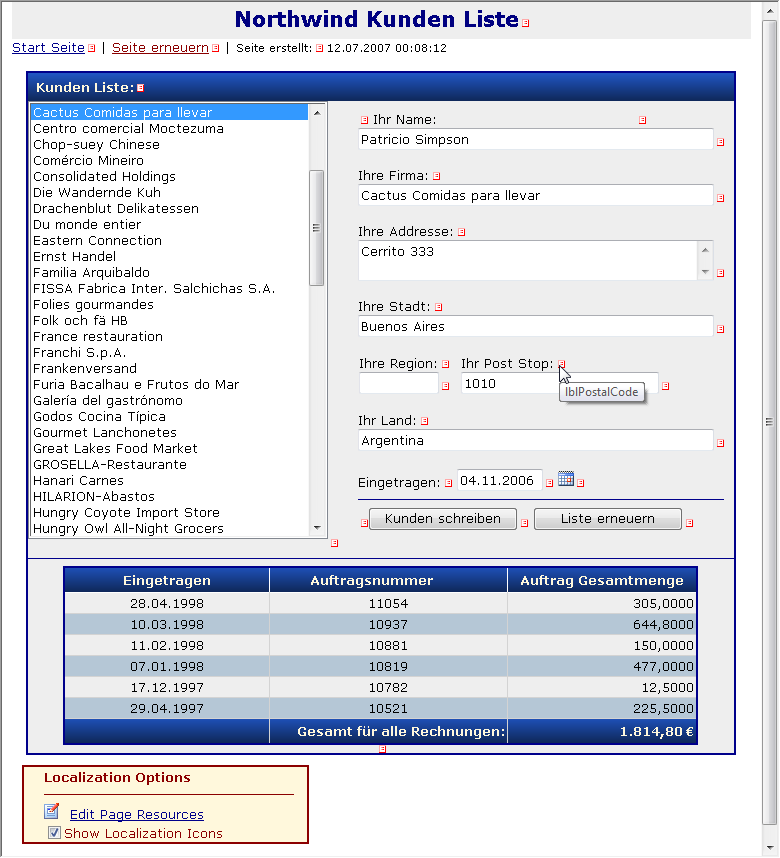
Figure 3 – The
DbResourceControl can be dropped onto any ASP.NET form to provide context
sensitive links to Resource Administration form to show the appropriate
resources if they exist.
When enabled the control runs through all the controls
on the page and checks for any localizable properties. If there are any it
dynamically adds an icon image next to the control. Clicking the icon
launches the Resource Administration form and passes the control id as a
parameter. The admin form then tries to find a matching resource for this
control if it exists. It may not always find an exact match, since there can
be multiple localizable properties on a control, and resource naming may
vary, but it should get you close in the list. The search pattern looks for
the name of the control or the name plus the control plus Resource as
generated by Generate Local Resources for matches. The control is smart
enough to detect user controls and master page content and send you to the
appropriate ResourceSet for these controls rather than the Page.
The DbResourceControl can be dropped on any ASP.NET
form, but it’s really useful only if you drop it onto a form that has
resources associated with it already. The control can be globally enabled or
disabled as part of the resource provider configuration. One of the provider
properties determines whether the control should be shown and if the option
is set to false the control simply won’t render anywhere in the application.
This makes it easy to turn resource administration on during development and
testing and turn it off when the site goes live.
Getting started with DbResourceProvider
DbResourceProvider and all of the support services
are implemented in a single self contained Westwind.Globalization.dll
assembly that you can deploy with your application. However, the
Administration interface requires a couple of additional items: You have to
deploy the Adminstration UI as a folder underneath your Web application.
This folder contains the administration form, style sheet and resources (for
English and German). You can simply copy the
LocalizationAdmin folder from the
sample project into your Web App’s root directory application. In addition
the Westwind.Web.Controls.dll assembly is required to provide Ajax callbacks
and a few support controls.
Provider
Configuration
Since the provider needs various configuration settings
like a connection string, table name and a few other options that determine
how the provider behaves there’s custom configuration section that is used
to configure it. To use the provider you need to add the following to your
web.config file:
<?xml
version="1.0"?>
<configuration>
<configSections>
<section
name="DbResourceProvider"
type="Westwind.Globalization.DbResourceProviderSection"
requirePermission="false"/>
</configSections>
<DbResourceProvider
connectionString="LocalizationSamples"
resourceTableName="Localizations"
designTimeVirtualPath="/internationalization"
showLocalizationControlOptions="true"
showControlIcons="true"
localizationFormWebPath="~/localizationadmin/localizeform.aspx"
addMissingResources="false"
useVsNetResourceNaming="false"
stronglyTypedGlobalResource="~/App_Code/Resources.cs,AppResources"/>
</configuration>
The key property here is the ConnectionString, which
can either be a full ConnectionString to a database or as above to a
ConnectionStrings entry in the .config file.
resourceTableName lets you specify a table name of
where resources are stored. Note that you can add resources to any database
of your choice - the provider only requires one table. If the table doesn’t
exist when you bring up the resource form you’ll be prompted to create the
table. When you run the app for the first time, make sure you use a Sql
account for the connection that has rights to create a table in the
specified database (this is also useful for the Backup feature which creates
a _Backup table copy).
The other important property is the
localizationFormWebPath which needs to point at the resource administration
form, wherever you copied it inside of your application. This link is used
on the icon links that pop up next to controls to provide context sensitive
resource lookup. The designTimeVirtual path should map the name of your
ASP.NET project – this is used to let the designTime provider find
web.config and the configuration information of the provider at design time.
If you hook up the provider settings above you are
configuring the resource provider’s operation and the operation of the admin
form, but the provider is not actually hooked up yet. The last step is to
actually enable the ResourceProvider so ASP.NET can use it.
Important!
Create the Database and import Resources First!
But before you hook up the provider you should first
import all resources into the database. This is done for you with the
samples provided, but is absolutely required with any new projects you start
up with. Otherwise there will be no resources and any forms that rely on
resources including the admin form will come up looking awfully void of
static content. Not good.
So before hooking up the resource provider you need to
(see Figure 4):
·
Go to the Admin form LocalizeAdmin/default.aspx
page
·
If no table exists go ahead and create it
first (#1)
·
Use Import From Resources to import .Resx
resources (#2)
·
Make sure the admin form works properly and
shows data
·
Now go ahead and hook up the resource
provider (see below)
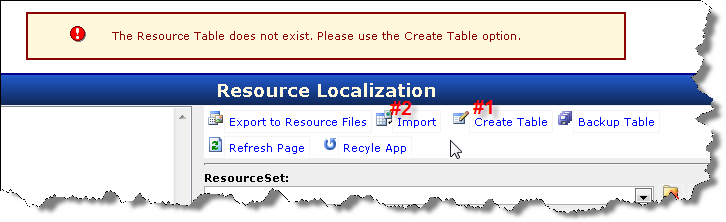
Figure 4
– Before hooking up the DbResourceProvider as a ResourceProvider
in web.config make sure you create
the resource table and import existing resources – this is required for the
admin form to work but also to get you started with any existing resources
you might have.
At that point the database provider should contain the
same resources your app used from .Resx before if any. At the very least the
Admin form’s resources were imported. It also ensures that the provider is
working properly, that your database connection is alright etc. Basically if
the admin form works the provider will work as well since both share the
same configuration settings from web.config.
You can now continue to work with the Administration
form and make changes even though you are still using the Resx provider.
However, you will not be able to see the changes you made to the resources
in your actual Web UI until you hook up the provider.
So the last step is to hook up the provider:
<configuration>
<system.web>
<globalization
resourceProviderFactoryType="Westwind.Globalization.DbSimpleResourceProviderFactory,Westwind.Globalization"
/>
<!--<globalization resourceProviderFactoryType="Westwind.Globalization.DbResourceProviderFactory,Westwind.Globalization"
/>-->
</system.web>
</configuration>
ASP.NET expects a resource provider factory and here
I’m specifying one of the two resource providers that are part of the
DbResourceProvider library. The full DbResourceProvider uses a .NET
ResourceManager implementation behind the scenes while the
DbSimpleResourceProvider uses only the ASP.NET required interfaces. The
simple version is slightly more efficient as it doesn’t make pass through
calls to the underlying resource manager so there’s really no need to use
the full provider. It’s mainly there to test the ResourceManager’s operation
that can also be used in WinForms apps.
Refreshing Resources
After you’ve made changes to the resources you might
actually like to see the new resources show up in the live user interface.
Notice n Figure 1 that there’s a Recyle App button in the menu. ASP.NET’s
resource provider loads resources and the resources are forever cached until
the application shuts down. As far as I know there’s no built-in way to
release the resources, but the data provider here includes some logic for
tracking each provider instance loaded and unloading the resources which is
quite nice as you can see changes made in real time.
One of the key new concepts for localization in ASP.NET
is the Resource Provider model which allows plugging of a new provider to
serve resources. A Resource Provider is specific to ASP.NET and provides the
basis for easy resource access from anywhere within the Web Application.
Anytime you do::
·
HttpContext.GetGlobalResourceObject()
·
HttpContext.GetLocalResourceObject
·
this.GetGlobalResourceObject()
(in TemplateControl context)
·
this.GetLocalResourceObject()
(in TemplateControl context)
you are actually talking to the ASP.NET Resource
Provider implementation. ASP.NET then builds on top of these very basic
features with compiler enhancements like Explicit Resource and Implicit
Resource expressions that allow you to bind control properties to resource
keys easily. The ASP.NET compiler basically generates code with calls to the
above methods (see intro article for details).
Traditional .NET applications use a ResourceManager
that deals with serving resources, but ASP.NET uses the provider model to
provide a somewhat simpler extension interface – it’s quite a bit easier to
build a resource provider than a full resource manager. The default ASP.NET
Resource Provider however calls the standard .NET ResourceManager object to
serve Resx resources.
So when it comes to creating a custom Resource Provider
or Resource Manager you have a choice to make: Do you want it to work
exclusively with ASP.NET in which case you can implement only a Resource
Provider, or do you need it also to work with WinForms or other types of
projects? In that case you will need to implement a ResourceManager as well.
I’ve provided to versions of a ResourceProvider and a ResourceManager both
accessing the same backend data storage.
ASP.NET Resource Provider Basics
I’ll start with the simple, self contained Resource
Provider. A Resource Provider needs to implement a few classes at minimum:
·
ResourceProviderFactory
·
ResourceProvider
·
ResourceReader
Figure 5 shows the base implementation of the
DbSimpleDataProvider which demonstrates the class structures for a basic
resource provider.
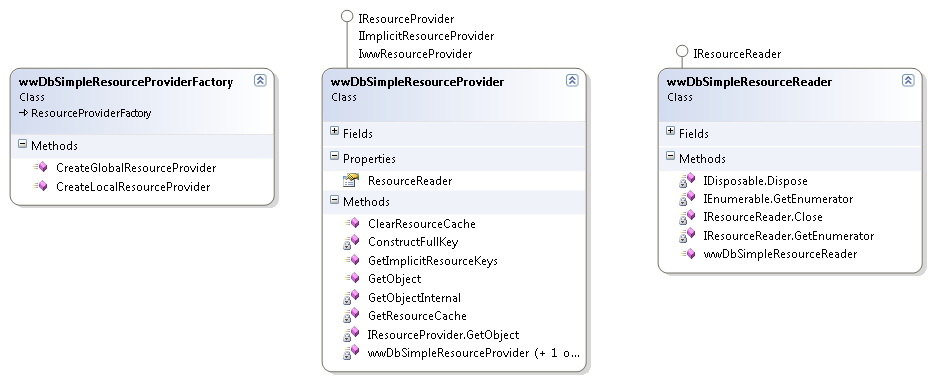
Figure 5
– A basic ResourceProvider Implementation must implement 3 classes and
several interfaces, but it’s fairly straight forward. Most of the code is
boilerplate with only a couple of points where data retrieval is required.
The ResourceProviderFactory is a very simple class that
simply returns a Resource Provider instance. The Resource Provider is where
all the action is and it requires implementation of the IResourceProvider
and IImplicitResourceProvider interfaces. The ResourceProvider manages all
the resource sets and provides data to ASP.NET when it calls into the
provider. Finally ResourceReader is used to actually read through the
resource sets by iteration. The ResourceReader is little more than specialty
IDictionaryEnumerator implementation that can quickly traverse a given
ResourceSet. It’s used internally to serve the resource data as well as
exposed externally for ASP.NET to access the resource data in the required
public ResourceSet property of the provider.
The key methods on the ResourceProvider are GetObject()
which is what HttpContext.GetGlobalResourceObject/GetLocalResourceObject
call into, and GetImplicitResourceKeys() which is called by ASP.NET during
compilation to retrieve all resource keys for a given control name as
provided by the meta:ResourceKey attributes. The compiler then generates
code for the this.GetLocalResourceObject() calls in Page initialization for
these implicit keys.
How does the ResourceProvider work?
A ResourceProvider is a hosting container for a set of
resources. A resource set is made up of all the resources for all cultures
for specific group of resources say a single resource file or a single page
for local resources. To put this in perspective with Resx files, all files
with the same base filename make up one resource set: Resources.resx,
Resources.de.resx, Resources.fr.resx etc. The ResourceProvider presents
these resources in nested IDictionary structures which are exposed through a
ResourceReader. The Dictionaries are nested which is a little confusing at
first: The top level dictionary holds another set of dictionaries one for
each of the cultures implemented for the given ResourceSet. Each one of
IDictionary entries then in turn contains a dictionary of the actual
resources keys and values pairs that make up the actual resource data.
When ASP.NET receives a call to
HttpContext.GetGlobalResourceObject or HttpContext.GetLocalResourceObject,
it creates a new provider for each individual resource set requested and
holds on to it internally. Internally ASP.NET manages the ResourceSets by
resource name for local resources (ie. some normalized form of
~/admin/default.aspx) or by global resource filename (ie. MyResources). Both
of the HttpContext method calls provide these ‘ResourceSet keys’ as
parameters and so ASP.NET picks the appropriate provider and calls GetObject()
on it to retrieve the actual resource value. The provider then uses its
internal ResourceReader to retrieve the value and return it ASP.NET.
Keep in mind that ASP.NET actually instantiates MANY
resource provider objects – one for each page’s local resources (each page
and control) and one for each set of global resources. You ever wonder why
you can’t a reference to ‘the’ resource provider in ASP.NET? The reason is
there’s no single resource provider, but many anonymous resource providers
that ASP.NET internally tracks and doesn’t expose to the ASP.NET
application.
Provider Implementation
You can implement the provider any way you like, but
the recommended approach is to load up these resource dictionaries as they
are requested and then cache them in memory. The default implementations in
.NET use Hashtables and Dictionary<string,object> and I followed those same
conventions in my data driven provider. The caching dictionary mechanism is
fast and works well. In fact it’s surprising how little performance overhead
difference there is between localized and non-localized forms!
But resource caching also has the downside that you can
never effectively unload the resources. The assumption is that resources are
static and therefore don’t need to be refreshed and so ASP.NET doesn’t
provide a mechanism for unloading them. Nevertheless this can be a useful
feature if you’re using a dynamic resource provider that allows editing for
resources. To work around this important issue the DbResourceProvider adds
a ClearResourceCache() method to each provider and a static list object
that adds each provider as it's loaded. This makes it
possible to unload resources by simply iterating over the
list and calling ClearResourceCache. This beats the raw ASP.NET alternative which is to force the AppDomain to unload
with HttpRuntime.UnloadAppDomain() or by touching web.config that I've used previously.
With the custom provider you can call the static DbResourceConfiguration.ClearResourceCache()
from anywhere to force a reload of all resources from the database.
What follows is a discussion of a simple resource
provider implementation. The key methods of the a ResourceProvider are
GetObject() and GetImplicitResourceKeys() which are the only methods that
ASP.NET calls to actually retrieve actual resource data. Listing 1 shows the
full provider implementation to give you an idea how the resource retrieval
and caching works.
///
<summary>
/// Provider
factory that instantiates the individual provider. The provider
/// passes a 'classname'
which is the ResourceSet id or how a resource is identified.
/// For global
resources it's the name of hte resource file, for local resources
/// it's the full
Web relative virtual path
///
</summary>
[DesignTimeResourceProviderFactoryAttribute(typeof(DbDesignTimeResourceProviderFactory))]
public
class DbSimpleResourceProviderFactory
: ResourceProviderFactory
{
///
<summary>
/// ASP.NET sets
up provides the global resource name which is the
/// resource ResX
file (without any extensions). This will become
/// our
ResourceSet id. ie. Resource.resx becomes "Resources"
///
</summary>
///
<param name="classname"></param>
///
<returns></returns>
public override
IResourceProvider
CreateGlobalResourceProvider(string
classname)
{
return new
DbSimpleResourceProvider(null, classname);
}
///
<summary>
/// ASP.NET passes
the full page virtual path (/MyApp/subdir/test.aspx) wich is
/// the effective
ResourceSet id. We'll store only an application relative path
/// (subdir/test.aspx)
by stripping off the base path.
///
</summary>
///
<param name="virtualPath"></param>
///
<returns></returns>
public override
IResourceProvider
CreateLocalResourceProvider(string
virtualPath)
{
// *** DEPENDENCY HERE: use Configuration
class to strip off Virtual path leaving
//
just a page/control relative path for ResourceSet Ids
// *** ASP.NET passes full virtual path:
Strip out the virtual path
// *** leaving us just with app relative
page/control path
string ResourceSetName =
DbResourceConfiguration.Current.StripVirtualPath(virtualPath);
return new
DbSimpleResourceProvider(null,ResourceSetName.ToLower());
}
}
///
<summary>
///
Implementation of a very simple database Resource Provider. This
implementation
/// is self
contained and doesn't use a custom ResourceManager. Instead it
/// talks
directly to the data resoure business layer (DbResourceDataManager).
///
/// Dependencies:
///
DbResourceDataManager
///
DbResourceConfiguration
///
/// You can
replace those depencies (marked below in code) with your own data access
/// management.
The two dependcies manage all data access as well as configuration
/// management
via web.config configuration section. It's easy to remove these
/// and instead
use custom data access code of your choice.
///
///
</summary>
public
class DbSimpleResourceProvider :
IResourceProvider,
IImplicitResourceProvider
{
///
<summary>
/// Keep track of
the 'className' passed by ASP.NET
/// which is the
ResourceSetId in the database.
///
</summary>
private string
_ResourceSetName;
///
<summary>
/// Cache for each
culture of this ResourceSet. Once
/// loaded we just
cache the resources.
///
</summary>
private
IDictionary _resourceCache;
private DbSimpleResourceProvider()
{ }
public DbSimpleResourceProvider(string
virtualPath, string className)
{
_ResourceSetName = className;
}
///
<summary>
/// Manages
caching of the Resource Sets. Once loaded the values are loaded from the
/// cache only.
///
</summary>
///
<param name="cultureName"></param>
///
<returns></returns>
private
IDictionary GetResourceCache(string
cultureName)
{
if (cultureName ==
null)
cultureName = "";
if (this._resourceCache
== null)
this._resourceCache =
new
ListDictionary();
IDictionary Resources =
this._resourceCache[cultureName]
as IDictionary;
if (Resources ==
null)
{
// *** DEPENDENCY HERE (#1): Using
DbResourceDataManager to retrieve resources
// *** Use datamanager to retrieve the
resource keys from the database
DbResourceDataManager Data =
new
DbResourceDataManager();
Resources = Data.GetResourceSet(cultureName
as string,
this._ResourceSetName);
this._resourceCache[cultureName] =
Resources;
}
return Resources;
}
///
<summary>
/// Clears out the
resource cache which forces all resources to be reloaded from
/// the database.
///
/// This is never
actually called as far as I can tell
///
</summary>
public void
ClearResourceCache()
{
this._resourceCache.Clear();
}
///
<summary>
/// The main
worker method that retrieves a resource key for a given culture
/// from a
ResourceSet.
///
</summary>
///
<param name="resourceKey"></param>
///
<param name="culture"></param>
///
<returns></returns>
object
IResourceProvider.GetObject(string
ResourceKey, CultureInfo Culture)
{
string CultureName =
null;
if (Culture !=
null)
CultureName = Culture.Name;
else
CultureName = CultureInfo.CurrentUICulture.Name;
return this.GetObjectInternal(ResourceKey,
CultureName);
}
///
<summary>
/// Internal
lookup method that handles retrieving a resource
/// by its
resource id and culture. Realistically this method
/// is always
called with the culture being null or empty
/// but the
routine handles resource fallback in case the
/// code is
manually called.
///
</summary>
///
<param name="ResourceKey"></param>
///
<param name="CultureName"></param>
///
<returns></returns>
object GetObjectInternal(string
ResourceKey, string CultureName)
{
IDictionary Resources =
this.GetResourceCache(CultureName);
object value =
null;
if (Resources ==
null)
value = null;
else
value
= Resources[ResourceKey];
// *** If we're at a specific culture
(en-Us) and there's no value fall back
// *** to the generic culture (en)
if (value ==
null && CultureName.Length > 3)
{
// *** try again with the 2 letter locale
return GetObjectInternal(ResourceKey,CultureName.Substring(0,2)
);
}
// *** If the value is still null get the
invariant value
if (value ==
null)
{
Resources = this.GetResourceCache("");
if (Resources ==
null)
value = null;
else
value = Resources[ResourceKey];
}
// *** If the value is still null and we're
at the invariant culture
// *** let's add a marker that the value is
missing
// *** this also allows the pre-compiler to
work and never return null
if (value ==
null && string.IsNullOrEmpty(CultureName))
{
// *** No entry there
value = "";
// *** DEPENDENCY HERE (#2): using
DbResourceConfiguration and DbResourceDataManager to optionally
//
add missing resource keys
// *** Add a key in the repository at least
for the Invariant culture
// *** Something's referencing but
nothing's there
if (DbResourceConfiguration.Current.AddMissingResources)
new
DbResourceDataManager().AddResource(ResourceKey, value.ToString(),
"", this._ResourceSetName);
}
return value;
}
///
<summary>
/// The Resource
Reader is used parse over the resource collection
/// that the
ResourceSet contains. It's basically an IEnumarable interface
/// implementation
and it's what's used to retrieve the actual keys
///
</summary>
public
IResourceReader ResourceReader
// IResourceProvider.ResourceReader
{
get
{
if (this._ResourceReader
!= null)
return this._ResourceReader
as
IResourceReader;
this._ResourceReader =
new
DbSimpleResourceReader(GetResourceCache(null));
return this._ResourceReader
as
IResourceReader;
}
}
private
DbSimpleResourceReader _ResourceReader =
null;
#region
IImplicitResourceProvider Members
///
<summary>
/// Called when an
ASP.NET Page is compiled asking for a collection
/// of keys that
match a given control name (keyPrefix). This
/// routine for
example returns control.Text,control.ToolTip from the
/// Resource
collection if they exist when a request for "control"
/// is made as the
key prefix.
///
</summary>
///
<param name="keyPrefix"></param>
///
<returns></returns>
public
ICollection GetImplicitResourceKeys(string
keyPrefix)
{
List<ImplicitResourceKey>
keys = new List<ImplicitResourceKey>();
IDictionaryEnumerator Enumerator =
this.ResourceReader.GetEnumerator();
if (Enumerator ==
null)
return keys;
// Cannot return null!
foreach (DictionaryEntry
dictentry in this.ResourceReader)
{
string key = (string)dictentry.Key;
if (key.StartsWith(keyPrefix +
".",
StringComparison.InvariantCultureIgnoreCase) ==
true)
{
string keyproperty =
String.Empty;
if (key.Length > (keyPrefix.Length +
1))
{
int pos = key.IndexOf('.');
if ((pos > 0) && (pos ==
keyPrefix.Length))
{
keyproperty = key.Substring(pos + 1);
if (String.IsNullOrEmpty(keyproperty)
== false)
{
//Debug.WriteLine("Adding Implicit Key: " +
keyPrefix + " - " + keyproperty);
ImplicitResourceKey implicitkey =
new
ImplicitResourceKey(String.Empty,
keyPrefix, keyproperty);
keys.Add(implicitkey);
}
}
}
}
}
return keys;
}
///
<summary>
/// Returns an
Implicit key value from the ResourceSet.
/// Note this
method is called only if a ResourceKey was found in the
/// ResourceSet at
load time. If a resource cannot be located this
/// method is
never called to retrieve it. IOW, GetImplicitResourceKeys
/// determines
which keys are actually retrievable.
///
/// This method
simply parses the Implicit key and then retrieves
/// the value
using standard GetObject logic for the ResourceID.
///
</summary>
///
<param name="implicitKey"></param>
///
<param name="culture"></param>
///
<returns></returns>
public object
GetObject(ImplicitResourceKey implicitKey,
CultureInfo culture)
{
string ResourceKey = ConstructFullKey(implicitKey);
string CultureName =
null;
if (culture !=
null)
CultureName = culture.Name;
else
CultureName = CultureInfo.CurrentUICulture.Name;
return this.GetObjectInternal(ResourceKey,
CultureName);
}
///
<summary>
/// Routine that
generates a full resource key string from
/// an Implicit
Resource Key value
///
</summary>
///
<param name="entry"></param>
///
<returns></returns>
private static
string ConstructFullKey(ImplicitResourceKey
entry)
{
string text = entry.KeyPrefix +
"." + entry.Property;
if (entry.Filter.Length > 0)
{
text = entry.Filter + ":" + text;
}
return text;
}
#endregion
}
///
<summary>
/// Required
simple IResourceReader implementation. A ResourceReader
/// is little
more than an Enumeration interface that allows
/// parsing
through the Resources in a Resource Set which
/// is passed in
the constructor.
///
</summary>
public
class DbSimpleResourceReader :
IResourceReader
{
private
IDictionary _resources;
public DbSimpleResourceReader(IDictionary
resources)
{
_resources = resources;
}
IDictionaryEnumerator
IResourceReader.GetEnumerator()
{
return _resources.GetEnumerator();
}
void
IResourceReader.Close()
{
}
IEnumerator
IEnumerable.GetEnumerator()
{
return _resources.GetEnumerator();
}
void IDisposable.Dispose()
{
}
}
Although there’s a fair bit of code in Listing 2, the
DbResourceProvider code is almost completely boiler plate: To create a new
provider of your own you can simply use all of the above code, change the
class names and hook up your data retrieval mechanism in the two places
highlighted in the code with
DEPENDENCY HERE.
All other code is fully self contained.
The GetObjectInternal
method does most of the work for simple resource retrieval and it works by
retrieving resources through the ResourceCache. Notice LoadResourceCache
basically loads the data from the database exactly once and after that
simply caches the data in the in memory IDictionary structure. I’ll come
back to the DbResourceDataManager and what it does, but for now just know
that it simply returns a Dictionary<string,object> which is populated from
the database. GetObjectInternal() then simply asks for a specific resource
key and tries to return it.
The
GetImplicitResourceKeys() method provides ASP.NET with a list of all
matching keys for a given property. ASP.NET bascially passes the value of a
meta:ResourceKey expression as a parameter and expects the method to return
a collection ImplicitResourceKey
objects that match the prefix. So ASP.NET will ask for lblNameResource1 and
expects to get back lblNameResource1.Text and lblNameResource1.ToolTip for
example where each key is returned as an ImplicitResourceKey object that
breaks out the KeyPrefix and Property separately. Based on the returned data
ASP.NET then embeds calls to this.GetLocalResourceObject() into the Page
tree, which in turn cause GetObject() calls against the provider at runtime.
Implicit keys are
requested at compile time, not runtime! This means the resource keys must be
available at compile time. Compile time can mean dynamic compilation on your
live site when you deploy or – if you are precompiling your site locally –
compilation on your local machine. In either case you need to make sure that
the resource provider is available at compile time or the implicit resources
will not be generated into the page. The compiler will
not let you know that the
implicit resources are missing – you’ll just get blank values.
There’s a little more to it!
I cheated a bit in Figure 5 to keep things simple.
I showed an over simplified view of
the ResourceProvider classes that leaves out all of the support classes.
Figure 6 shows a more complete model of the simple provider implementation.
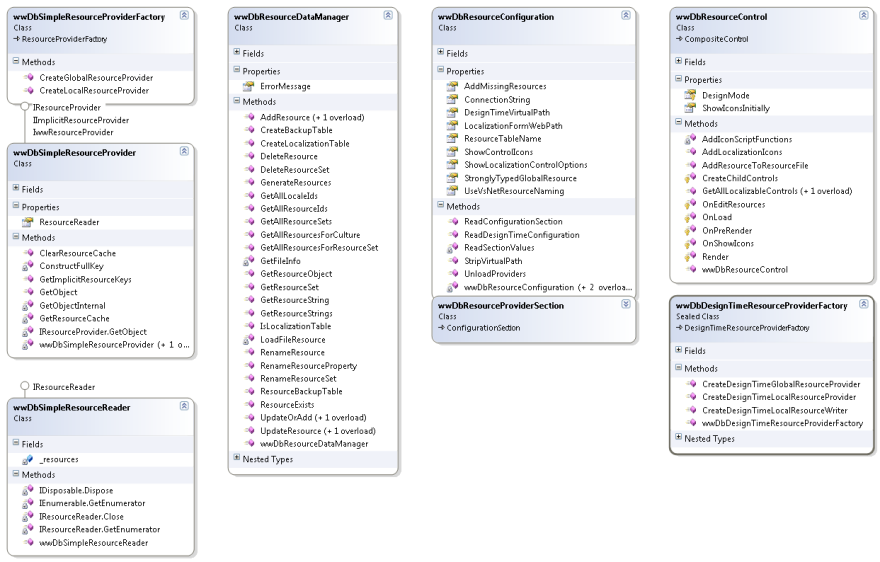
Figure 6
– The complete class hierarchy for the simple resource provider
There are a host of additional classes involved in the
resource provider implementation:
DbResourceDataManger
This is the ‘business object’ class that’s responsible
for actually managing data access to the resource table. This class is quite
extensive and it includes many methods that have nothing to do with the
resource provider. The resource provider only requires a single method on
the data manager which is GetResourceSet(). But the data manager also
provides data interface for the ASP.NET front end editor which accounts for
the rich method interface. There are methods for adding, updating, renaming
and deleting of resources in a variety of ways, and various methods that
return the resource data in various different views required for the
resource admin form to work. The class uses an internal wwSqlDataAccess DAL
component that is specific to Sql Server.
DbResourceConfiguration
In order for the provider to work properly a number of
configuration settings are required. An instance of this class is always
available via the static DbResourceConfiguration.Current. There’s the
ConnectionString, the table name, and a few other options that are vitally
important for the operation of the runtime and design time resource
provider. The static instance is accessible from anywhere within the
application. For example, DbResourceConfiguration.Current.ConnectionString
can be used from anywhere where the connection string is required. It’s used
by the Provider implementation, by the data manager and throughout the
utility classes. DbResourceConfiguration also holds a reference to all of
the provider instances loaded and its static UnloadProviders() method can be
called to clear all resources so you can see changes in real time in the
application.
DbResourceProviderSection
The provider section provides a .config section for the
configuration values exposed by DbResourceConfiguration. The provider
section basically duplicates the DbResourceConfiguration properties. When
DbResourceConfiguration initializes it reads the configuration section
values and loads itself up with these values.
DbDesignTimeResourceProvider
As if all these resource providers weren’t enough,
Visual Studio requires yet another provider implementation to support design
time resource loading and support for the Generate Local Resources feature.
The design time resource provider is hooked up to the full resource provider
via an attribute. This provider needs to deal with a few design time
specific issues like properly retrieving the configuration information
(which is very different than a live application) and mapping the virtual
directory path of the application. In addition, there’s also some specialty
code in this provider that allows for generating simpler ResourceKey ids
than the nasty ones Visual Studio generates (lblNameResource1 for example).
There’s an optional configuration key – useVsNetResourceNaming which is set
to false by default – which effects how resource names are generated. This
provider tries to generate simple resource key names (lblName first, then
lblName2, lblName3 if there are duplicate control names on a page) which
makes it much easier to find resources effectively in the administration
interface.
DbResourceControl
This WebControl can be dropped onto any ASP.NET page to
provide resource lookup links to popup the resource admin form. The control
(shown in Figure 3 as the yellow box) provides a small UI that can be used
to toggle the icon drawing on and off. When the control is on a form and
enabled, it parses through all
of the controls on the live page and looks for localizable properties (those
that have a [Localizable(true)] attribute). Any control it finds it then
marks with an icon and a link that brings up the administration form. It
uses
control.TemplateControl.AppRelativeVirtualPath
to determine the ResourceSet (ie. Page or control) that it is
associated so that controls on user controls or master pages bring up the
appropriate user control or master page resources rather than the page’s.
The control can be globally toggled off via the showLocalizationOptions
provider configuration key. When false the control simply will not render at
all on any page. This is great for enabling localization globally without
interfering when the site is deployed for a live environment.
All of these classes are provided in the accompanying
source code so you can take a closer look at each of these implementations.
A full ResourceManager Based Implementation
As mentioned earlier I’ve also provided a full
ResourceManager implementation and another ResourceProvider that uses the
ResourceManager behind the scenes. The DbResourceManager implementation is
quite important because it allows the same data based resources to be used
in non-Web applications and this is a way to let you test the
ResourceManager through your Web interface. Implementing a ResourceManager
is a bit more complicated and low level than a ResourceProvider and Figure 7
shows the implementation of this more complex scenario.
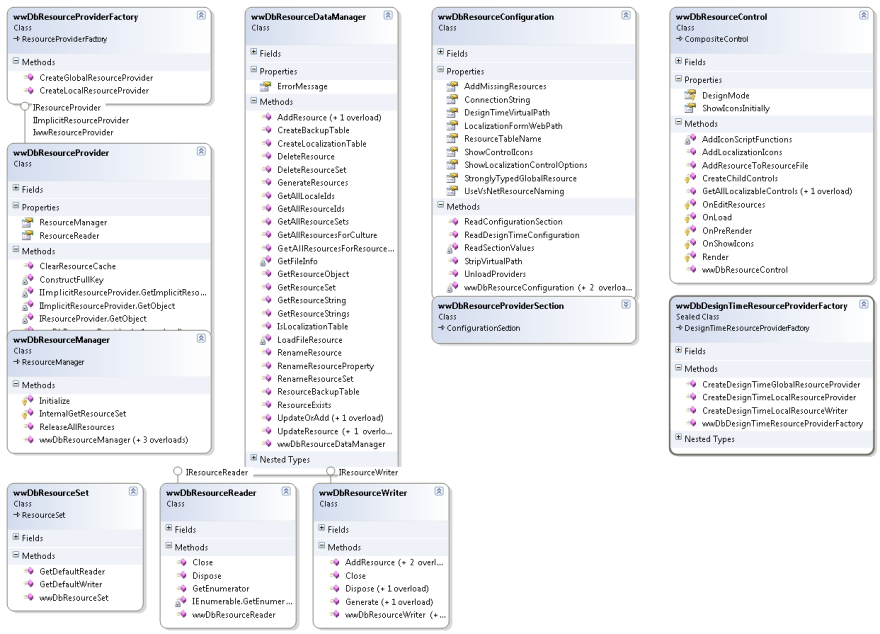
Figure 7
– A full blown ResourceProvider implementation that uses a data driven
ResourceManager to provide all of its data. The ResourceManager is useful
because it- unlike the ResourceProvider -
can be used in non-Web applications.
Functionally the only difference in this chart is the
addition of the ResourceManager, ResourceSet, ResourceReader and
ResourceWriter classes which serve as the underlying mechanism that talks to
the DbResourceDataManager. In this scenario, rather than the
ResourceProvider directly interfacing with the data manager all resource
retrieval goes through the resource manager implementation instead. Because
the resource manager interfaces are quite similar for the ResourceReader and
ResourceSet many of the methods in the provider simply forward to the
resource manager.
As with the ResourceProvider the ResourceManager
implementation is mostly boilerplate with just a couple of places where
custom behavior is added but it’s not quite as easy as with the provider.
There’s no official API for extending .NET resource managers – there are no
interfaces to implement, but rather you have to directly inherit from the
concrete class and explicitly override various methods.
There are no official guidelines on what you need to
implement and override and most of the implementation code was gleamed from
Reflector and various resources I found online and in the excellent
.NET Internationalization book
by Guy Smith Ferrier. It’s not an exact science <s>. However, once
you have an implementation that works, it can be easily adjusted to work
with any kind of data source for resources. The code for the ResourceManager
is also provided in the code download.
Odds and Ends
The library also includes a number of other utility
classes and tools that you might find useful. There’s a DbResxConverter
class which provides a programmatic interface to importing resources from
Resx files into the database and the reverse that can export resources back
out into Resx files from the database. These options are also available on
the ASP.NET Administration interface.
There’s also a StronglyTypedWebResources class which
can generate strongly typed resources for your Global resources. Although
ASP.NET provides strongly typed resources natively (it generates a Resources
namespace with each of your global resource sets exposed as classes)
its implementation uses a
ResourceManager, not the ASP.NET ResourceProvider. This causes two problems:
It won’t work with a different resource provider because the ResourceManager
is hardwired to Resx resources. It also causes resources to be duplicated in
memory as ResourceManager basically ends up creating a separate
ResourceManger in addition to the ResourceProvider which results in
duplicate resources getting loaded into memory. The generator provided in
LocalizationAdmin/StronglyTypedResources.aspx will generate strongly typed
resources that properly use the HttpContext.GetGlobalResourceObject()
methods to retrieved resources. You can also use the
StronglyTypedWebResources class to generate resources in code with a variety
of options.
There’s a lot of additional utility code in the library
and I invite you to browse through the various classes in the
online
documentation
Localize Away
I hope this article has given you some ideas of how you
can utilize resources beyond the standard Resx resources or even if you
stick with Resx resources you might have gotten some ideas on how you can
edit these resources in real time. I hope that the tool provided
will be useful to a few of you and make it a bit easier
to create localized applications. I realize that professional localization
folks will probably find this tool quaint but for those that are working
through localization without high end professionals it should be a great
start in helping to localize an application.
Realistically though this is only a start. There are so
many more things that could be done with this tool, from better
visualization of the resource data to more interactive editing. But once the
data is in a database as I’ve shown here the possibilities of what you can
do with it becomes infinitely more flexible. At this point it becomes a data
entry problem <s>…
And off you go! Have fun with it…
If you have any questions comments or ideas please stop
by our message board and leave a message.
Discuss this Article
Article Updates - West Wind Web Toolkit
3/31/2009 - There have been a number of updates to
the code described in this article. The classes have been refactored and the administration interface has been overhauled to be more
responsive. All of the 'ww' classes have been renamed without the 'ww'
prefix. There have also been many improvements and small fixes to user provided issues and suggestions
that have been integrated. The code base has been integrated into the West Wind Web Toolkit for ASP.NET
which consolidates a host of components and tools that have been
described in articles and blog posts. This toolset also provides
frequent updates and access to the live code repository so that code
updates can be disseminated more easily. If you are interested in
updates or newer features please check out the code from the toolkit -
it includes these same samples described here.
Resources:
Latest Code and Samples on GitHub
(includes samples, updates, support, latest source code)
https://github.com/RickStrahl/Westwind.Globalization
Documentation
for the DbResourceProvider
Configuration and Operation
Class Reference
Introduction to
Localization in ASP.NET 2.0
Rick Strahl
www.west-wind.com/presentations/wwDbResourceProvider/introtolocalization.aspx
.NET
Internationalization Book
Guy Smith Ferrier
http://shrinkster.com/qyr
ASP.NET 2.0
Localization: A Fresh Approach to Localizing Web Applications
Michelle Leroux Bustamante
http://msdn2.microsoft.com/en-us/library/ms379546(VS.80).aspx