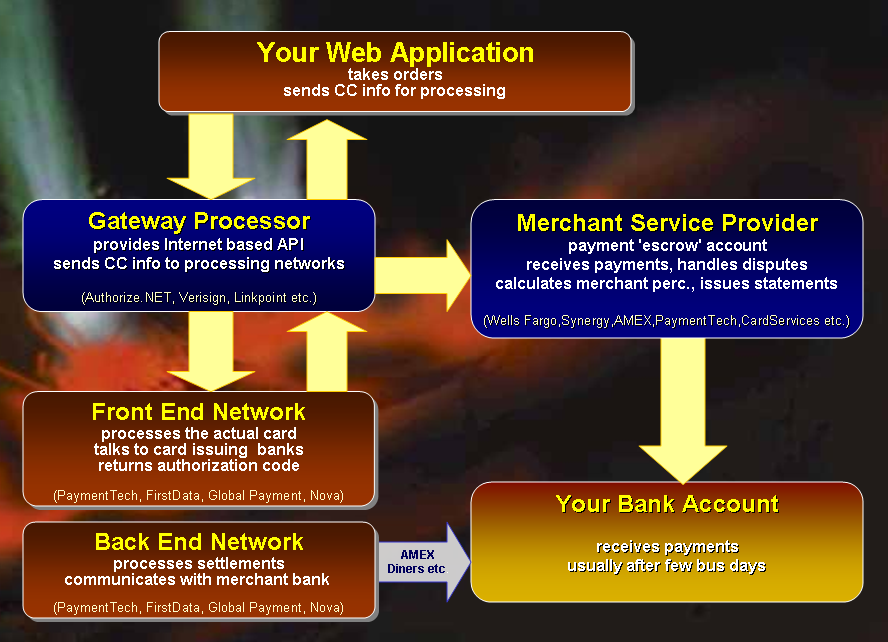
|
|
| White Papers Home | White Papers | Message Board | Free Tools | Products | Purchase | News | Web Log | |

Integrating Electronic Payment Processing into
|
|
Member |
Description |
|
Returns a string
for a single AVS code value Supported codes: ANSUWXYZER_ |
|
|
Determines
whether given string passes standard Mod10 check. |
|
|
Base ValidateCard
method that provides the core CreditCard checking. Should always be
called at the beginning of the subclassed overridden method. |
|
|
Billing Street Address. |
|
|
Authorization Code returned for Approved transactions from the gateway |
|
|
The AVS Result code from the gateway if available |
|
|
Used for Linkpoint only. Specifies the path to the certificate file |
|
|
Billing City |
|
|
Order Comment. Usually this comment shows up on the CC bill. |
|
|
Billing Company |
|
|
Two letter Country Id - US, DE, CH etc. |
|
|
Full expiration date in the format 01/2003 |
|
|
Credit Card Expiration Month as a string (2 digits ie. 08) |
|
|
Credit Card Expiration Year as a 4 or 2 digit string |
|
|
The credit card number. Number can contain spaces and other markup characters which are stripped for processing later. |
|
|
Email address |
|
|
Error flag set after a call to ValidateCard if an error occurs. |
|
|
Error message if error flag is set or negative result is returned. Generally this value will contain the value of this.ValidatedResult for processor failures or more general API/HTTP failure messages. |
|
|
First Name of customer's name on the card. Can be used in lieu of Name property. If Firstname and Lastname are used they get combined into a name IF Name is blank. |
|
|
Reference to an wwHttp object. You can preseed this object after instantiation to allow setting custom HTTP settings prior to calling ValidateCard(). |
|
|
The link to hit on the server. Depending on the interface this can be a URL or domainname or domainname:Port combination. |
|
|
Last Name of customer's name on the card. Can be used in lieu of Name property. If Firstname and Lastname are used they get combined into a name IF Name is blank. |
|
|
Optional path to the log file used to write out request results. If this filename is blank no logging occurs. The filename specified here needs to be a fully qualified operating system path and the application has to be able to write to this path. |
|
|
The merchant Id or store name or other mechanism used to identify your account. |
|
|
The merchant password for your merchant account. Not used in most cases. |
|
|
First name and last name on the card |
|
|
The amount of the order. |
|
|
The Order Id as a string. This is mainly for reference but should be unique. |
|
|
Billing Phone Number |
|
|
Determines what type of transaction is being processed (Sale, Credit, PreAuth) |
|
|
This is a string that contains the format that's sent to the processor. Not used with all providers, but this property can be used for debugging and seeing what exactly gets sent to the server. |
|
|
The raw response from the Credit Card Processor Server. |
|
|
Referring Url used with certain providers |
|
|
The 3 or 4 letter digit that is on the back of the card |
|
|
Billing State (2 letter code or empty for foreign) |
|
|
The amount of Tax for this transaction |
|
|
Timeout in seconds for the connection against the remote processor |
|
|
The Transaction ID returned from the server. Use to match transactions against the gateway for reporting. |
|
|
Determines whether a Mod10Check is performed before sending the credit card to the processor. Turn this off for testing so you can at least get to the provider. |
|
|
Optional flag that determines whether to send a test transaction Not supported for AccessPoint |
|
|
The parsed error message from the server if result is not APPROVED This message generally is a string regarding the failure like 'Invalid Card' 'AVS Error' etc. This info may or may not be appropriate for your customers to see - that's up to you. |
|
|
The parsed short form response. APPROVED, DECLINED, FAILED, FRAUD |
|
|
Postal or Zip code |
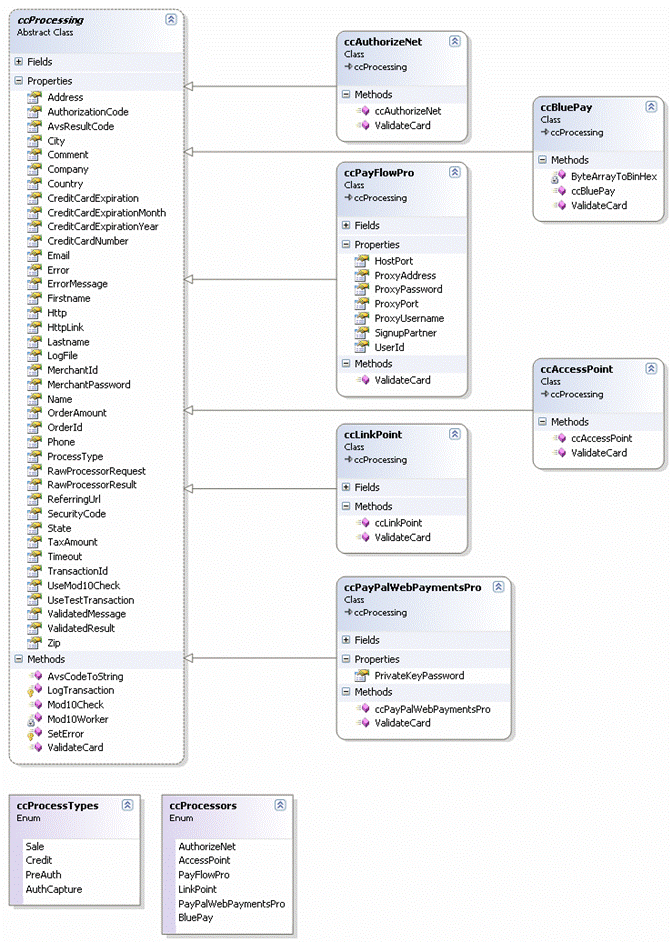
As you can see the main portion of this class provides properties for most of the possible values that you need to describe a credit card transaction. There's billing information for the customer, the Credit Card information including the Card Number, Card Expiration and CVS SecurityCode as well as the order amount.
There are processing specific properties such as the HttpLink (used with HTTP based providers like Authorize.NET, BluePay and AccessPoint). There's MerchantId and MerchantPassword that identifies the merchange.
Then there are Response values such as the ValidatedResult (APPROVED, DECLINED,
FAILED, FRAUD), ValidatedMessage which returns a descriptive message returned
from the provider, RawProcessorResult, which returns the raw data returned if
available. There's also AuthorizationCode and TransactionId which return these
values from transactions.
The base class also supports logging of every request to a log file and you can easily Test mode on and off (for those providers that support it through the gateway API) for a transaction.
There are also a couple of helper methods that can do Mod10 checking and convert a single AVS code to a string value. AVS codes are returned for failed transactions and you can use the conversion to potentially provide more information to your customers.
The worker method that does all the work is ValidateCard(). Since this class is abstract the default ValidateCard() method doesn't do anything useful (it does have logic though so make sure to call the base method in your implementation) – this method needs to be overridden by the specific processor implementation classes.
Logic says there should be a common Gateway API for all providers, but the reality is that most of the APIs work very differently. Even those that are operationally similar – those that use pure HTTP POST interfaces like Authorize.NET, AccessPoint and BluePay – use completely different POST variables and formats. So, each of these classes essentially features a complete custom implementation to talk to the specific Gateway provider.
While the base class interface of the various processing classes is identical, most of the classes require slightly different start up configuration. This means if you plan on supporting multiple credit card providers in a single application (such as a more generic shopping cart) there's a little bit of conditional code required for each of the providers.
The following C# code is an example of how all of the supported credit card providers are integrated into my Invoice business object, which gives you a pretty good idea how the class can be used at the Application level:
/// <summary>
/// Processes credit cards for the provider set in App.Configuration.CCMerchant
/// Works with the WebStoreConfig settings for setting to configure the provider
/// settings.
/// </summary>
/// <remarks>The Invoice is not saved at this point.
/// Make sure to call Save() after this operation.</remarks>
/// <returns></returns>
public bool ProcessCreditCard()
{
bool Result = false;
wws_invoiceRow Inv = this.Entity;
wws_customersRow Cust = this.Customer.Entity;
ccProcessing CC = null;
ccProcessors CCType = App.Configuration.CCProcessor;
try
{
if (CCType == ccProcessors.AccessPoint)
{
CC = new ccAccessPoint();
}
else if (CCType == ccProcessors.AuthorizeNet)
{
CC = new ccAuthorizeNet();
CC.MerchantPassword = App.Configuration.CCMerchantPassword;
}
else if (CCType == ccProcessors.PayFlowPro)
{
CC = new ccPayFlowPro();
CC.MerchantPassword = App.Configuration.CCMerchantPassword;
}
else if (CCType == ccProcessors.LinkPoint)
{
CC = new ccLinkPoint();
CC.MerchantPassword = App.Configuration.CCMerchantPassword;
CC.CertificatePath = App.Configuration.CCCertificatePath;
// ie. "d:\app\MyCert.pem"
}
else if (CCType == ccProcessors.PayPalWebPaymentsPro)
{
CC = new ccPayPalWebPaymentsPro();
CC.MerchantPassword = App.Configuration.CCMerchantPassword;
((ccPayPalWebPaymentsPro)CC).PrivateKeyPassword = "";
}
else if (CCType == ccProcessors.BluePay)
{
CC = new ccBluePay();
CC.MerchantId = App.Configuration.CCMerchantId;
CC.MerchantPassword = App.Configuration.CCMerchantPassword;
}
CC.MerchantId = App.Configuration.CCMerchantId;
//CC.UseTestTransaction = true;
// *** Tell whether we do SALE or Pre-Auth
CC.ProcessType = App.Configuration.CCProcessType;
// *** Disable this for testing to get provider response
CC.UseMod10Check = true;
CC.Timeout = App.Configuration.CCConnectionTimeout; // In Seconds
CC.HttpLink = App.Configuration.CCHostUrl;
CC.LogFile = App.Configuration.CCLogFile;
CC.ReferingUrl = App.Configuration.CCReferingOrderUrl;
// *** Name can be provided as a single string or as firstname and lastname
//CC.Name = Cust.Firstname.TrimEnd() + " " + Cust.Lastname.TrimEnd();
CC.Firstname = Cust.Firstname.TrimEnd();
CC.Lastname = Cust.Lastname.TrimEnd();
CC.Company = Cust.Company.TrimEnd();
CC.Address = Cust.Address.TrimEnd();
CC.State = Cust.State.TrimEnd();
CC.City = Cust.City.TrimEnd();
CC.Zip = Cust.Zip.TrimEnd();
CC.Country = Cust.Countryid.TrimEnd(); // 2 Character Country ID
CC.Phone = Cust.Phone.TrimEnd();
CC.Email = Cust.Email.TrimEnd();
CC.OrderAmount = Inv.Invtotal;
CC.TaxAmount = Inv.Tax; // Optional
CC.CreditCardNumber = Inv.Cc.TrimEnd();
CC.CreditCardExpiration = Inv.Ccexp.TrimEnd();
CC.SecurityCode = Inv.Ccsecurity.TrimEnd();
// *** Make this Unique
CC.OrderId = Inv.Invno.TrimEnd() + "_" + DateTime.Now.ToString();
CC.Comment = App.Configuration.CompanyName + " Order # " +
Inv.Invno.TrimEnd();
// *** Result returned as true or false
Result = CC.ValidateCard();
// *** Pick up the Validated result values from the class
Inv.Ccresult = CC.ValidatedResult;
if (!Result)
{
this.ErrorMessage = CC.ValidatedMessage;
Inv.Ccerror = this.ErrorMessage;
}
// *** Always write out the raw response
if (string.NullOrEmpty(CC.RawProcessorResult))
Inv.Ccresultx = CC.ValidatedMessage;
else
Inv.Ccresultx = CC.RawProcessorResult;
}
catch (Exception ex)
{
this.SetError(ex.Message);
Inv.Ccresult = "FAILED";
Inv.Ccresultx = "Processing Error: " + ex.Message;
Inv.Ccerror = "Processing Error: " + ex.Message;
return false;
}
return Result;
}
This class method is designed to work with multiple credit card providers that are supported by the store. Using this routine as a front end I can use basically any of the credit card providers that are supported by the ccProcessing subclasses simply by setting a switch in the web.config file (or via an admin interface).
The code starts out instantiating each of the individual classes and setting a few provider specific properties on it. You notice that some require a certificate, others require only a merchant id, others require password and so on. Aside from that though all the various providers use identical code.
The code that follows assigns the application specific data to the processing object – in this case the data comes from Invoice and Customer objects and – for the system configuration settings – from an App.Configuration object which provides application configuration settings of various kinds with the ultimate source being in the web.config file.
The call to ValidateCard() is made which goes out and uses the provider specific code to process the credit card. The method returns true or false. If true the order was approved otherwise it was declined or failed.
The code here captures the ValidatedResult (APPROVED, DECLINED, FAILED or FRAUD) as well as the ValidatedMessage and the RawProcessorResult which in turn are stored in the invoice object. Storing the RawProcessorResult may seem like overkill but it provides a good record in case there are problem in the future such as a chargeback or fraudulent transaction. I highly recommend storing the raw response data if available by the provider.
The response value from the ValidateCard() method and the parsed result values make it easy to quickly figure out what happened during processing and take appropriate action in your application. All the parsing of the card processor response is taken care of for you in the various processor specific classes, so it's short work to pick up the result values.
In this case the results are simply stored in the business object and saved. If a failure occurs the ValidatedResult error message is displayed back to the user in the Web interface.
Notice that this code is completely provider agnostic and keeps all the messy domain knowledge about the credit card processing out of the business object code. The code is relatively short and clean and easy to read and modify and generic enough to work with various gateways at the flick of a switch. Sweet.
So now let's take a look at the individual provider implementations. As you might have guessed each one of the provider classes essentially implements the ValidateCard() method and maybe a few of the stock property settings in the constructor. For example, the various HTTP gateway classes override the HttpLink property to point at the default gateway Url so that you don't have to set it. Some providers like PayFlow also add a couple of additional properties such as explicit proxy settings that are published by their API.
Let's take a look at the various classes and what it takes to set up a couple of the gateway APIs.
Authorize.NET has become the most popular Gateway provider and having written implementation code for various gateways I can see why. Authorize.NET is easy to work with and doesn't require any external configuration. Even if you were to start from scratch building an interface you could probably do it in very short order. Authorize.NET uses plain HTTP POST operations against its gateway server.
The ccAuthorizeNet class provides Credit Card processing against the Authorize.Net Gateway. It uses plain POST operations against the Web Server so other than providing URL and login information there are no further setup requirements.
What you need:
Here is the ccAuthorizeNet implementation:
/// <summary>
/// This class provides Credit Card processing against
/// the Authorize.Net Gateway.
/// </summary>
public class ccAuthorizeNet : ccProcessing
{
public ccAuthorizeNet()
{
this.HttpLink = "https://secure.authorize.net/gateway/transact.dll";
}
/// <summary>
/// Validates the actual card against Authorize.Net Gateway using the HTTP
/// interface.
/// <seealso>Class ccAuthorizeNet</seealso>
/// </summary>
/// <param name=""></param>
/// <returns>Boolean</returns>
public override bool ValidateCard()
{
if (!base.ValidateCard() )
return false;
if (this.Http == null)
{
this.Http = new wwHttp();
this.Http.Timeout = this.Timeout;
}
string CardNo = Regex.Replace(this.CreditCardNumber,@"[ -/._#]","");
this.Http.AddPostKey("x_version","3.1");
this.Http.AddPostKey("x_method","CC");
this.Http.AddPostKey("x_delim_data","True");
this.Http.AddPostKey("x_password",this.MerchantPassword);
this.Http.AddPostKey("x_login",this.MerchantId);
if (this.UseTestTransaction)
this.Http.AddPostKey("x_test_request","True");
if (this.OrderAmount >= 0)
{
if (this.ProcessType == ccProcessTypes.Sale)
this.Http.AddPostKey("x_type","AUTH_CAPTURE");
else if (this.ProcessType == ccProcessTypes.PreAuth)
this.Http.AddPostKey("x_type","AUTH_ONLY");
else if (this.ProcessType == ccProcessTypes.Credit )
this.Http.AddPostKey("x_type","CREDIT");
this.Http.AddPostKey("x_amount",this.OrderAmount.ToString(
CultureInfo.InvariantCulture.NumberFormat));
}
else
{
this.Http.AddPostKey("x_type","CREDIT");
this.Http.AddPostKey("x_amount",((int) (-1 * this.OrderAmount)).ToString(CultureInfo.InvariantCulture.NumberFormat));
}
if (this.TaxAmount > 0.00M)
this.Http.AddPostKey("x_tax",
this.TaxAmount.ToString(CultureInfo.InvariantCulture.NumberFormat));
this.Http.AddPostKey("x_card_num",CardNo);
this.Http.AddPostKey("x_exp_date",this.CreditCardExpirationMonth.ToString() + "-" +
this.CreditCardExpirationYear.ToString() );
if (this.SecurityCode.Trim() != "")
this.Http.AddPostKey("x_card_code",this.SecurityCode.Trim());
this.Http.AddPostKey("x_first_name",this.Firstname);
this.Http.AddPostKey("x_last_name",this.Lastname);
this.Http.AddPostKey("x_company",this.Company);
this.Http.AddPostKey("x_address",this.Address);
this.Http.AddPostKey("x_city",this.City);
this.Http.AddPostKey("x_state",this.State);
this.Http.AddPostKey("x_zip",this.Zip);
this.Http.AddPostKey("x_country",this.Country);
if (this.Phone.Trim() != "")
this.Http.AddPostKey("x_phone",this.Phone);
this.Http.AddPostKey("x_email",this.Email);
this.Http.AddPostKey("x_invoice_num",this.OrderId);
this.Http.AddPostKey("x_description",this.Comment);
this.Http.CreateWebRequestObject(this.HttpLink);
this.Http.WebRequest.Referer=this.ReferringUrl;
this.RawProcessorResult = this.Http.GetUrl(this.HttpLink);
if (this.Http.Error)
{
this.ValidatedResult = "FAILED";
this.ValidatedMessage = this.Http.ErrorMessage;
this.SetError(this.Http.ErrorMessage);
this.LogTransaction();
return false;
}
string[] Result = this.RawProcessorResult.Split(new char[1] {','} );
if (Result == null)
{
this.ValidatedResult = "FAILED";
this.ValidatedMessage = "Invalid response received from Merchant Server";
this.SetError(this.ValidatedMessage);
this.LogTransaction();
return false;
}
// *** REMEMBER: Result Codes are in 0 based array!
this.TransactionId = Result[6];
this.AvsResultCode = Result[5];
if (Result[0] == "3" ) // Error - Processor communications usually
{
// *** Consider an invalid Card a DECLINE
// *** so we can send back to the customer for display
if (Result[3].IndexOf("credit card number is invalid") > -1)
this.ValidatedResult = "DECLINED";
else
this.ValidatedResult = "FAILED";
this.ValidatedMessage = Result[3];
this.SetError(this.ValidatedMessage);
}
if (Result[0] == "2" || Result[0] == "4") // Declined
{
this.ValidatedResult = "DECLINED";
this.ValidatedMessage = Result[3];
if (this.ValidatedMessage == "")
this.ValidatedMessage = this.RawProcessorResult;
this.SetError(this.ValidatedMessage);
}
else
{
this.ValidatedResult = "APPROVED";
// *** Make the RawProcessorResult more readable for client application
this.ValidatedMessage = Result[3];
this.AuthorizationCode = Result[4];
this.SetError(null);
}
this.LogTransaction();
return !this.Error;
}
}
Note, Authorize.NET's gateway API has become so popular that various smaller providers now offer Authorize.NET compatible gateways. For example, MerchantPlus offers its NaviGate gateway that uses the same Authorize.NET POST interface. Other smaller gateway providers are starting to do the same.
The class above uses a custom wwHTTP class that's a thin wrapper around the .NET WebRequest class. It's provided as part of the sample downloads for this article.
Verisign uses a custom API that is based that is available in COM and .NET versions. The .NET version is merely a COM interop wrapper around the COM API, so it's a bit bulky to install as you have to register both the COM object and the interop assembly. In fact I found it easier to bypass the .NET API altogether and directly call the COM API to avoid the Interop assembly which really didn't provide any special features.
The ccPayFlow class processes credit cards against Verisign PayFlowPro gateway service. This service is set up to work with the PayFlow Pro COM object which must be installed and configured properly on the machine to process credit cards. To avoid use of the Interop assembly, the class uses Late Binding with Reflection to invoke the COM API which is merely a single method call.
To configure PayFlow Pro follow these steps: Download the
PayFlow Pro SDK Version 3.0 from the Verisign Web Site. You can download a free
trial from here:
http://www.verisign.com/products/payflow/trial.html
To install the SDK unzip the file into a directory. The following instructions
are basic instructions for installing the PayFlow SDK itself - if you run into
problems with this please check the SDK documentation.
The implementation used with the Web Store uses the COM implementation of PayFlow so you will need to register the COM component. To do so:
<Windows Path>/System32/inetsrv
Copy the SDK's entire Cert directory into this path so you have:
<Windows Path>/System32/inetsrv/cert/
with the content of the certificate file.
If you've performed all these steps the PayFlow SDK should be up and running.
In addition to the steps above you'll also need PayFlow UserId and Password which should be assigned to MerchantId and MerchantPassword respectively.
Here's the implementation of the PayFlowPro class:
public class ccPayFlowPro : ccProcessing
{
public int HostPort
{
get { return _HostPort; }
set { _HostPort = value; }
}
private int _HostPort = 443;
public string ProxyAddress
{
get { return _ProxyAddress; }
set { _ProxyAddress = value; }
}
private string _ProxyAddress = "";
public int ProxyPort
{
get { return _ProxyPort; }
set { _ProxyPort = value; }
}
private int _ProxyPort = 0;
public string ProxyUsername
{
get { return _ProxyUsername; }
set { _ProxyUsername = value; }
}
private string _ProxyUsername = "";
public string ProxyPassword
{
get { return _ProxyPassword; }
set { _ProxyPassword = value; }
}
private string _ProxyPassword = "";
/// <summary>
/// Sign up partner ID. Required only if you signed up through
/// a third party.
/// </summary>
public string SignupPartner
{
get { return _SignupPartner; }
set { _SignupPartner = value; }
}
private string _SignupPartner = "Verisign";
/// <summary>
/// Overridden consistency with API names.
/// maps to MerchantId
/// </summary>
public string UserId
{
get { return _UserId; }
set { _UserId = value; }
}
private string _UserId = "";
/// <summary>
/// Internal string value used to hold the values sent to the server
/// </summary>
string Parameters = "";
/// <summary>
/// Validates the credit card. Supported transactions include only Sale or Credit.
/// Credits should have a negative sales amount.
/// </summary>
/// <returns></returns>
public override bool ValidateCard()
{
if (!base.ValidateCard())
return false;
this.Error = false;
this.ErrorMessage = "";
// *** Counter that holds our parameter string to send
this.Parameters = "";
// *** Sale and Credit Supported
decimal TOrderAmount = this.OrderAmount;
if (this.OrderAmount < 0.00M)
{
this.Parameters = "TRXTYPE=C";
TOrderAmount = this.OrderAmount * -1.0M;
}
else
this.Parameters = "TRXTYPE=S";
string CardNo = Regex.Replace(this.CreditCardNumber,@"[ -/._#]","");
string TUserId = this.UserId;
if (TUserId == "")
TUserId = this.MerchantId;
string ExpDate = string.Format("{0:##}",this.CreditCardExpirationMonth) ;
ExpDate += this.CreditCardExpirationYear;
this.Parameters += "&TENDER=C" +
"&ACCT=" + CardNo +
"&VENDOR=" + this.MerchantId +
"&USER=" + TUserId +
"&PWD=" + this.MerchantPassword +
"&PARTNER=" + this.SignupPartner +
"&AMT=" + TOrderAmount.ToString(CultureInfo.InvariantCulture.NumberFormat) +
"&EXPDATE=" + ExpDate +
"&STREET=" + this.Address +
"&CITY=" + this.City +
"&STATE=" + this.State +
"&ZIP=" + this.Zip +
"&EMAIL=" + this.Email +
"&COMMENT1=" + this.Comment;
if (this.TaxAmount > 0.00M)
this.Parameters += "&TAXAMT=" + this.TaxAmount.ToString(CultureInfo.InvariantCulture.NumberFormat);
if (this.SecurityCode != "")
this.Parameters += "&CVV2=" + this.SecurityCode;
// *** Save our raw input string for debugging
this.RawProcessorRequest = this.Parameters;
// *** connects to Verisign COM object to handle transaction
System.Type typPayFlow = System.Type.GetTypeFromProgID( "PFProCOMControl.PFProCOMControl.1" );
object PayFlow = Activator.CreateInstance( typPayFlow );
this.RawProcessorResult = "";
try
{
// *** Use Reflection and Late binding to call COM object
// *** to avoid creating Interop assembly
int context = (int) wwUtils.CallMethod(PayFlow,"CreateContext",this.HttpLink,this.HostPort,this.Timeout,
this.ProxyAddress,this.ProxyPort,this.ProxyUsername, this.ProxyPassword);
this.RawProcessorResult = (string) wwUtils.CallMethod(PayFlow,"SubmitTransaction",context,Parameters,Parameters.Length);
wwUtils.CallMethod(PayFlow, "DestroyContext",context);
}
catch(Exception ex)
{
this.ValidatedResult = "FAILED";
this.ValidatedMessage = ex.Message;
this.LogTransaction();
return false;
}
string ResultValue = wwHttpUtils.GetUrlEncodedKey(this.RawProcessorResult,"RESULT");
this.TransactionId = wwHttpUtils.GetUrlEncodedKey(this.RawProcessorResult, "PNREF");
// *** 0 means success
if (ResultValue == "0")
{
this.ValidatedResult = "APPROVED";
this.AuthorizationCode = wwHttpUtils.GetUrlEncodedKey(this.RawProcessorResult, "AUTHCODE");
this.LogTransaction();
return true;
}
// *** Empty response means we have an unknown failure
else if (ResultValue == "")
{
this.ValidatedMessage = "Unknown Error";
this.ValidatedResult = "FAILED";
}
// *** Negative number means communication failure
else if (ResultValue.StartsWith("-") )
{
this.ValidatedResult = "FAILED";
this.ValidatedMessage = wwHttpUtils.GetUrlEncodedKey(this.RawProcessorResult,"RESPMSG");
}
// *** POSITIVE number means we have a DECLINE
else
{
this.ValidatedResult = "DECLINED";
this.ValidatedMessage = wwHttpUtils.GetUrlEncodedKey(this.RawProcessorResult,"RESPMSG");
}
this.Error = true;
this.LogTransaction();
return false;
}
}
Note that this class implements a few additional provider specific properties such as the proxy settings and VerisignPartner.
It's kind of ironic that this API uses COM to call out to the Verisign servers, but it requires a UrlEncoded input and output mechanism to get the actual result values.
The LinkPoint API is another custom API that provides a .NET implementation as well as a COM implementation. The .NET implementation is a bit clunky to say the least as it requires you to manually download and install a custom SSL driver that LinkPoint uses for secure communications. I guess stock .NET SSL is not good enough for these guys <g>. The need for this is likely related to their use of a custom certificate on the client.
The process of using LinkPoint involves:
The LinkPoint API provides a variety of components for different languages and
development environments. The API basically handles setting up transactions and
sending the transactions via HTTPS to the LinkPoint Gateway server. To work with
the API you only the appropriate component plus a little code to drive the
component which is provided by the wwLinkPoint class.
You can download the LinkPoint API from:
https://www.linkpoint.com/viewcart/
You'll want to use the LinkPoint API .NET (C# or VB) download for Windows. This download includes a couple of DLLs (linkpointTransaction.dll and lpssl.dll) which you should copy in your bin or executable directory so your application can find it.
OpenSSL is a separate, required download
For .NET you will also need to download the OpenSSL DLLs which Linkpoint uses.
You can go to
http://www.linkpoint.com/support/ and follow the links from there to
download and drop libeay.dll and ssleay.dll into your System32 directory.
Using the wwLinkPoint Class
Once the LinkPoint API is installed you'll need the following information from
your confirmation email(s):
Enabling the ccLinkPoint class
Because the LinkPoint API has a dependency on the external LinkPoint assemblies
the ccLinkPoint class by default disables the class through a #define blo. At
the top of the ccLinkPoint class there's a #define EnableLinkPoint directive,
which is commented out by default. When commented the body of the class is
excluded and any attempt to instantiate the class fails with an exception.
To enable the class uncomment the #define EnableLinkPoint directive. Then copy the LinkpointTransaction.dll and lpssl.dll into the bin/executable directory of your application and add a reference in your project to LinkPointTransaction.dll.
Although a factory pattern might have isolated this interface more cleanly it would have also required a separate assembly. Since LinkPoint is a specialty install and you will need to copy the LinkPoint DLLs explicitly anyway so we opted for this simpler more integrated approach.
Special Properties you need to set
CC = new ccLinkPoint();
CC.MerchantPassword = App.Configuration.CCMerchantId; // "123412314"
CC.CertificatePath = App.Configuration.CCCertificatePath; // "d:\app\MyCert.pem"
// *** HTTP Link can be server name plus port
CC.HTTPLink = "staging.linkpt.net:1229";
// CC.Port = 1229; // or specify port separately
Here's the implementation of the ccLinkPoint class:
#define EnableLinkPoint
using System;
using System.Reflection;
using System.Text.RegularExpressions;
using System.Globalization;
using Westwind.InternetTools;
using Westwind.Tools;
#if EnableLinkPoint
using LinkPointTransaction;
#endif
namespace Westwind.WebStore
{
/// <summary>
/// The ccLinkPoint class provides an ccProcessing interface to the
/// LinkPoint 6.0 interface.
/// </summary>
public class ccLinkPoint : ccProcessing
{
/// <summary>
/// The Port used by the LinkPoint API to communicate with the server.
/// This port will be provided to you by LinkPoint. Note that you
/// can also provide the port as part of the HTTPLink domainname.
/// </summary>
public int HostPort = 1129;
public ccLinkPoint()
{
this.HttpLink = "secure.linkpt.net:1129";
}
#if EnableLinkPoint
/// <summary>
/// Validates the credit card. Supported transactions include Sale or Credit.
/// Credits should have a negative sales amount.
/// </summary>
/// <returns></returns>
public override bool ValidateCard()
{
if (!base.ValidateCard())
return false;
this.Error = false;
this.ErrorMessage = "";
// *** Parse the HttpLink for domain + port number
int At = this.HttpLink.IndexOf(":");
if (At > 0)
{
string t = this.HttpLink.Substring(At+1);
this.HostPort = int.Parse( t );
this.HttpLink = this.HttpLink.Substring(0,At);
}
// create order
LPOrderPart order = LPOrderFactory.createOrderPart("order");
// create a part we will use to build the order
LPOrderPart op = LPOrderFactory.createOrderPart();
// Figure out what type of order we are processing
if (this.OrderAmount < 0 )
{
op.put("ordertype","CREDIT");
this.OrderAmount = this.OrderAmount * -1;
}
else if (this.ProcessType == ccProcessTypes.Credit )
op.put("ordertype","CREDIT");
else if (this.ProcessType == ccProcessTypes.Sale )
op.put("ordertype","SALE");
else if (this.ProcessType == ccProcessTypes.PreAuth )
op.put("ordertype","PREAUTH");
// add 'orderoptions to order
order.addPart("orderoptions", op );
// Build 'merchantinfo'
op.clear();
op.put("configfile",this.MerchantId);
// add 'merchantinfo to order
order.addPart("merchantinfo", op );
// Build 'billing'
// Required for AVS. If not provided,
// transactions will downgrade.
op.clear();
op.put("name",this.Name);
op.put("address1",this.Address);
op.put("city",this.City);
op.put("state",this.State);
op.put("zip",this.Zip);
op.put("country",this.Country);
op.put("email",this.Email);
op.put("phone",this.Phone);
int AddrNum = 0;
try
{
string T = this.Address.Substring( 0 , this.Address.IndexOf(" ") ).Trim();
AddrNum = int.Parse(T);
}
catch { ; }
if (AddrNum != 0)
{
op.put("addrnum", AddrNum.ToString( System.Globalization.CultureInfo.InvariantCulture.NumberFormat) );
}
order.addPart("billing", op );
// Build 'creditcard'
op.clear();
op.put("cardnumber",this.CreditCardNumber );
op.put("cardexpmonth",this.CreditCardExpirationMonth);
op.put("cardexpyear",this.CreditCardExpirationYear);
order.addPart("creditcard", op );
// Build 'payment'
op.clear();
op.put("chargetotal",this.OrderAmount.ToString( System.Globalization.CultureInfo.InvariantCulture.NumberFormat ) );
order.addPart("payment", op );
// *** Trasnaction Details
op.clear();
if (this.OrderId != null && this.OrderId != "" )
op.put("oid",this.OrderId );
order.addPart("transactiondetails",op);
if (this.Comment != "" )
{
// *** Notes
op.clear();
op.put("comments",this.Comment );
order.addPart("notes",op);
}
// create transaction object
LinkPointTxn LPTxn = new LinkPointTxn();
// get outgoing XML from the 'order' object
this.RawProcessorRequest = order.toXML();
// Call LPTxn
try
{
this.RawProcessorResult = LPTxn.send(this.CertificatePath,this.HttpLink,this.HostPort, this.RawProcessorRequest );
}
catch(Exception ex)
{
if (this.RawProcessorResult != "")
{
string Msg = wwUtils.ExtractString(this.RawProcessorResult,"<r_error>","</r_error>") ;
if (Msg == "")
this.SetError(ex.Message);
else
this.SetError(Msg);
}
else
{
this.SetError(ex.Message);
}
this.ValidatedMessage = this.ErrorMessage;
this.ValidatedResult = "FAILED";
return false;
}
this.ValidatedResult = wwUtils.ExtractString(this.RawProcessorResult,"<r_approved>","</r_approved>");
if (this.ValidatedResult == "")
this.ValidatedResult = "FAILED";
this.ValidatedMessage = wwUtils.ExtractString(this.RawProcessorResult,"<r_message>","</r_message>");
if (this.ValidatedResult == "APPROVED")
{
this.SetError(null);
}
else
{
this.SetError( wwUtils.ExtractString(this.RawProcessorResult,"<r_error>","</r_error>") );
this.ValidatedMessage = this.ErrorMessage;
}
this.LogTransaction();
return !this.Error;
}
#else
public override bool ValidateCard()
{
throw new Exception("ccLinkPoint Class is not enabled. Set the EnableLinkPoint #define in the source file.");
}
#endif
}
In addition to these three providers listed above there are also classes for AccessPoint and BluePay which are included in the download that goes with this article. The provided help file also provides the configuration details.
Please realize that these classes provide basic sale functionality. Most of the classes support SALE/AUTH CAPTURE, AUTH and CREDIT transactions. If you need to do things like recurring billing or debit card payments you'll have to extend the functionality of these classes, but the base here should give you a good starting point for creating additional functionality or adding a new provider.
I've provided a small sample application that lets you test this class. You only need to configure the provider specific settings in the sample and you then should be able to test the specific provider that you have the appropriate credentials for. The sample application is included in the downloads for this article.
All of the Gateway providers provide TestModes that allow you to test processing without charging real transactions. Some of the gateways require a special URL, while others have a flag value that lets operation switch into Test mode. The ccProcessing classes automatically switches gateways that use flags (Authorize.NET, BluePay, AccessPoint,PayFlowPro).
Once you've tested the gateways in test mode I recommend that you run a few test transactions through with live credit cards. The reason for this is that test transactions tend to give you generic messages and usually don't provide all the information that live requests return. For example, AVS codes and detailed error messages are usually not available through test modes.
Most APIs also support some special credit card numbers that are intended to run against the live gateway and to produce specific errors. For example, Authorize.NET lets you specify a special card number and set a dollar amount that matches the result error code you want to have returned. Other gateways provide similar functionality. Check the provider's gateway documentation.
PayPal is actually another alternative payment processing solution. PayPal supports both PayPal Basic and Pro. Basic is a remote site payment integration solution that requires you to navigate to PayPal's servers to validate your payment.
PayPal is a great choice if you are just starting out because it is easy to sign up without any startup costs and start taking money almost immediately. Depending on what price you're selling things at, PayPal can be a bit pricier than merchant accounts, but it's great solution for getting online quick and with paperwork and up front money outlay or any sort of commitment.
I've written an extensive article about PayPal Basic ASP.NET integration here:
http://www.west-wind.com/presentations/PayPalIntegration/PayPalIntegration.asp
PayPal recently also started offering PayPal Payments Pro which also provides a merchant type API. I currently have not completed integrating PayPal Payments Pro into this class hierarchy, although I started the process. There's some starter code in place, but it is not complete and has not been tested yet. At the time I had problems with the PayPal certificate not working and decided there were more important things than PayPals funky API <g>. Left for another day.
PayPal Pro offers flat rate merchant percentages and no transaction fees so in some situations it can be a cheaper solution. However, there's been a lot of complaining about PayPal's support and in dealing with chargeback resolution. If you are thinking about PayPal Payments Pro be sure to do some research online to see what problems exist. At the time of this writing PayPal Payments Pro just got released a couple of weeks ago. Time will tell.
Phew, we're finally ready to put all of this to work and stick it into an application. I use a standard shopping cart as an example here, because it's likely the most common scenario and can be easily adapted to any kind of payment situation.
Let's take a quick walk through a typical Web store from shopping cart through checkout and describe the process, and then go through the code to make it happen afterwards. Figure 3 through 7 shows the process. If you want to check this out in real time, you can visit www.west-wind.com/webstoresandbox/ and access the store from there. This is a sandbox site so you can put in bogus data and play around.
It all starts with your Shopping Cart application. Generally you'll have some sort of shopping basket that collects all the items and provides running totals of the order. Figure 3 shows what this looks like on my Web site.
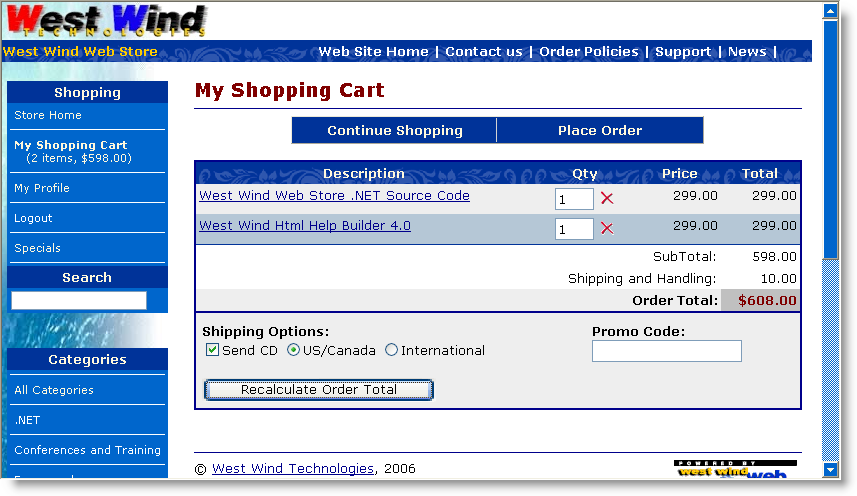
Figure 3: The starting point for an order is usually a shopping cart that collects and subtotals items.
Customers will tend to browse your site, pick items and eventually are ready to check out. At that point there needs to be some way to check out or in this case Place Order. In a live site, this is usually also the point where the application transitions from regular http: to a secure https: connection.
The next couple of steps collect customer and order
information. In my store I broke out this information into 2 distinct forms –
one for the customer information and one for the order specific information. But
you can obviously put this all onto one form (a little too busy for my taste) or
split it into additional forms.
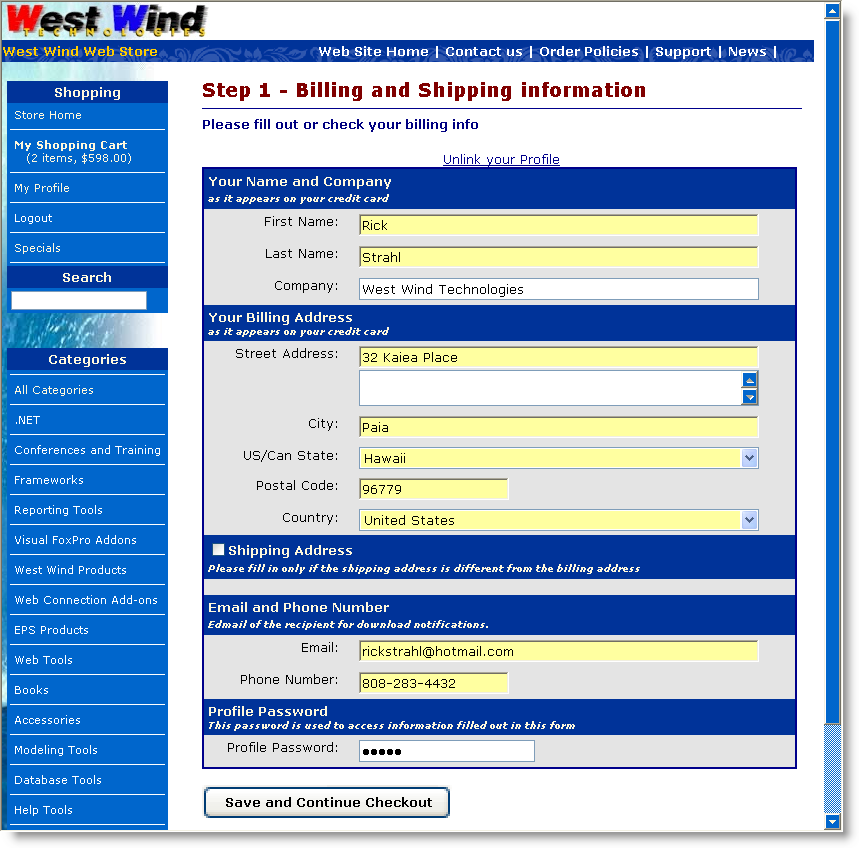
Figure 4: Taking customer information maps to the credit card billing information. Note this page should run under SSL to protect the customers personal information over the wire.
The order form collects customer information which will ultimately maps to the credit card billing information. It's important that you collect credit card BILLING information because this information is used in Address Verification of the customer. If you have separate shipping address information you should present that separately. Note the form shows a checkbox to expand shipping information that lets the customer enter the shipping address if it's different from the billing address (and in this case only if a physical shipment is requested).
I've found that it's important to make that very clear on your forms - customers often forget to use their billing address especially on business credit cards. We'll have a chance to catch this later as part of processing when Address Verification fails, but it's much easier and cheaper to catch it at the point of data entry. Make sure you make it clear that Billing address info is what you need to capture.
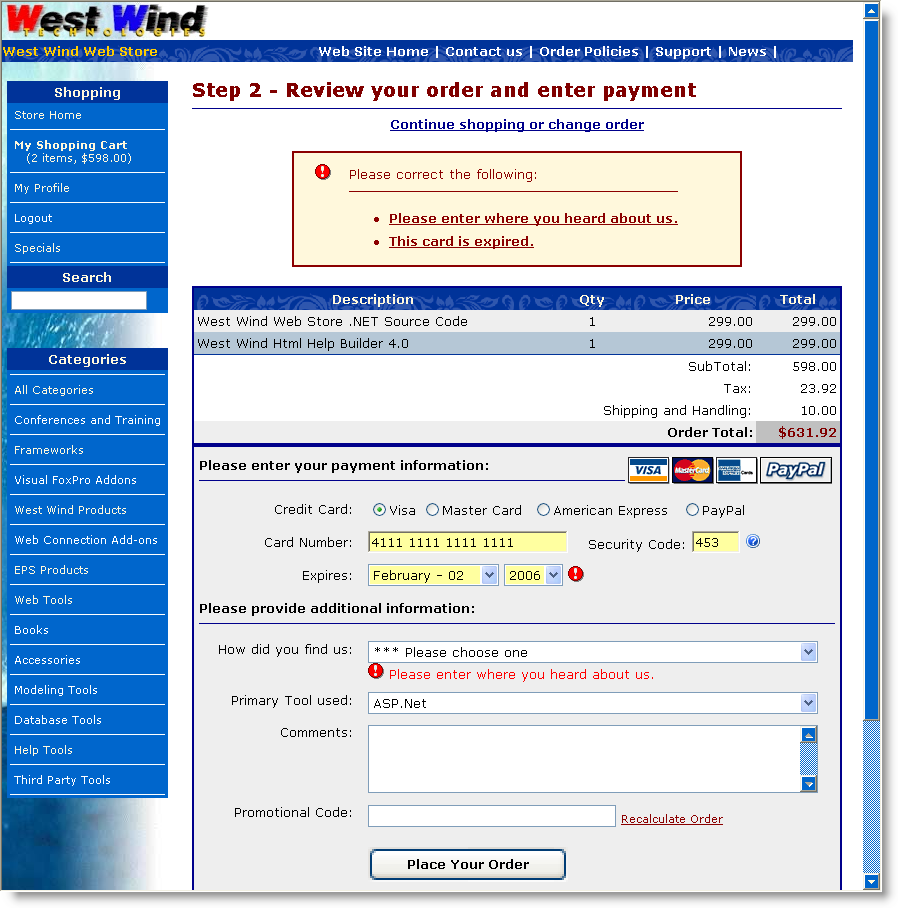
Figure 5: The final order form should let you capture credit card information and handle the validation process. Errors should also display back on this page.
Review Order Information
Next we need to collect the billing information from the
customer. It's important that the customer can see the order information on this
page so he or she can review his order before submitting payment. At minimum
this form should display an order total, but I recommend you show the order in
all its detail to make absolutely sure the customer knows what he's getting. I
know I've gone into online stores more than once only to purchase the wrong
thing or ordering 2 of something when I intended to only get one.
Anything you can do make the orders submitted correct at the point of entry, you should do as it takes a lot more effort to fix it after the order has been placed. Not only does it take away from the automated process you're striving to achieve with an online site, it also costs money and manual processing time if you have to issue credits and/or resubmit orders.
CVS Code
The information captured here is the Credit Card Number, Expiration date and Security Code. The security code is optional with most providers but I highly recommend that you require users to provide it as it provides at least a little additional protection against fraud. Using the code also lowers your merchant percentage slightly with some merchant providers. It's a good idea to require it. If you do make sure you provide information on where to find it on the card. In Figure 5 clicking on the ? icon brings up more information and if you go to the live site you can use the text and images I use there.
Pre-Validation of Credit Card Information
The credit card gateways will validate the credit card number and expiration date and it may seem to tempting to skip validation and let the gateway deal with it. But keep in mind that every access to the gateway and the front end network costs a little money in transaction charges, so it's a good idea to do as much up front checking as possible.
Credit Card numbers can be validated using simple Mod10 validation. The form above includes some client side JavaScript that checks the card number for Mod10 compliance and notifies the user if
A JavaScript validation routine (that I used with some slight modification) in my store can be found here:
http://javascript.internet.com/forms/credit-card-number-validation.html?CreditCard=4111111111111112
In the application above the Mod10 validation is hooked to the onblur of the credit card textbox and it displays a little tooltip underneath the textbox as a visual hint to the customer. The server side ccProcessing class also includes Mod10 validation and you can utilize that code on the server if you don't want to deal with client side script validation.
The form also validates all user input on the server. The Invoice business object has a Validate() method that can validate the user input and can check for the credit card date being valid and the various informational field being filled in. If an error of any sort occurs the form is spit back to the user with an error message (as shown above) BEFORE any credit card processing is done. In other words, the credit card processing is the last step of the invoice processing and only if everything else is OK does the card get sent off to the Gateway for processing.
Note that in ASP.NET the request posts back to the same page. And while the processing for the credit card validation is going on you want to make sure that the customer is not clicking on the submit button more than once. The form actually replaces the display content of the page as soon as the Place Order button is clicked and you'll see a display like this:
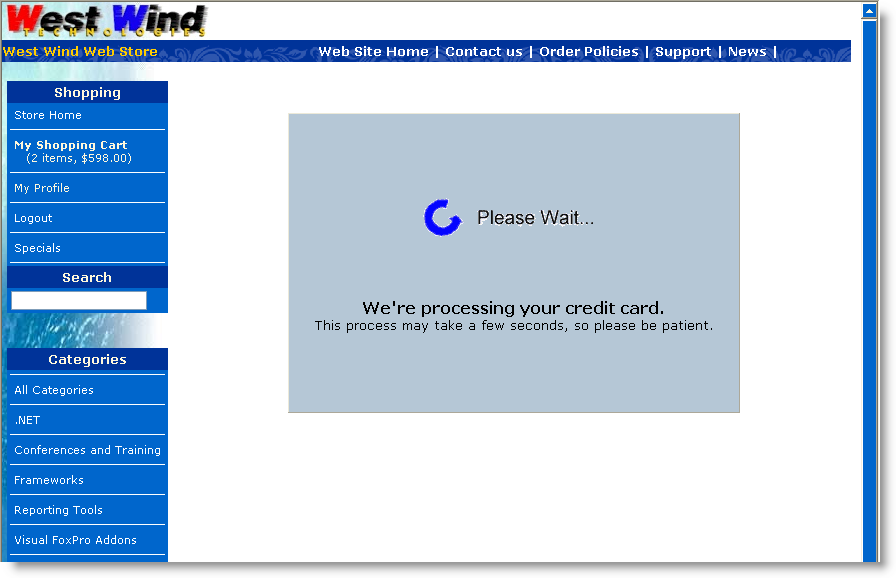
Figure 6: A 'please wait' interface replaces the form as soon as the place order button is clicked in order to avoid having customers click more than once to submit the form.
This HTML panel is merely a client side initially hidden <iframe> tag, that is made visible by the button click, while the main page content – wrapped in a <div> is hidden. The logic is hooked up to the form's onsubmit:
<form id="frmOrderForm" onsubmit="ShowWaitDisplay()" runat="server">
and then implemented with this simple JavaScript function:
function ShowWaitDisplay()
{
document.getElementById("MainForm").style.display="none";
IFrame = document.getElementById("WaitFrame");
IFrame.src = "waitform.htm"
IFrame.style.display = "inline";
window.scrollTo(0,0);
return true;
}
The IFRAME loads a static HTML page that can be designed separately of the order form itself, so it's easy to maintain. If you need a dynamic message you can also use an ASPX page and pass data to it via the querystring or if more complicated via the Session object.
When the server side processing is done the page returns back to itself, since the page is using a standard page POSTBACK. If an error occurred it displays the credit card error message. This value is retrieved indirectly ccProcessing.cValidatedMessage and presented as yet another error message similar to the ones shown in Figure 5.
If the credit card processing went through the invoice is saved and written to disk and the form then redirects to an order confirmation page. which is shown in Figure 6.
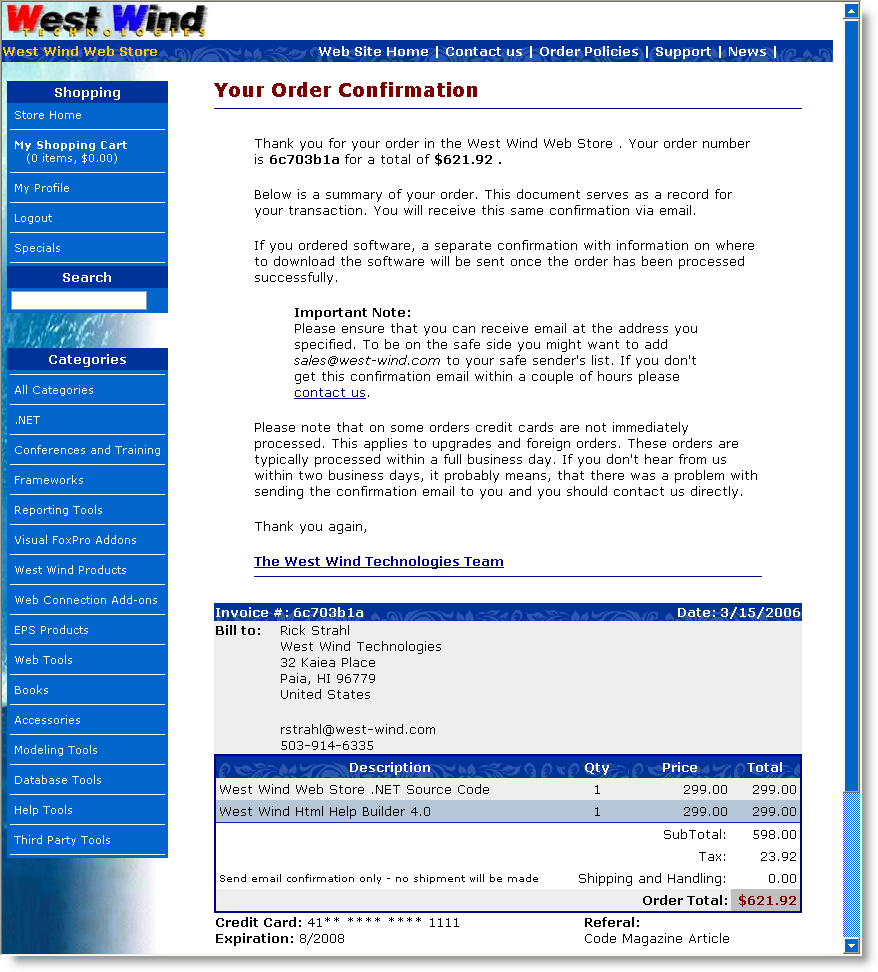
Figure 7: The order confirmation page summarizes the order and lets the user know what to expect and where to go if there should be a problem. This is especially important if you're using some form of electronic fulfillment and the fulfillment (usually email) fails.
The confirmation serves a number of important functions. It obviously confirms to the customer what's she's just paid for, but more importantly it communicates to them what happens next. They paid for the product so now you need to fulfills the order. If you are a vendor that fulfills orders electronically you can notify the customer that a confirmation will be sent or that items will be shipped etc. along with a content address that can be used for them to contact support.
The confirmation form in this application is also serves as the notification portion of the application, so an order confirmation is sent with the same info displayed on this form, and if items can be confirmed immediately or accessed via a download link a confirmation notice is sent off immediately as well.
Alright, now we've seen how the order process works, let's take a look behind the scenes and see how the credit card processing is hooked into this.
In this store application the UI page that handles the credit card processing is OrderForm.aspx which is shown in Figure 5. Up until this point data has been internally collected in the application and stored in a database (or temporary table) along with some identification that identifies the customer and the invoice.
The core processing occurs in the btnSubmit_Click when the Place order button is clicked.
/// <summary>
/// Saves the invoice if all goes well!
/// </summary>
/// <param name="sender"></param>
/// <param name="e"></param>
protected void btnSubmit_Click(object sender, System.EventArgs e)
{
// *** Unbind the form and display any errors related to the binding
this.UnbindData();
// *** This check is somewhat application specific
if (this.txtHeardFrom.Text.StartsWith("***"))
{
this.AddBindingError("Please enter where you heard about us.",this.txtHeardFrom.ID);
}
invRow = this.Invoice.Entity;
// *** Override custom field handling
invRow.Ccexp = Request.Form["txtCCMonth"] + "/" + Request.Form["txtCCYear"];
invRow.Shipdisks = Invoice.ShipInfo.ShipToCustomer;
if (Invoice.ShipInfo.ShippingMethod != "--")
invRow.Shipby = Invoice.ShipInfo.ShippingMethod;
// *** Add the DevTool Used
if (this.DevToolUsed != "" && !this.DevToolUsed.StartsWith("***"))
this.Invoice.SetProperty("DevToolUsed", this.DevToolUsed);
// *** Load up the Shipping Address captured previously
object Temp = Session["ShippingAddressPk"];
if (Temp != null)
{
busShippingAddress ShipAddress = WebStoreFactory.GetbusShippingAddress();
if (ShipAddress.Load((int)Temp))
this.Invoice.UpdateShippingAddress(ShipAddress);
}
// The promo code wasn't databound to the invoice - do it now
invRow.Ordercode = this.Invoice.ShipInfo.PromoCode;
// *** Must recalc and update the invoice and display
this.ShowLineItems();
// *** If Invoice doesn't validate show error and exit
if (!this.Invoice.Validate() || this.bindingErrors.Count > 0 )
{
this.AddValidationErrorsToBindingErrors(this.Invoice.ValidationErrors);
this.ErrorDisplay.ShowError(this.bindingErrors.ToHtml(),"Please correct the following:");
return;
}
if (this.bindingErrors.Count > 0)
{
this.ErrorDisplay.ShowError(this.bindingErrors.ToHtml());
return;
}
// *** Handle PayPal Processing seperately from ProcessCard() since it requires
// *** passing off to another page on the PayPal Site.
// *** This request will return to this page Cancel or Success querystring
if (App.Configuration.CCProcessingType != CCProcessingTypes.None &&
this.txtCCType.Text == "PP" &&
!this.PayPalReturnRequest)
{
// *** We have to Save Invoice so that IPN confirm can see it!
// *** We'll mark it as an UNPROCESSED order.
this.invRow.Ccresult = "UNPROCESSED";
if (!Invoice.Save(true))
{
this.ErrorDisplay.ShowError(this.Invoice.ErrorMessage,
"An error occurred saving the invoice:");
return;
}
// *** Now redirect to PayPal
this.HandlePayPalRedirection();
}
// *** We're processing Credit Cards
// *** the method decides whether CC processing actually takes place
if (!this.ProcessCreditCard())
{
string Error = Invoice.ErrorMessage;
int lnAt = Error.IndexOf(";");
if (lnAt > 0)
Error = Error.Substring(0, lnAt);
// *** If we have a FAILED transaction pass it through unprocessed - we handle it offline
// *** Otherwise echo error back.
if (invRow.Ccresult != "FAILED")
{
this.ErrorDisplay.ShowError(Error, "Credit Card Processing failed: ");
return;
}
}
// *** Let's make sure the Temp LineItems are updated
// *** Since we may have changed the Promo Code
Invoice.LineItems.SaveLineItems(false);
// *** Save the invoice by copynig the Temporary LineItems to the real lineitems
if (!this.Invoice.Save(true))
{
this.ErrorDisplay.ShowError(this.Invoice.ErrorMessage, "An error occurred saving the invoice:");
return;
}
// *** Confirm the order items
if (invRow.Ccresult.Trim() == "APPROVED" && this.Invoice.CanAutoConfirm())
this.Invoice.SendEmailConfirmation();
// *** Clear out the Invoice Session PK so this invoice is 'history'
Session.Remove("ShoppingCartItems");
Session.Remove("ShoppingCartSubTotal");
Session.Remove("ShippingAddressPk");
// *** Clear out expired Temporary lineitems
busTLineItem LineItems = WebStoreFactory.GetbusTLineItem();
LineItems.ClearExpiredLineItems(7200); // 2 hours
// *** Show the confirmation page - don't transfer so they can refresh without error
Response.Redirect("Confirmation.aspx");
}
The code starts off with unbinding the data on the form back into the business
objects that are loaded on the form. The form's Page_Load() sets up an empty
Invoice and Customer object and loads the available data (Invoice Pk, Customer
Pk and lineitems) into it. The unbinding the takes the values from the current
form and updates the appropriate fields (if you're interested in how this
control based two-way databinding works
go here).
Once the data's been bound from the controls into the business object, it gets validated. First a few explict page level field checks are done followed by the Invoice object's validation (Invoice.Validate()). If either of these fail, BindingErrors are added and the page is redisplayed with the errors displayed at the top of the form.
If all that goes well, the next step is the payment processing. This form handles both PayPal and Credit Card Processing. For more detail on the PayPal integration in this same mechanism visit this page. The Credit card processing essentially goes out to an internal routine that calls the business object's ValidateCreditCard() method I showed earlier. This method returns true or false, and if false the error message is displayed and the form redisplayed. If successful the order is saved (Invoice.Save()) and written to disk. Finally the application redirects to the confirmation page which then displays the final order information and sends email confirmations.
The internal credit card processing is offloaded to a custom method:
bool ProcessCreditCard()
{
// *** PayPal shouldn't be procesed
if (App.Configuration.CCProcessingType == CCProcessingTypes.None ||
this.invRow.Cctype == "PP")
return true;
// *** See if we're On to do online processing
// *** This logic checks to see whether items are shippable without manual validation
// *** If all are then the order is processed online. Otherwise it's simply submitted
// *** and processed offline later.
if (!App.Configuration.ccProcessCardsOnline)
return true;
// *** Check to see if this order can be processed without
// *** manual confirmation (such as upgrades etc.)
// *** YOU MAY WANT TO REMOVE THIS LINE IF YOU ALWAYS PROCESS CARDS
if (!Invoice.CanAutoConfirm())
return true;
// *** Process the actual card for this invoice
if (!Invoice.ProcessCreditCard())
{
// *** Let the Page handle the error
// *** Invoice.ErrorMessage has parsed error info
return false;
}
return true;
}
The core logic in this method decides how credit cards are to be processed, which uses global configuration settings in the App.Configuration object which maps to web.config settings (for more info see Building a better Application Configuration Class). It's a good idea to not hardcode any settings related to credit card processing into the application, so using configuration settings.
Here's the Invoice.ProcessCreditCard() method I showed earlier in the article again this time in context. As you can see this method also uses configuration settings for any of the credit card processing parameters, such as merchant id and password, timeouts and so on. The rest of the properties are set simply from the Invoice object's data members:
/// <summary>
/// Processes credit cards for the provider set in App.Configuration.CCMerchant
/// Works with the WebStoreConfig settings for setting to configure the provider
/// settings.
/// </summary>
/// <remarks>The Invoice is not saved at this point.
/// Make sure to call Save() after this operation.</remarks>
/// <returns></returns>
public bool ProcessCreditCard()
{
bool Result = false;
wws_invoiceRow Inv = this.Entity;
wws_customersRow Cust = this.Customer.Entity;
ccProcessing CC = null;
ccProcessors CCType = App.Configuration.CCProcessor;
try
{
if (CCType == ccProcessors.AccessPoint)
{
CC = new ccAccessPoint();
}
else if (CCType == ccProcessors.AuthorizeNet)
{
CC = new ccAuthorizeNet();
CC.MerchantPassword = App.Configuration.CCMerchantPassword;
}
else if (CCType == ccProcessors.PayFlowPro)
{
CC = new ccPayFlowPro();
CC.MerchantPassword = App.Configuration.CCMerchantPassword;
}
else if (CCType == ccProcessors.LinkPoint)
{
CC = new ccLinkPoint();
CC.MerchantPassword = App.Configuration.CCMerchantPassword;
CC.CertificatePath = App.Configuration.CCCertificatePath; // "d:\app\MyCert.pem"
}
else if (CCType == ccProcessors.PayPalWebPaymentsPro)
{
CC = new ccPayPalWebPaymentsPro();
CC.MerchantPassword = App.Configuration.CCMerchantPassword;
((ccPayPalWebPaymentsPro)CC).PrivateKeyPassword = "";
}
else if (CCType == ccProcessors.BluePay)
{
CC = new ccBluePay();
CC.MerchantId = App.Configuration.CCMerchantId;
CC.MerchantPassword = App.Configuration.CCMerchantPassword;
}
CC.MerchantId = App.Configuration.CCMerchantId;
//CC.UseTestTransaction = true;
// *** Tell whether we do SALE or Pre-Auth
CC.ProcessType = App.Configuration.CCProcessType;
// *** Disable this for testing to get provider response
CC.UseMod10Check = true;
CC.Timeout = App.Configuration.CCConnectionTimeout; // In Seconds
CC.HttpLink = App.Configuration.CCHostUrl;
CC.LogFile = App.Configuration.CCLogFile;
CC.ReferingUrl = App.Configuration.CCReferingOrderUrl;
// *** Name can be provided as a single string or as firstname and lastname
//CC.Name = Cust.Firstname.TrimEnd() + " " + Cust.Lastname.TrimEnd();
CC.Firstname = Cust.Firstname.TrimEnd();
CC.Lastname = Cust.Lastname.TrimEnd();
CC.Company = Cust.Company.TrimEnd();
CC.Address = Cust.Address.TrimEnd();
CC.State = Cust.State.TrimEnd();
CC.City = Cust.City.TrimEnd();
CC.Zip = Cust.Zip.TrimEnd();
CC.Country = Cust.Countryid.TrimEnd(); // 2 Character Country ID
CC.Phone = Cust.Phone.TrimEnd();
CC.Email = Cust.Email.TrimEnd();
CC.OrderAmount = Inv.Invtotal;
CC.TaxAmount = Inv.Tax; // Optional
CC.CreditCardNumber = Inv.Cc.TrimEnd();
CC.CreditCardExpiration = Inv.Ccexp.TrimEnd();
CC.SecurityCode = Inv.Ccsecurity.TrimEnd();
// *** Make this Unique
CC.OrderId = Inv.Invno.TrimEnd() + "_" + DateTime.Now.ToString();
CC.Comment = App.Configuration.CompanyName + " Order # " +
Inv.Invno.TrimEnd();
Result = CC.ValidateCard();
Inv.Ccresult = CC.ValidatedResult;
if (!Result)
{
this.ErrorMessage = CC.ValidatedMessage;
Inv.Ccerror = this.ErrorMessage;
}
// *** Always write out the raw response
if (string.NullOrEmpty(CC.RawProcessorResult))
Inv.Ccresultx = CC.ValidatedMessage;
else
Inv.Ccresultx = CC.RawProcessorResult;
}
catch (Exception ex)
{
this.SetError(ex.Message);
Inv.Ccresult = "FAILED";
Inv.Ccresultx = "Processing Error: " + ex.Message;
Inv.Ccerror = "Processing Error: " + ex.Message;
return false;
}
return Result;
}
The business object takes care of all the details of dealing with the credit card processing. When the processing is complete, the Invoice's ccResult,ccResultx and ccError properties are set. ccResultx is the raw response and is stored for future reference should there be any problems with the transaction.
When this method returns – true or false – the client code can simply check these 3 properties to determine whether it worked and get an error message to display back on the page on failure.
Ok, so that completes the CC Processing code. This example, is a live application so there are a few application specific details I've shown, but I hope these have given you a realistic view of how you can integrate the basic credit card processing classes I described here. Of course you don't have to go through this abstraction if you don't want to – you can simply call the appropriate class directly in your ASPX if you choose, but I've found that abstraction of credit card processing code is a good idea in case you need to switch providers later, or more importantly if you need that same credit card processing in another application.
For example, the abstraction also allows me to reuse this credit card processing code in an offline application of the Web Store. Orders can be downloaded from the Web Site via Web Service to a WinForms applications that keeps the order and customer data local. The same Invoice and ccProcessing classes are used in the WinForms application. And in both applications I now only have to fill the invoice properties and call ProcessCreditCard() and check the return value and 3 result values – it becomes really easy to reuse the credit card processing logic in the Invoice object. Even without the business object, the various ccProcessing classes can also be used directly in WinForms applications.
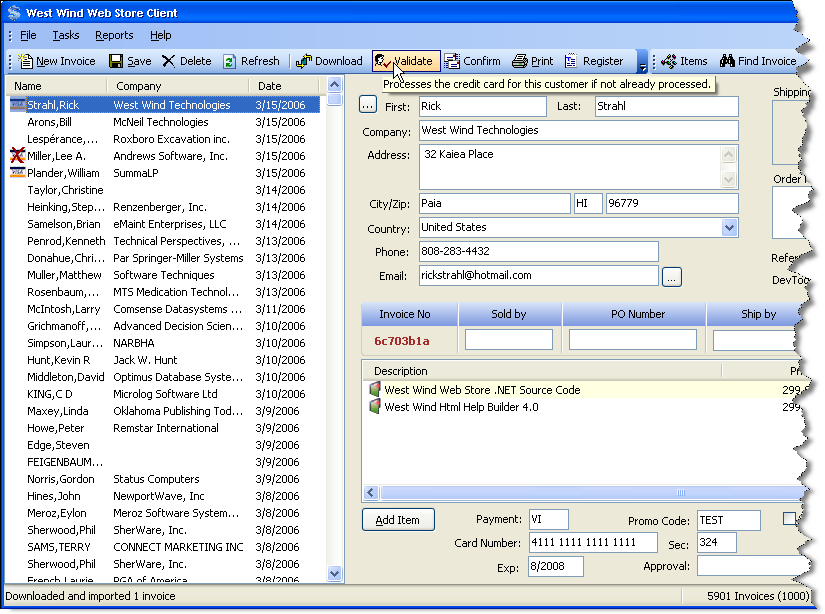
Figure 8: Reusability is good: An offline application of the store can use the same exact credit card processing routines from the business object and/or ccProcessing classes.
The offline application actually raises an interesting point. Should you process cards online or should you process them after the original order entry is complete. Naturally we all want to take credit cards and charge them right away and get the customers money <g>. But there are situations where you might NOT want to charge the customer right away.
For example, on my Web Site I sell primarily software which can be downloaded immediately. For those items you definitely want to do online processing. Or do you? <g> For a while I had major problems with orders from the far east being fraudulent. I now have a filter built into my business object that checks the country where the order is placed from and if it's not within a list of countries allowed the order is not immediately processed and instead completed as unprocessed.
I can then later download the order, manually review it in hopes of catching potential fraud. It's often easy to tell potential fraud when email addresses looks wrong or addresses sound phoney. At that point I can contact the customer and double check. Usually if fraud is involved you'll never hear back.
Another scenario in my business is upgrades. I don't keep invoice information online beyond a couple of days – so the online site does not actually have all the order history for customers. Even if I did, customer companies often change and so verifying upgrades is not something that I have been able to completely automate. So, things like upgrades are flagged in my store's inventory as non-self-confirming items. When there's a non-self-confirming item on the order, the order is not sent to credit card processing immediately.
All of this happens inside of the Invoice business object with this method:
public override bool CanAutoConfirm()
{
InvoiceEntity Invoice = this.Entity;
// *** If we have a special order code we need to manually
// *** process this order as we have to apply a discount
// *** and verify the order
string OrderCode = Invoice.Ordercode;
if (OrderCode != null && OrderCode != "" || OrderCode == "TEST")
return false;
// *** Don't process cards online without a security code (PayPal is an exception)
if (Invoice.Ccsecurity.Trim() == "" && Invoice.Cctype != "PP")
return false;
// *** Due to potential fraud don't process foreign cards
// *** except from common countries - others will
// *** require offline processing
string CountryCode = (string) this.Customer.DataRow["CountryId"];
if (CountryCode != "US" && CountryCode != "CA" && CountryCode != "DE" &&
CountryCode != "GB" && CountryCode != "AU" && CountryCode !="AT" &&
CountryCode != "CH" && CountryCode != "FR")
return false;
return base.CanAutoConfirm();
}
The above is what I call conditional offline processing.
Note that 'offline' processing doesn't have to be done in an 'offline application' like a Windows Forms App either. For example, the store has an Administration area (and a PDA interface) where I can review orders and validate and confirm orders from.
Offline processing gives you a chance to verify orders. If you're dealing in large ticket items, or you are in a business where the fraud potential is high, offline processing might be a good choice. Unless you sell electronic delivery goods or access type services where immediate notification is required, there's not much inconvenience to the customer by not immediately processing the card. But obviously there's inconvenience to you as the validation now becomes a manual process – it's tradeoff but one that might be worthwhile in some situations.
Another downside to offline processing is that you can't immediately get the results from the credit card processing and echo any errors back to the customer. So if an invalid card was entered, or more likely, an invalid address was used, you're not going to catch it until you run the card at a later point. If the card fails you'll have to contact the customer to get her to resubmit the order or otherwise clear up the error. This is obviously a lot more work than having the customer fix it immediately as they are placing the order.
Another way that you can 'buy a little time' is by using an AUTH as opposed to a SALE or AUTH CAPTURE transaction. In the samples here I've shown SALE transactions, which immediately charge the customers credit card (well at the end of the day or whenever your batches close anyway). But you can also do just an AUTH which reserves funds, but doesn't charge the customer until you go back and do an AUTH CAPTURE. AUTH operation works by returning you an Authorization code that is returned and reserves funds on the customer's credit card. The money is held for some period of time. To capture the actual money you do another credit card transaction and use AUTH CAPTURE passing in the Authorization code (or transaction id – depends on gateway) from the original AUTH procedure.
Using AUTH is required if the vendor is not shipping product to the customer within 48 hours.
Support for later AUTH CAPTURE requests are not supported in the ccProcessing classes except for Authorize.NET. For all others you can run the initial AUTH but the code for later capturing is not available. It should be easy to add if you need it though.
It's pretty obvious that there are security considerations when you are dealing with customer's credit card data. It's important that the date the customer submits on the Web site is safe while traveling over the wire and that the data captured from the customer stays safe when store with you as the vendor.
Your customers will expect your site to be SSL enabled if they are to trust you with their credit card information. SSL ensures that data is encrypted as it travels over the wire and this protects you from potential network sniffing. To hook up SSL you need to get a public SSL certificate from a certificate authority or reseller of certificates. Base certificates have gotten a lot cheaper in recent years and you can get certificates from many providers and hosting companies for under $100. I use DirectNic for all my certificates and domain registrations, but there are plenty of other providers out there that are in that same range. If you use an ISP check with the providers they use as they often get volume deals that may be cheaper than your own shopping.
The next issue is to make sure that you NEVER display full credit card numbers in your Web application back to the customer beyond the initial point of entry. The idea is if for whatever reason your application is compromised or a user account is compromised you are not in any way displaying the card information back to the unauthorized person.
This means, if after the order has been placed you display order information back to the customer, like say on an order status page, make sure you display the credit card number with blacked out numbers except a few of the numbers to let the customer identify the card used. The official rules from the Credit Card companies are that only the last four digits can be displayed.
Here's a routine I use to handle the display consistently as part of the business object that normally displays the value:
public string GetHiddenCC()
{
InvoiceEntity Inv = this.Entity;
string CC = Inv.Cc.TrimEnd();
if (Inv.Cctype == "PP" && CC == "")
return "<a href='http://www.paypal.com/'>paid with PayPal</a>";
if (CC.Length == 0)
return "";
if (CC.Length < 10)
return "**** **** **** ****";
string lcFirst = CC.Substring(0, 2);
string lcLast = CC.Substring(CC.Length - 4, 4);
//return "**** **** **** " + lcLast;
return lcFirst + "** **** **** " + lcLast;
}
So inside of a page I might display the value as an expression like this:
<%= this.Invoice.GetHiddenCC() %>
Notice I cheat a little in displaying the first two digits, so I have an idea what type of card I'm dealing with. I think this makes it easier for anyone to identify a card at a glance. But be the official rules are only to display the last 4 digits.
Storing credit cards is also an important security consideration. The threat is always that your Web server (or even standalone machine) might be compromised in some way and credit cards might get out. It's highly unlikely that this will happen, but there's always the potential. There are many potential security risks from break ins, your ISP, or even somebody inside the company stealing card numbers.
If at all possible you should not hold on to credit card data of your customers. This is not always possible especially in e-Commerce applications that expect frequent repeat customers and want to avoid having to re-enter credit cards over and over again.
If possible though, it's a good idea to clear credit card data for orders once the order has been processed. Should there be any sort of trouble with the transaction and you need to issue a refund or the customer returns you can just ask for the card again. This is one way to remove any possibility that large amounts of credit card data can be compromised and it limits your liability greatly.
If you absolutely must store credit card data it should be stored in encrypted form.
There are various compliance standards (specifically CSIP and PCI) that vendors are supposed to follow that describe specific rules of how networks need to be secured and data stored. These rules are fairly complex and require very expensive certification. However, these standards are so strict and expensive to get verified for that it's nearly impossible for smaller businesses to comply. While smaller vendors are not likely to be pushed to comply, not complying essentially releases the credit card company of any liability should there be fraud or a security breach. In other words you are fully responsible for the full extent of the damage (realistically you are anyway – I'm only echoing back the rough concepts of these certifications).
While we're at it – as vendor you usually get the short end of the stick if there is any problem with a transaction. If a customer calls the merchant provider and requests his money back this is known as a ChargeBack. If a customer complains and files a chargeback request, chances are greatly in favor of the customer to get his money back unless you can meticulously document the transaction and shipment to the customer. This is especially difficult if your transactions and product delivery are made electronically.
You can and should always fight a chargeback and your best weapon are complete records of the transaction and more importantly the fulfillment of the order. Make sure you keep good documentation on all transactions. Keep all transaction data, have good shipping records if you ship physical product including signature receipts. This gives you the best chance of fighting frivolous chargebacks.
Some merchant banks are also more aggressive about standing up for their vendors than others. My previous merchant provider pretty much never let chargebacks get reversed even though I sent in fairly complete documentation. My current merchant (Synergy) on the other hand has much fewer chargebacks coming back to me – presumably because they are being resolved at the merchant level. And chargebacks that I have received have had a much higher reversal rate after documentation was sent in. The reality is that most chargeback requests are created by customers who can't figure out what they actually bought. Often contacting the customers and verifying what they bought can get them to reverse chargeback.
So the merchant matters in these situations. Unfortunately, there aren't good ways to find out before signing which type you end up with, unless you spend some time online search various merchant forums and paying close attention to which providers are getting good feedback from vendors.
We've covered a lot of ground in this long article and I hope you find this information useful. If you're starting out with payment processing this article has most of the information you need short of a specific provider list. I obviously have my preferences and I've mentioned them here. However, I recommend that you spend a little time comparing rates, and checking out various merchant forums to see which merchant providers offer the best rates, choices and customer service.
It's time to get busy and start making some money online…
Source Code from this article:
The source code for this article includes the classes described here including all support classes. There's also a small sample application for both ASP.NET 1.1 and 2.0 that you can use to test operation against the supported providers assuming you have an account to test with. The sample also includes the PayPal Classic integration code and sample.
Special thanks to Zachary Smith from MerchantPlus who provided clarification and detail on the backend processing networks.

By Rick Strahl
Rick Strahl is president
of West Wind Technologies on Maui, Hawaii. The company specializes in Web
and distributed application development and tools with focus on .NET, Visual Studio and Visual FoxPro. Rick is author of
West Wind Web Connection, a powerful and widely used Web application
framework and
West Wind HTML Help Builder and
West Wind Web Store. He's also a
C# MVP,
a frequent speaker at international developer conferences and a frequent contributor to magazines and books. He is co-publisher of Code
magazine. For more information
please visit:
http://www.west-wind.com/ or contact Rick at
rstrahl@west-wind.com.
| White Papers Home | White Papers | Message Board | Search | Products | Purchase | News | |