
 The Visual FoxPro Framework
On the Visual FoxPro side a server application runs that can communicate with the ISAPI extension. The Web Connection framework, which consists of a number of classes, provides an easy interface of passing requests to your user code.
The idea is that the framework handles all the Web abstraction so that your code can concentrate on the business task at hand. Your code basically implements a custom class with methods for each incoming request. When your method is called you receive a ready made Request and Response object that you can use to start writing your Web application code using plain Visual FoxPro code.
Framework objects
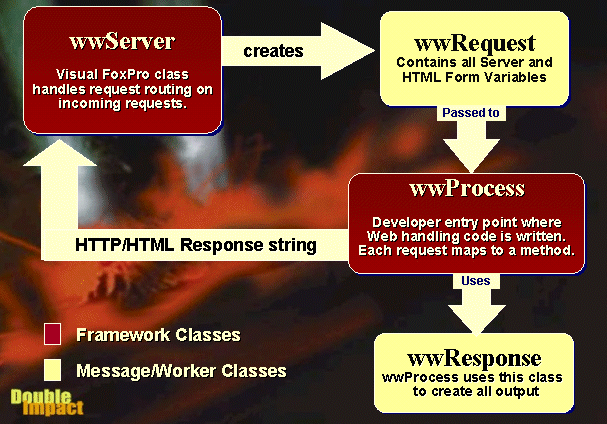
The Visual FoxPro framework consists of a number of objects that interact with each other to provide you the information you need to create an HTTP response. The following diagram shows how the core objects interact:
- wwServer
The wwServer class is responsible for handling incoming requests from the Web server and creating a wwRequest object to pass to your user code as input. The server class is also responsible for abstracting the various message mechanisms like file based and COM based, ASP based messaging and handles the incoming data accordingly. When the Request object is created it's abstracted for each mechanism so that the user code doesn't need to know or care whether it's running under COM or file based messaging.
You will always create a subclass of this class and override at least three methods: OnInit(), OnLoad() and Process(). The first two are for configuration of the server, while Process serves as an entry point for your code on each request - Process() gets called after the Web server has created a wwRequest object. The New Project Wizard sets up the basic skeleton server class, which you can customize with your own configuration settings.
wwRequest Class
The wwRequest class serves as the Input for each incoming Web request. The wwServer class creates a Request object and passes it to the wwProcess object which serves as your entry point for your application code. wwRequest encapsulates all the information made available by the Web server. This includes the contents of HTML form variables (Request.Form()) and status information about the Web server and the browser that called it (Request.ServerVariables()). You'll access this object in your code as Request. Some common information you can pull from the Request object includes the QueryString and portions of the Query String, Authentication information, Client IP address, the current browser used to access the request, active Cookies, type of request (POST/GET)... The Request object is essentially your Web application's raw input.wwResponse Class
The wwResponse object serves as the output for your application. With it you output into the HTTP output stream. The oResponse object property is part of the wwProcess object and thus accessible to your code as soon as your request method is accessed. This class actually exists in a variety of combinations that vary how where the output generated is stored. Some specializations include wwResponseFile, wwResponseString and wwPageResponse. The wwProcess class automatically determines which class to use based on the server type and type of page to process so you don't have to worry about which class to use explicitly (although you can override it).
The class provides a simple interface for file or string based HTML creation. The methods range from the low-level Write() method to the ShowCursor() method that displays an entire cursor with one line of code to the immensely powerful ExpandTemplate() and ExpandScript() which can display HTML containing embedded FoxPro expressions or even entire CodeBlocks (courtesy of Randy Pearson's CodeBlck) right inside of the HTML text. The Response class provides over 30 methods and allows access to the HTTP header for very fine control over output. Support for HTTP Cookies, Authentication, Keep-Alive and Page Caching is all built in. You'll access this object in your code as Response.
- wwProcess Class
The wwProcess class serves as the application process class. This is where most application code gets written - this means your code! As the name suggests this class is where the actual request processing occurs. The wwServer class routes requests to this class and by the time your code - typically a method inside of this class or Web Control Framework Page class - gets control, all the support objects have been configured and are ready to be used. So you can use Request and Response to retrieve input and output respectively inside any of the Process methods you create. The wwProcess class acts as a sort of a container of the support objects and manages the output creation and storage. When the Destroy of this class fires the output is assembled and assigned back to the Server object, which in turn will then push it back to the Web Server and to the HTTP client.
Incoming requests are picked up by the wwServer class. In file based messaging a timer waits for files with a certain file template. In COM messaging a COM object is instantiated the first time and then recycled on each hit. In both scenarios the request data is passed in encoded format to the server, which depending on the mechanism picks up the data and creates a Request object from it.
All requests are funnelled through the wwServerProcessHit() method which serves as the entry point for a server request. ProcessHit() configures the wwRequest object instance and then calls the wwServerProcess() method. Process() is a request router method that looks at the incoming parameters to determine which application receives the request since you can create multiple process classes in a single Server application with each process serving as a sub application or grouping of services. Process() consists of a large CASE statement that handles routing to each of these process classes. This CASE statement is usually autoconfigured when you use one of the Wizards in Web Connection to create a new application or add sub-Process to an existing application.
The routing sends the request off into a wwProcess class, instantiating the class. The new object receives a copy of the Request object and instructions on how to handle the outgoing HTTP response (a file, or string) and sets up these objects internally. Then the wwProcess::Process() method is called which serves as the common entry point into this application class. Remember this class acts as your user code class with each request serving a specific Web request/URL.
The Process() method has a default implementation, so you don't have to override it by default. However, most applications will override this method to handle operations that must occur on every Web hit - namely things like Authentication or user verification, or potentially some sort of state or user management. By overriding this method you can perform these tasks easily.
Process()'s responsibility is to route the request to the appropriate method of the class and it does so by looking at the 'parameters' or QueryString or name of the requested page. And so your custom code gets called in this class method! Once you get called in this fashion all of Visual FoxPro's features.
Your code at this point also has access to the input and output objects as:
**
- Request or THIS.oRequest
- Response or THIS.oResponse
- Server or THIS.oServer
- Session or THIS.oSession (make sure to set THIS.lEnableSessionState = .T. before use)**
If you created a Process class called MyCode and a data access method like the following:
Function CustList

lcName = Request.QueryString("Name")

*** Run a static query
SELECT company, careof as Name, address, phone ;
   FROM wwDemo\TT_CUST ;
   WHERE UPPER(Company) = UPPER(lcName) ;
   ORDER BY Company ;
   INTO CURSOR TQuery

*** Create HTTP Header, HEAD section, HTML/BODY tags and header text
Response.HTMLHeader("Customer Data Accces")

Response.Write("This demo displays data from a customer file.<p>")

Response.ShowCursor()

Response.HTMLFooter()
To access this URL you could use:
http://localhost/wconnect/wc.dll?MyCode~CustList
or if you have set up a script map called myScript:
http://localhost/wconnect/CustList.myScript
Summary
At first glance it appears that there's a lot happening, and that this whole scheme is very complex unless you have a grasp of the architecture. However, what's happening is that you actually have only two major objects (wwServer and wwProcess) communicating with each other via message objects (wwRequest and wwResponse). The entire process is basically hidden and provided for you in the Web Connection Visual FoxPro framework code, which you don't have to understand or manipulate directly.
The mechanism described here is the core Web Connection engine. All other functionality is built ontop of this small core engine which is relatively simple and easily extended at all levels. The framework has been carefully designed to provide maximum flexibility and extensibility. All classes are open and can be easily subclassed and replaced with your own classes that extend the functionality of the framework. As far as framework code goes Web Connection implements a very flat hierarchy that relies on a few key hook points and subclassing and #DEFINE class hooks to provide easy built in extensibility that is easy to work with and understand.
Finally, Web Connection's Management Console Wizards greatly simplify setting up and configuring a new project and new sub-process classes added to an existing applications so that in most cases you never need to worry about this low level logic at all.

Comment or report problem with topic