
 Using Custom icons in your CHM file
Microsoft in their infinite wisdom decided to make it very hard to include custom icons with an HTML Help file in the content tab. Adding custom icons is rather difficult and requires that you copy an external file with your compiled Help project in the Windows directory.
How Icons work in HTML Help
In HTML Help workshop you can attach one of 42 icons to a topic. This icon ID maps to an internal image strip resource inside of the HTML Help runtime. You can experiment with these numbers if you open up your project in HTML Help Workshop, go to the content tab, select a topic and click on the edit button. On the Advanced tab you'll find an image index spinner that lets you see the default icons available.The actual number of available icons is actually smaller, because HTML help requires two successive icons for normal and expanded icons. Any topic that might expand in the help file should always have two icons associated with it. This effectively gives you only 21 icons to work with and several of these are default icons that you need to keep intact.
Help Builder allows you to attach an Icon ID to each of its topic type templates. This allows you to specify which icon displays in the help file. Note that the Icon ID has no effect of how Help Builder displays icons in the tree, or in its HTML display. The Icon ID is used only for generation into the Help File.
Custom icons - get ready for a headache
There are three things that need to be done to do this correctly:- Create a BMP tab strip that contains 42 icons in exactly the right proportions (16x16 each)
- Tell the help project where to find icon file externally (it can't be compiled in)
- Distribute the help file and the icon file in the Windows directory
Help Builder comes with a custom icon strip that supports custom icons for classes, methods, properties and events to make class documentation easier to read. You can find this icon strip in your project's BMP directory as wwHelpIcons.bmp. Help Builder also allows you to export your icons from your project into a custom icon strip file. Using the Topic Type Editor.
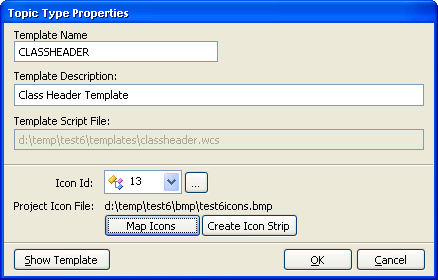
To create a new icon strip file from your icons:
- Make sure your project has an Icon Strip associated with it
You can set this up in the Options page. If an icon file doesn't exist you can copy the wwhelpicons.bmp file or use that file, although it's recommended that you rename it to match your project.
- Bring up the Template Viewer
- Make sure that your topics are all assigned to icon ids of your choice
- Bring up a topic type as in the figure above
- Select Create Icon File
This will generate a new icon strip file for you in BMP format.
Getting the icons to display in your CHM file
Make sure that you have this icon file selected as your icon file for the project in the project options. Go ahead and build the project now. This process is identical as before.
Help Builder generates code to cause the icon file to be referenced externally. Unfortunately, HTML Help has only a limited number of locations it can find on disk - one of them being the Windows directory. In order to get the icons to work you must install the icon strip into the Windows directory.
Note if you assign the icon file and don't ship it the help file will display an error - which can be ignored. However, most likely your icon definitions will show funky icons since you likely mapped to your custom icons which now point at the default icons in the help file. Therefore make very sure that you ALWAYS distribute your icon file with your CHM file.
Icon Colors
A final note: the CHM content list uses a very limited color palette (Windows Safe Colors). Therefore it's very important that you use icons that are not highly variant in colors. It's recommended that once you've generated your icon strip you use an image program to adjust the colors.
Recommendations
As you can see the process of using custom icons is a bit involved. Certainly the distribution issue is a major pain, so if you don't have tight control over the CHM distribution don't even think about using custom icons. <g>
Due to the color limitations I would recommend you stick with the stock icons provided with help builder. These icons are safe and they are stored in a default strip in wwhelpicons.bmp in your project.
For more low level information on custom icons and how this works in the CHM format you can review the following BLOG entry: Using custom icons in a compiled HTML Help 1.0 (CHM) file

Comment or report problem with topic