
 The Help Builder IDE elements
 The Help Builder IDE elements
Help Builder's User Interface consists of a rich IDE that is responsible for creating, editing and viewing topic content. The User interface consists of the following major items:
Content List
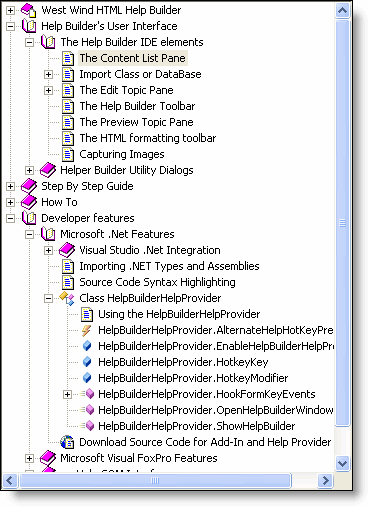 The content list displays a list of all topics the help file and is used for navigation and adding and deleting of topics. The content view is hierarchical so topics can live underneath other topics in the same way as your final HTML Help file will display.
Generally it's a good idea to create your topic layout first, then add the actual topic content after the structure of your help file has been laid out.
The content list displays a list of all topics the help file and is used for navigation and adding and deleting of topics. The content view is hierarchical so topics can live underneath other topics in the same way as your final HTML Help file will display.
Generally it's a good idea to create your topic layout first, then add the actual topic content after the structure of your help file has been laid out.
The Content list serves as your main navigation and topic manipulation tool while working on your help file. Note that you can also browse topics without moving the active topic by using the Topic Browser.
- Content Editor/Viewer
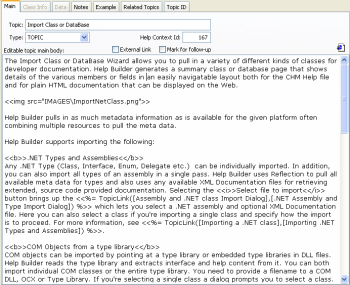
The actual content is displayed in the content pane. This pane is a dual interface as it lets you both edit the current topic in text mode and preview the topic in rich HTML format that looks exactly as the final topic will display in the HTML Help file.
| Edit Topic | Preview Topic |
|---|---|
 |
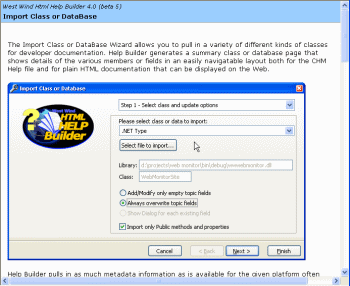 |
Toggling of Edit and Preview modes is controlled via the Preview icon on the toolbar (the IE Looking Glass).
Toolbar
The Help Builder Toolbar and Menu is vital to operation of the product and provides access to all operations that can be performed on topics. The toolbar contains all file operations such as creating new projects and topics. It also creates most of the topic formatting options you can use to mark up your topic text with.

In addition right click menus are available in many locations especially in the Content List pane as well as in the edit fields for quick access to many functions.

Comment or report problem with topic