
 Offline Application Requirements and Library
 Offline Application Requirements and Library
The WebStore offline application is a C# Windows forms application and the Web Store provides both executable and source code versions to it. You can find them here:
Source Code:
<installdir>\WebStoreClient
Excecutables:
<installdir>\WebStoreClient_run
The application uses a couple of third party components:
- SandBar
Provides the user interface controls for toolbars and menus. This framework is very simple, but very clean, easy to use with an intuitive designer. Unlike other similar components it is also very fast. - ActiveReports
ActiveReports provides a flexible report engine that outputs to printer, preview, PDF, HTML, Excel and more. It provides a decent report designer, but the real value of this tool is in its programmability of reports that provides a familiar events based processing model for reports.
Once installed you will need to add the following assemblies to the WebStoreClient Project:
- Sandbar.dll
- ActiveReports.dll
- ActiveReports.PdfExport.dll
- ActiveReports.Viewer.dll
You will need licenses for these products if you plan on customizing the offline application. You can download and install demo versions for both products. Sandbar provides a free version for non-commercial use and we've shipped it here for convenience so you can run the offline application. ActiveBar requires that you download and install first. However the application should run just fine without it except for the printing functions. To compile the code you will need to download both components. For convenience if you put the above DLLs in the SupportedDlls directory of the WebStoreClient application the code should easily compile (or if not you can easily add the references from there).
Source Code
The Web Store Offline application source code consists of 6 projects similar to the ASP.Net application. The main project is WebStoreClient which contains all of the forms and application specific classes. The application uses the same business object classes used in the ASP.Net application and most of the other projects in this solution are the same as for the ASP.Net application.
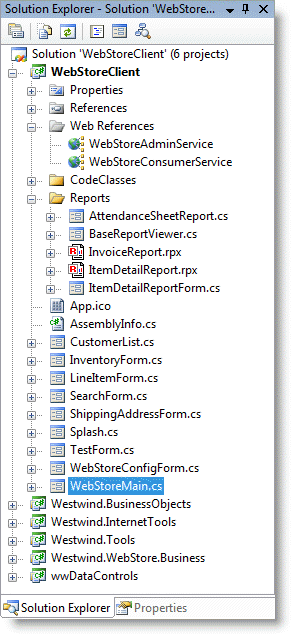
The other WinForms specific project is wwDataControls which contains WinForms controls for custom databinding. There are also a number of other enhanced controls:
- Multi-column DropDown implementation
.Net unfortunately does not have a mechanism to display multi-column content in list. Since this is a must have feature we have an implementation that looks like this:
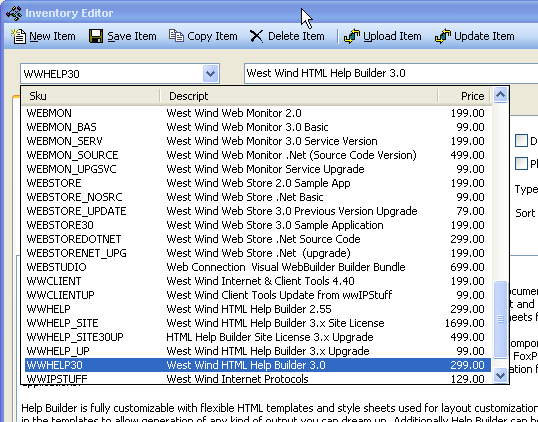
The control works against a data table and can return a selected data row, with options to set the selected item/row/index and specification of field header, width and alignment. Used in a number of places in this application.
- WebBrowser Control
There's a WebBrowser control that you can simply drop onto a form without having to do a COM import. This reduces codesize. The control is a simple container that hosts the ActiveX provider which provides a simplified event model for common events. - DateTimePicker that supports 'empty' dates
Note it does not support null dates but it treats dates before 1901 as 'empty' and displays it without content. - TextBox that supports input types
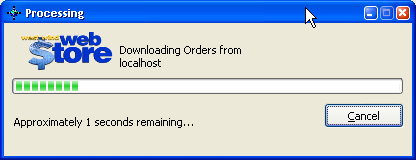
The textbox control can be set up to display numeric values, text or date values which all handle input options a little differently - this provides for rudimentary input control that is missing from the stock control. - A generic progress form
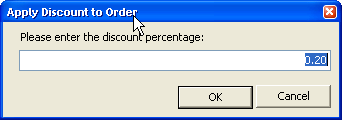
- A generic Input that is type aware form

Comment or report problem with topic