
 The Shopping Cart Page - ShoppingCart.aspx
 The Shopping Cart Page - ShoppingCart.aspx
The ShoppingCart page, not surprisingly, displays the content of the Shopping Cart. As we've seen in the last step the Shopping Cart is a 'virtual' invoice that consists only of a table of temporary lineitems that are stored in the wws_tlineitems table.
Here's what the Shopping Cart page looks like on the site:
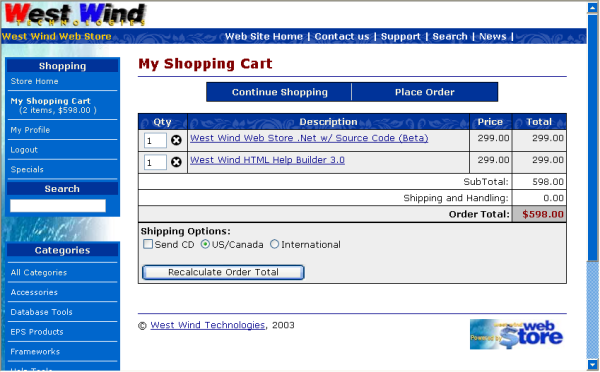
This page allows a number of options. Specificially you can change the shipping options by selecting to 'physically' ship an item (Send CD) and by selecting a country. The country selection will be pre-selected if the customer is identified with a customer profile - ie. he has logged in or his cookie points at his profile.
You can also change the quanties of items here. Note that you have to press the Recalculate Order Total button to perform any order total re-calculations. The changes don't take if you click on the Place Order button only.
Although this page looks simple to the user a fair amount of functionality is buried in it behind the scenes. If you bring up this page in VS.Net you'll notice a very different view than what you see on the live site:
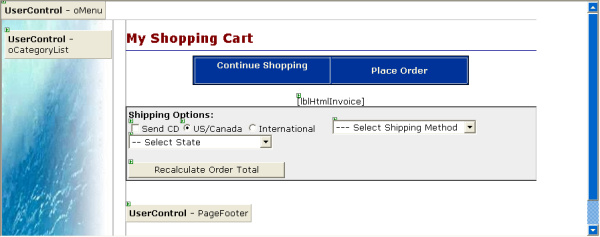
Specifically the Item list and totals are not displayed on the development page. Instead there's just a control (lblHtmlInvoice) that represents a placeholder for the invoice that is generated in code - by the business object. The business object may sound like a bad place to have this UI behavior placed, however in this application this display is very frequently reused. On the Shopping Cart, on the Order Confirmation, on the Admin Order display page and even on the offline Windows Forms Application. So in this case a method on the business object - HtmlLineItems() handles display of lineitems. I'll come back to this in a bit.
The core of what happens in the shopping cart is displaying the order status of this temporary invoice. This works by creating a temporary invoice, attaching the existing items and then displaying the current order totals and related shipping information. To give you an idea here's what the Page_Load looks like:
private void Page_Load(object sender, System.EventArgs e)
{
	// *** Create temporary LineItem invoice
	Invoice = WebStoreFactory.GetbusInvoice();
	Invoice.TemporaryLineItems = true;

	object InvPk = Session["InvPk"];
	if (InvPk == null)
	{
		// *** Create a new empty invoice
		Invoice.New();
		Session["InvPk"] = (int) Invoice.DataRow["pk"];

		// *** Show empty shopping cart in this case
		this.lblHtmlInvoice.Text = Invoice.HtmlLineItems(2,true) ;
	}
	else
	{
		// *** create a new invoice object and use existing Id (no customer sub object)
		if (!Invoice.New(true,-1))
		{
			this.lblHtmlInvoice.Text = "<hr>Error loading shopping cart invoice...";
			return;
		}

		// *** Assign existing Invoice PK and load any existing lineitems
		Invoice.DataRow["Pk"] = (int) InvPk;
		if(!Invoice.LoadLineItems((int) InvPk))
		{
			this.lblHtmlInvoice.Text = "<hr>Error loading shopping cart invoice...";
			return;
		}

		/// *** Deal with the REMOVE action
		string lcAction = Request.QueryString["Action"];
		if (lcAction != null && lcAction == "Remove")
		{
			string Pk = Request.QueryString["item"];
			if (Pk != null)
			{
				int LineItemPk = int.Parse(Pk);

				// *** Remove the lineitem from the table
				Invoice.LineItems.RemoveLineItem(LineItemPk,(int) InvPk);

				// *** Remove from the DataTable so we don't have to reload
				Invoice.LineItems.RemoveLineItemFromCollection(LineItemPk,(int) InvPk);
			}
		}

		// *** Handle the ShipInfo Session Var which batches
		// *** User's Shipping Selections - Shipping controls
		// *** are bound to the Invoice.ShipInfo object
		if (!this.IsPostBack)
		{
			Invoice.ShipInfo = (ShippingInfo) Session["ShippingInfo"];
			if (Invoice.ShipInfo == null)
			{
				Invoice.ShipInfo = new ShippingInfo();
				Session["ShippingInfo"] = Invoice.ShipInfo;
			}

			if (Invoice.ShipInfo.CountryId != "US" && Invoice.ShipInfo.CountryId != "CA")
				Invoice.ShipInfo.CountryId = "MX";   // fixed value for 'foreign country id'

			this.BindData();
		}
		else
		{
			this.UnbindData(); // bind the data controls back into ShipInfo
			Session["ShippingInfo"] = Invoice.ShipInfo;
		}

		// *** Force InvoiceTotal to use the ShipInfo structure
		Invoice.ShipInfo.UseInvoiceFields = false;  // no data in table yet

		// *** Total the invoice and display the lineitems
		Invoice.InvoiceTotal();
		this.lblHtmlInvoice.Text = Invoice.HtmlLineItems(2,true);

		// *** Update the Shopping Cart keys that we use to display
		// *** content in the menu with
		Session["ShoppingCartItems"] = Invoice.LineItemCount;
		Session["ShoppingCartSubTotal"] = Invoice.SubTotal;
	}
}
The code starts out by creating a temporary invoice from the existing temporary lineitems. To do so it uses the existing InvPk that was created when the items were added to the invoice. Remember this InvPK is moved forward through a Session variable - InvPk. The way this works is that we call Invoice.New(false,-1) which creates a new invoice without creating a new Invoice PK and without loading related customer information. We then assign the invoice our existing invoice Pk. At this point the invoice knows how to retrieve its lineitems. Because this invoice is marked as TemporaryLineItems = true it knows to pull the items from the wws_tlineitems table with the Invoice.LoadLineItems() method.
The code then checks to see if we are trying to remove items which are requested via QueryString requests - if so the code tries to remove the requested item from the internal list of lineitems by removing the row from the datatable which is handled by these two method calls:
Invoice.LineItems.RemoveLineItem(int.Parse(lcAction),(int) InvPk);
Invoice.LineItems.RemoveLineItemFromCollection(int.Parse(lcAction),(int) InvPk);
The first physicallly removes the lineitem from disk while the second removes the lineitem from the local LineItems DataTable.
Dealing with Shipping Information
Shipping information at this point is tricky because we may not have all the information to properly do shipping validation. Specifically the user may not have given us information about where he wants his order shipped. So in this case we simply allow the user to specify the country (and optionally the state and shipping method). If you look at the form in VS.Net you see that there are a few controls that are not actually visibile in the actual Web page shown above - the reason for this is that the West Wind site doesn't need this information. But it's easy for you to simply mark the invisible controls visible to allow selection of state and shipper information (which you may want to customize).The Shipper information is collected into a ShippingInfo object which in turn is persisted into the Session object. The ShippingInfo object thus is available later on in the order process to provide shipping information. The approach works real well because as more information becomes available it can be assigned to the ShippingInfo object and passed forward to the final order process.
Generating the Invoice Detail and Totals
As mentioned in the beginning the HtmlLineItems() method of the busInvoice object is responsible for generating the HTML for the display of the lineitems and totals of the invoice. This is an efficient approach using a StringBuilder to generate output in a variety of ways that's customized for the output display mechanism. The form here displays a form with fields for quantity fields and deletion buttons. The invoice confirmation in turn simply shows the quantity. The display for the offline Windows Form application in turn shows simply the quantity and the delete button.Although this approach is non-visual and thus not easily customizable it's highly efficient and reusable. The code that generates this HTML also requires a fair amount of internal knowledge, especially in terms of generating the totals that would have made it very convoluted to use DataGrid or even simpler controls like the Repeater.
The table renders at 100% width so anything that wishes to render below it (like the Shipping options table) must match this width to look correct.
Recalculating the LineItem quantities and shipping options
In addition to displaying the invoice we also have to deal with changing quantities and making changes to the ShippingInfo information.Each of the lineitems written into the table have an input field which is named ITEM_<SKU> so that it can be retrieved easily from the processing code listed below. So if a value is changed we first check to see if the value has changed and if it has we load the lineitem and assign the new value and save it, then recalculate the lineitem total.
Here's what this code looks like:
private void btnRecalculate_Click(object sender, System.EventArgs e)
{
	this.RecalculateQty();

	// *** Must recalculate the invoice and redisplay
	Invoice.InvoiceTotal();
	this.lblHtmlInvoice.Text = Invoice.HtmlLineItems(2,true);
}

private void RecalculateQty()
{
	// *** If we have no lineitems do nothing
	if (Invoice.LineItemCount < 1)
		return;

	DataTable dtLineItems = Invoice.LineItems.GetDetailTable();

	bool Updated = false;  // determines whether we need to reload the lineitems

	// *** run through all the lineitems in the order and see if qty has changed
	// *** and if so update it.
	for (int x=0;  x< Invoice.LineItemCount; x++)
	{
		int PK = (int) dtLineItems.Rows[x]["pk"];

		// ** Retrieve the form value -  ITEM_<pk>
		string Qty = Request.Form["ITEM_" + (string) PK.ToString() ];
		if (Qty == null)
			continue;

		int nQty = 0;
		try
		{
			nQty = Int32.Parse(Qty);
		}
		catch {;}

		// *** Compare the qty with the quantity in our current lineitems collection
		// *** If it's not equal we need to update the lineitem
		if (nQty !=  (decimal) dtLineItems.Rows[x]["qty"])
		{
			// *** Load the lineitem
			if (!Invoice.LineItems.Load(PK))
				continue;

			if (nQty < 1 )
				Invoice.LineItems.Delete();  // delete item from disk
			else
			{
				Invoice.LineItems.DataRow["qty"] =  nQty;
				Invoice.LineItems.CalculateItemTotal();
				Invoice.LineItems.Save();  // Save item to disk
			}

			Updated = true;
		}
	} // For

	// *** Must refresh the lineitems (or we could have updated the item there
	// *** with the values from the current record - this is easier
	if (Updated)
		Invoice.LineItems.LoadLineItems(Invoice.Pk);

}
Again, notice how the business objects make the code for this logic relatively simple. We're not dealing with SQL statements although we're actually changing items in the database. The logic in the business object in this case is also very simple because it mostly relies on the default behavior of the wwBusiness class to save the item to disk.
The update code is not terribly efficient, but keep in mind that most of the time people will display the items, and not change them. The display code is fairly efficient so we're addressing the most common scenario with good performance and the 'alternate' scenario with a bit more overhead. It's a tradeoff of performance for a maintainable developer interface which is worth the tradeoff.
Once the invoice lineitems have been properly updated on disk we still have to make sure that we display them properly. To do so we must retotal the invoice and re-generate the lineitems for display.
// *** Must recalculate the invoice and redisplay
Invoice.InvoiceTotal();
this.lblHtmlInvoice.Text = Invoice.HtmlLineItems(2,true);
Once this is done the invoice displays the updated data correctly.
Well, this is one of the most involved pages in the store that has 'inside' information in the processing code, but even so the code here is relatively minimal because the bulk is abstracted away in the business object. But even behind the scenes in the business objects not a lot of code fires because it's relying mostly on the default behavior that wwBusiness provides.
Alright now it's time to place an order and make it final.

Comment or report problem with topic