
 The Category List Control - CategoryList.ascx
 The Category List Control - CategoryList.ascx
The CategoryList provides the left side of the Master layout. This control provides a mixture of static and dynamic content that is generated in a variety of different ways. Here's what the control looks like
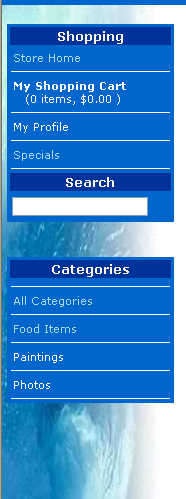
As you can see this control acts as a navigation element for the application. Here you can park any links that you want to have point inside of the application. Links to external locations are probably better placed on the top level toolbar.
In edit mode this control doesn't look anything like the live control:
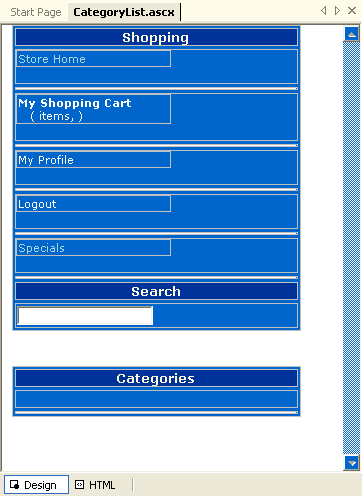
The toolbar provides a mixture of static, dynamic and operational link code. The top links are static and simply point at specific pages. To embed the control it's important to wrap inside of a non-ASP form like this:
<td class="categorylistbackground" valign="top"><br>
   <form action="ItemList.aspx" method="get">
      <ww:CategoryList runat="server" id="oCategoryList" />
   </form>
</td>
I'll come back to why this is a little later.
This allows the Search link to directly access the ItemList page and post the Search value of the Search Textbox to this form. The ItemList form then knows how to perform and display the search results. I'll
The Category List
This is the main purpose of this control: To provide a listing of all the categories of items in the WebStore. The list on the bottom is one of the few places where hand generated HTML is used in the application. The code in the Page_Load() event calls on the busInventory business object to retrieve the list of categories. A StringBuilder is then used to generate the HTML string which is stored to an internal field called cHtmlCategoryItems which is directly embedded into the HTML of the category list control:<table class="alternatebackground" ID="Table2" cellspacing="3" WIDTH="90%" BORDER="0">
<tr>
<td CLASS="menuband" WIDTH="100%" align="center">Categories</td>
</tr>
<tr>
<td WIDTH="100%"></td>
</tr>
<%= this.cHtmlCategoryItems %>
<tr>
<td HEIGHT="1"><img HEIGHT="1" SRC="images/space.gif" WIDTH="100%"></td>
</tr>
</table>Because the category list is fairly static the code manually caches the generated HTML and only calls the business object and gens the HTML if the cache isn't already filled:
/// *** Try to read the category list items out of the Cache
this.cHtmlCategoryItems = (string) this.Cache["HtmlCategoryItems"];
if (this.cHtmlCategoryItems != null)
	return;

// Put user code to initialize the page here
this.Lookups = WebStoreFactory.GetbusLookups();

int lnResult = this.Lookups.GetCategories();

... go on to generate Html

// *** Assign to display
this.cHtmlCategoryItems = sb.ToString();

/// *** cache the items
this.Cache["HtmlCategoryItems"] = this.cHtmlCategoryItems;
The HTML Generation code simply generates an inner table HTML fragment (a bunch of rows). A Repeater could have been used on the form but internal caching would have been difficult with this approach - hence this manual HTML generation.
The Shopping Cart Items
Another non-static item on the sidebar is the Shopping Cart Content. The shopping cart content is tracked with a pair of Session vars: ShoppingCartItems and ShoppingCartTotal which are set when the user accesses the shopping cart. Here these values are picked up and stored to properties of the control which are embedded into the HTML.Code:
// *** Make sure session object exists
// *** may not be there if coming from a different directory
if (this.Context.Session != null)
{
	// *** Shopping Cart Summary comes out of the Session object
	object loTemp = this.Context.Session["ShoppingCartItems"];
	if (loTemp != null)
		this.ShoppingCartItems = (int) loTemp;

	loTemp = this.Context.Session["ShoppingCartSubtotal"];
	if (loTemp != null)
		this.ShoppingCartSubTotal = (decimal) loTemp;
}
else
{
	this.ShoppingCartItems = 0;
	this.ShoppingCartSubTotal = 0.00M;
}
HTML:
<tr>
	<td WIDTH="100%"><a CLASS="menulink" HREF="ShoppingCart.aspx"><b>My Shopping Cart</b><br>
		   (<%= String.Format("{0:f0}",this.ShoppingCartItems) %>
			items,
			<%= String.Format("{0:c}",this.ShoppingCartSubTotal) %>
			)</a></td>
</tr>
Note the check for the availability of the Session object. The reason for this is that the CategoryList may be loaded from pages in different directories (Server.Transfer/Server.Execute for example).
The Search Link
To embed the CategoryList control it's important to wrap inside of a non-ASP form so that the embedded Search Link can work without a Redirect operation:
<td class="categorylistbackground" valign="top"><br>
   <form action="ItemList.aspx" method="get">
      <ww:CategoryList runat="server" id="oCategoryList" />
   </form>
</td>
This allows the Search link to directly access the ItemList page and post the Search value of the Search Textbox to this form. The ItemList form then knows how to perform and display the search results.
The CategoryList page is used on every page of the public interface of the Web Store. Although it has a few quirky pieces of code embedded inside of it, it's easy to use with a single embeddable tag. You can easily customize this control for your own needs. Keep in mind that the visual formatting aspects of the control is controlled through the style sheet. So if you want to change the look of the control you should look into the various style sheet properties for the CategoryList first.

Comment or report problem with topic