
 Master Page Layout
 Master Page Layout
The Web Store application is layed out with a 'master page' template approach that utilizes a standard template for each page that is complemented by a set of user controls that make up the reused components of the application. ASP.Net 1.x doesn't support page inheritance so this template is simply copied with content filled in manually in the 'body' section of the page.
The easiest way to see what this 'template' looks like is to open up any of the public pages in the VS.Net editor:
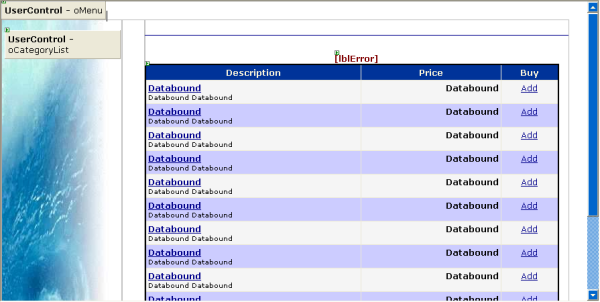
The page is layed out with three user controls and a 'content' table. The three controls are:
- PageHeader
- CategoryList
- PageFooter (not visible above)
The page content table is simply a table with two columns the first of which contains the CategoryList user control that renders the links for the store and the list to the various categories. The header and footer controls are very simple literal controls. The Category list is a bit more involved and calls on the Business objects to provide the category listing.
The main portions - the header, the table, category list and footer are the same on every page and are simply cut and paste into each new ASPX page. Merely the content varies between each of the pages. The content area is generally just a cell in the table.
The end result is a complete page that looks like this:
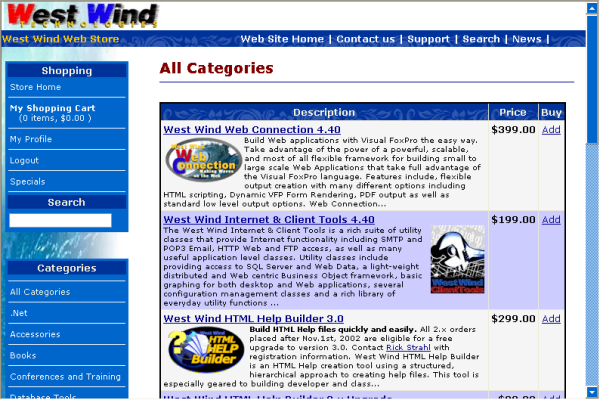
The 'template'
The template is pretty straight forward. Here's the basic layout of the template which is used on every page (this is the version for the Category List display so there are a couple of custom items in here like the title):<%@ Page language="c#" Codebehind="ItemList_Abstract.aspx.cs" AutoEventWireup="false" Inherits="Westwind.WebStore.ItemList_Abstract" %>
<%@ Register TagPrefix="ww" TagName="PageFooter" Src="PageFooter.ascx" %>
<%@Register TagPrefix="ww" TagName="CategoryList" src="CategoryList.ascx"%>
<%@Register TagPrefix="ww" TagName="PageHeader" src="PageHeader.ascx"%>
<html>
<head>
<title>Item Listing - <%= this.CategoryName %></title>
<meta http-equiv="content-type" content="text/html;charset=iso-8859-1">
<link href="wwWebstore.css" type="text/css" rel="stylesheet">
</head>
<body leftmargin="0" topmargin="0">
<!-- West Wind Menu --><ww:pageheader id="oMenu" runat="server"></ww:pageheader>
<table class="body" height="100%" cellspacing="0" cellpadding="0" width="98%" border="0">
<tr>
<td class="categorylistbackground" valign="top"><br>
<form action="ItemList.aspx" method="get">
<ww:categorylist id="oCategoryList" runat="server"></ww:categorylist></form>
</td>
<td valign="top" align="left" width="34" bgcolor="white">
</td>
<td class="body" valign="top" bgcolor="#ffffff">
<!-- Custom Form Stuff -->
<form id="Form1" runat="server">
<br>
<h2><%= this.CategoryName %></h2>
<hr>
<p></p>
<center><asp:label id="lblError" cssclass="errormessage" forecolor="Maroon" runat="server"></asp:label></center>
<asp:datagrid id="dgItemList" runat="server" onpageindexchanged="dgItemList_OnPageIndexChanged">
... rest of the datagrid code ommitted here>
</asp:datagrid>
<p>
<ww:pagefooter id="PageFooter" runat="server"></ww:pagefooter></p>
<p> </p>
</form>
</td>
</tr>
<!-- End Custom Form Stuff -->
</table>
</body>
</html>Note the control loading headers as well as the use of the wwWebStore.css style sheet loaded in the header. The template layout of the page should be visible in the ASPX/HTML code above - the specific page content is created inside the Custom Form Stuff comment blocks.
Where's the code?
Each page handles its own page layout logic - there's no master logic that fires. However, each page inherits from the wwWebStoreForm class which in turn is a subclass of the wwWebForm class which provides page level databinding features for any data bound controls on a form. The main purpose of this subclass is to provide a common subclass point for page behaviors.But there's no specific logic in this class that fires. Each page essentially handles its own logic via the Page_Load or individual control events that fire in response to pages.
We'll look at the code and layout of the individual pages and controls next.

Comment or report problem with topic