
 Overall Template Design in ASP.Net pages and controls
 Overall Template Design in ASP.Net pages and controls
Once we've modified the style sheet, you probably will want to change the content of the menus and forms to some degree. If nothing else you will need to modify the default.aspx page to show a nice welcome page that is more specific to your company and display some of the items you want to sell. In addition you'll likely want to change the menu band on top and possibly the category box on the left as well as the footer.
Overall Page Layout
The Web Store uses an overall page layout scheme for each of the 'public' interface pages of the Web Store. For reference here's a typical screen: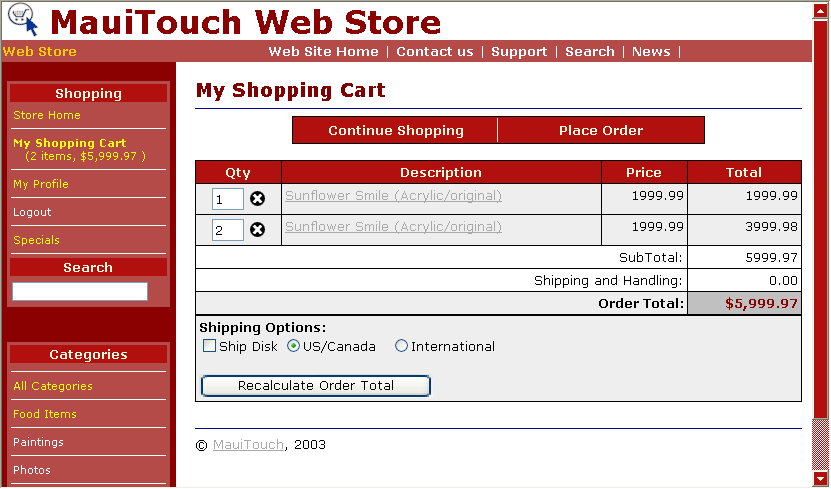
The base page for each WebForm is made up of 4 main parts:
- A Page Header Control
- A table that hosts the Category List and Content
- The actual content which is custom for each page
- Page Footer that gets added on the bottom of the content
Roughly the ASP.Net pages all have the same format and they look something like this:
<<b>><%@ Page language="c#" Codebehind="item.aspx.cs"
        Inherits="Westwind.WebStore.Item" enableViewState="False"%>
<%@ Register TagPrefix="ww" Namespace="Westwind.Web.Controls"
                     Assembly="wwWebDataControls" %>
<%@Register TagPrefix="ww" TagName="PageFooter" src="PageFooter.ascx"%>
<%@Register TagPrefix="ww" TagName="CategoryList" src="CategoryList.ascx"%>
<%@Register TagPrefix="ww" TagName="PageHeader" src="PageHeader.ascx"%>
<</b>><html>
   <header>
      <title><%= this.oItem.DataRow["Descript"] %> </title>
      <<b>><LINK href="wwWebstore.css" type="text/css" rel="stylesheet"><</b>>
   </header>
   <body text="black" vLink="gray" aLink="red" link="#000055" leftMargin="0" topMargin="0">
        <<b>><ww:PageHeader id="oMenu" RUNAT="server"></ww:PageHeader><</b>>
         <tr>
            <td class="categorylistbackground"><br>
               <form action="ItemList.aspx" method="get">
                  <<b>><ww:categorylist id="oCategoryList" RUNAT="server"></ww:categorylist><</b>>
               </form>
            </td>
            <td vAlign="top" align="left" width="20" bgColor="white">
            </td>
            <td class="body" vAlign="top" width="*" bgColor="#ffffff">
               <form id="form1" RUNAT="server">
                  <<b>><!-- Application Specific Form Stuff --><</b>>

                 <<b>><ww:pagefooter id="PageFooter" runat="server"></ww:pagefooter><</b>>
               </form>
            </td>
         </tr>
   </body>
Note the various register commands at the top of the page to pull in the user and custom controls. The PageFooter, CategoryList and PageFooter controls are used on all the public interface pages. The wwWebDataControls reference is only used for forms that use the databound input controlsthat handle two-way binding and validation. These are only used for the Profile pages and on the Admin pages - the other pages don't have much need for databinding as data needs to be massaged in order to be displayed.
As you can see this 'template' interface is pretty slim. The bulk of the content is generated into these pages where you see the Application Specific Form Stuff and that portion is specific for each page.
Next go and change some of the ASP.Net pages.

Comment or report problem with topic