
 Step 8 - Capturing Data and Validation Errors
In the previous step we captured the form variable manually, one at a time and we didn't check for errors in binding. Let's take a look and see how to simplify the capture process and do some basic error tracking and displaying of errors.
Capturing Form Data with Request.UnbindFormVars()
If you are binding to objects - as I recommend you do using SCATTER NAME and GATHER NAME - you can unbind form variables into objects more easily by using the Request.UnbindFormVars() method. This method takes an object as an input and reads form variables with the same name as its properties, assigning property values and doing automatic type conversion. The function also captures binding errors (invalid numeric or date values for example) and returns you an error collection.
To use Request.UnbindFormVars() can simplify our postback unbind code significantly:
*** Only unbind on Postback operation
IF Request.IsPostBack()
   *** Unbind all matching fields into properties of this object
   loErrors = Request.UnbindFormVars(poCustomer)

   IF (loErrors.Count > 0)
	      pcErrorMsg = "There are binding errors." + loErrors.ToHtml(.t.)
   ENDIF

   *** Validation goes here

   IF EMPTY(poCustomer.Id)
      poCustomer.Id = SYS(2015)
      APPEND blank
   ENDIF

   GATHER NAME poCustomer MEMO

   IF poErrors.Count = 0 AND EMPTY(pcErrorMsg)
	   pcErrorMsg = "Customer info saved."
	   Response.AppendHeader("refresh","3;url=CustomerList.wp")
   ELSE
       pcErrorMsg = "Please correct the following errors..."
   ENDIF
ENDIF

*** Render EditCustomer.wp
Response.ExpandScript()
There are a number of things happening here, let's break it down.
Unbinding
First UnbindFormVars() is called and it returns a collection of validation errors. If there are errors we can easily dump all those errors into a message to display on the form with loErrors.ToHtml(.t.) which produces an error message as an HTML list.
Displaying Errors
In order to display errors, I use a private pcErrorMsg variable, that gets persisted into the rendering template. If the message is not empty I can render it on the page with:
 <% if !Empty(pcErrorMsg) %>
    <div class="alert alert-warning">
        <i class="fa fa-warning error"></i>
        <%= pcErrorMsg %>
    </div>
<% endif %>
Alternately I can simply this a little more using a wwHtmlHelpers helper function:
<%= HtmlAlert(pcErrorMsg,"warning",,,.T.) %>
Both of these actually render just about the same output:
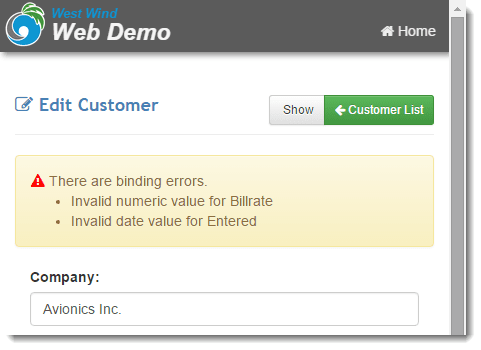
Note that the name of the fields is based on the names of the ControlIds. This may or may not work for and it's controlled by the .T. parameter in the loErrors.ToHtml(.T.) call. Unfortunately there's no good way for the UnbindFormVars() to automatically discover a proper name for a control so let's look at another way that you can display control errors.
Displaying Errors next to Controls
You can also display errors for controls, below or next to the control by explicitly displaying an HtmlBindingError() helper in the HTML.
<div class="form-group form-horizontal">
    <label class="col-sm-2">Billing Rate:</label>
    <div class="col-sm-7">
        <%= HtmlTextBox("BillRate",poCustomer.BillRate,[class="form-control"])  %>
        <%= HtmlBindingError("BillRate",poErrors) %>
    </div>
</div>
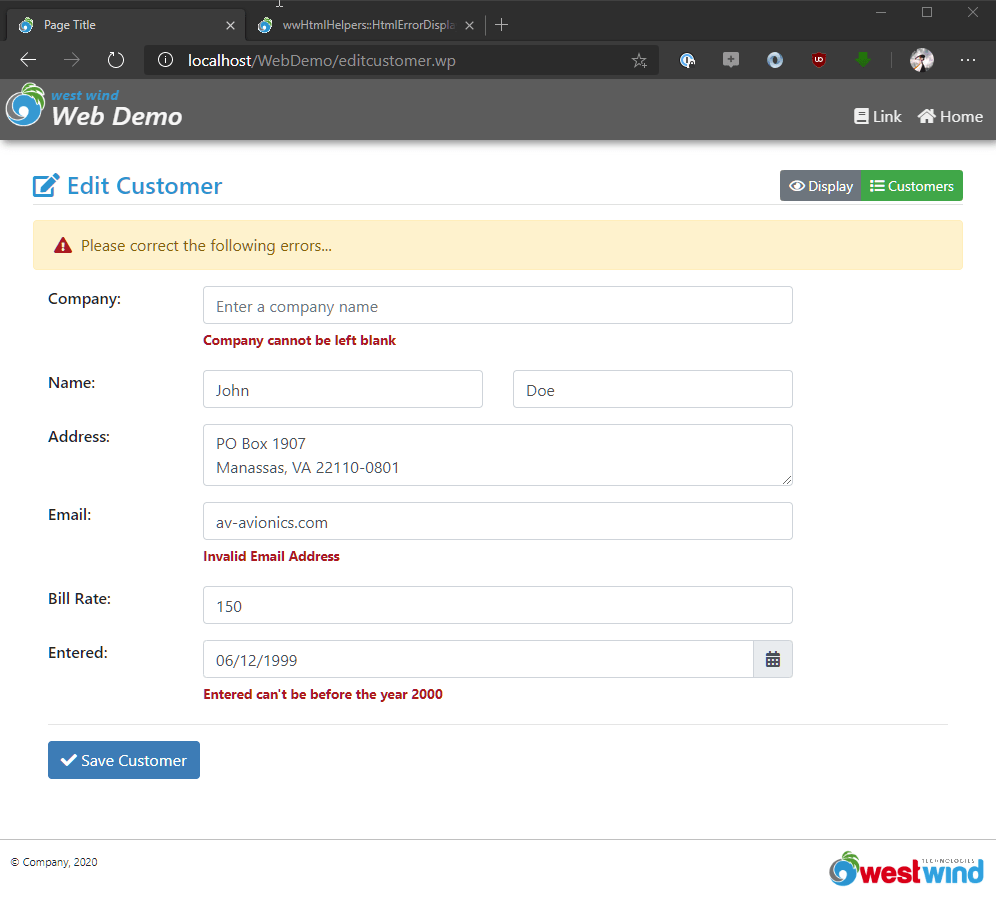
I'm using an HtmlTextBox() in this case, but that's optional. The important part is the HtmlBindingError() helper that checks for the BillRate form variable and sees if there's an error found in the poErrors ValidationErrors collection. If there is the error is displayed - otherwise nothing displays.
Here's what this looks like:

To make this work we'll also want change the code slightly, so we set the pcErrorMsg with just a generic message letting the control messages deal with the errors.
poErrors = null

IF Request.IsPostBack()
   poErrors = Request.UnbindFormVars(poCustomer)

   *** Validation goes here

   IF EMPTY(poCustomer.Id)
      poCustomer.Id = SYS(2015)
      APPEND blank
   ENDIF
   GATHER NAME poCustomer MEMO

   IF poErrors.Count = 0 AND EMPTY(pcErrorMsg)
	   pcErrorMsg = "Customer info saved."
	   Response.AppendHeader("refresh","3;url=CustomerList.wp")
   ELSE
       pcErrorMsg = "Please correct the following errors..."
   ENDIF
ENDIF

*** Render EditCustomer.wp
Response.ExpandTemplate()
When you run this now you should see the following:
Adding Application Validation Errors
The above handles binding errors. That is errors that occur when you bind data back from controls into FoxPro data and there's a problem with the type conversions or other issues.
But frequently you'll also have validation errors in your application and you can add those validation errors to the ValidationErrors collection in your Fox code and display them in the HTML.
*** Unbind all matching fields into properties of this object
loErrors = Request.UnbindFormVars(poCustomer)

IF (loErrors.Count > 0)
      pcErrorMsg = "There are binding errors." + loErrors.ToHtml(.t.)
ENDIF


*** Validation goes here
IF EMPTY(poCustomer.Id)
  poCustomer.Id = SYS(2015)
  APPEND blank
ENDIF
IF !EMPTY(poCustomer.Email) AND AT("@",poCustomer.Email) = 0
  loErrors.AddError("Invalid Email Address","Email")
ENDIF
IF EMPTY(poCustomer.Company)
  loErrors.AddError("Company cannot be left blank","Company")
ENDIF
IF poCustomer.Entered < {^2000-01-01 :}
  loErrors.AddError("Entered can't be before the year 2000","Entered")
ENDIF

GATHER NAME poCustomer MEMO

IF loErrors.Count = 0 AND EMPTY(pcErrorMsg)
   poError.Message = "Customer info saved."
   Response.AppendHeader("refresh","3;url=CustomerList.wp")
ELSE
   poError.Message = "Please correct the following errors..."
   poError.Errors = loErrors
   poError.Message =  loErrors.ToHtml()
ENDIF
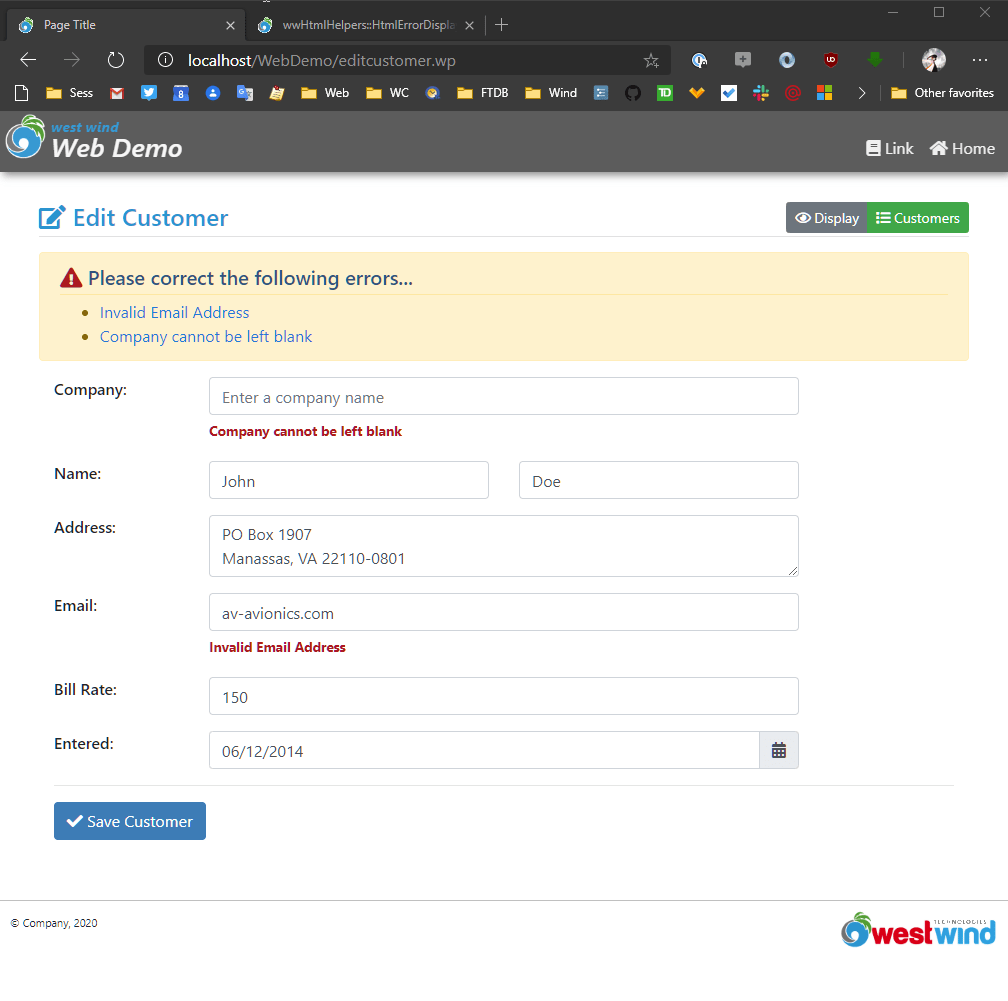
To display these errors more efficiently there's an HtmlErrorDisplay(poError) function you can use, that uses Bootstrap to render the error information:
<!-- Conditionally display an error message  -->
<%= HtmlErrorDisplay(poError) %>

<!-- old manual code -->
<!-- <% if !Empty(pcErrorMsg) %>
    <div class="alert alert-warning">
        <i class="fa fa-warning error"></i>
        <%= pcErrorMsg %>
    </div>
<% endif %> -->
With all this in place we can now get all the binding errors displayed and linked to the appropriate fields (based on id attributes):
wwBusiness Validation Errors
If you're using the wwBusiness object to handle your business logic you can easily copy the validation errors it produces into the current object with
loErrors.AddErrors(loBusiness.oValidationErrors).
In addition, if you use the use business objects you can easily bind validation errors from the business object to poErrors instance:
...
loErrors = Request.UnbindFormVars(loBusCustomer.oData)

*** Add business object validation errors to web validation errros
IF (!loBusCustomer.Validate())
   loErrors.AddErrors(loBusCustomer.oValidationErrors)
ENDIF

poCustomer = loBusCustomer.oData
...
Just make sure that each control you want to display a validation error on has an associated HtmlBindingError() helper in the template to make sure that the error message can be displayed.
Date and Time Display
You may have noticed that in the original example I used a nice date picker control to display the date time value:
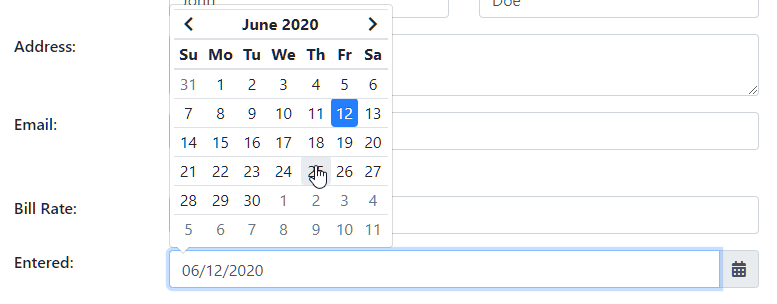
This input control uses a third party JavaScript Bootstrap add-in that provides this functionality. In order to use this component you need to use markup that is a bit more complex.
Here's the markup for the input box itself:
<div class="form-group row">
    <label for="Entered" class="col-sm-2">Entered:</label>
    <div class="col-sm-8">
        <%= HtmlDateTextBox("Entered",poCustomer.Entered,[class="form-control" ])  %>
        <%= HtmlBindingError("Entered",poError.Errors) %>
    </div>
</div>
In addition you also need to add some scripts that are part of the bower packages that are installed. You'll need jQuery, momentjs and the datetime picker itself. Add the following to the bottom of your page:
<script src="~/lib/moment/min/moment.min.js"></script>
<link href="~/lib/tempusdominus-bootstrap-4/build/css/tempusdominus-bootstrap-4.min.css" rel="stylesheet" />
<script src="~/lib/tempusdominus-bootstrap-4/build/js/tempusdominus-bootstrap-4.min.js"></script>
<script>
    // Add each control Id to date time picker
    $("#Entered").datetimepicker({
        format: "MM/DD/YYYY",  // Date format
    });
</script>
As you can see there are a few script dependencies including jQuery. Make sure all of these are added from this boilerplate code you can paste (don't add jQuery if it's already loaded).
The script code then attaches via jQuery selector to each document element that should be displayed as a date. Note that the actual selector points at the input-group id rather than the actual textbox and that the textbox has a different id (name_field). This is counter intuitive, but that's how this particular component works.
Note that you can control the date format via the format option of the datetimepicker(). For example the following format allows selection of both date and time in American format:
$("#Entered").datetimepicker({
    format: "MM/DD/YYYY hh:mm a"  // 12/01/2015 01:01pm
});
The date formats supported for input come from the moment.js library which provides a host of date formatting and parsing features. You can find supported date formats on the linked page.
Finished!
Yay! You made it through this walk-through. Hopefully this walkthrough has given you a good idea how Web Connection works at a fairly low level where most operations are handled with code.
I recommend you take a look at the Core Step by Step with the wwBusiness Object which expands on the topics we covered here by using Scripts and templates exclusively for rendering and using business objects for data access and binding.

Comment or report problem with topic