
 Scaling Web Connection Servers across the network
It's possible to run Web Connection over a network to move the CPU load of processing Request requests off the machine that is running the HTTP Web server. By offloading the database processing off the Web server CPU overhead on the Web server is minimal allowing the server to process more simultaneous requests without loss of response. Using this approach it's possible to scale your VFP processing server's to any Request request load simply by adding VFP sessions and/or machines on the network, without adversely affecting Web server performance.
Web Connection's internal mechanisms to do this include:
Use remote file access to pick up message files with file based messaging
File based messaging can support remote access over the network that allows remote Web Connection servers to pick up message files sent to a central Web server machine. The remotes grab messages off the shared drive and return results there. This allows potentially unlimited servers to service a single Web application. Note: Overhead here mainly is caused by the number of files in the messaging directoryInstantiating servers over Distributed COM (DCOM)
COM servers can be transparently instantiated on remote machines over DCOM. It's as easy as registering the server on the remote machine and specifying a remote machine to run it on. This allows to scale up to 32 servers both locally and remotely. Unfortunately, configuration for this setup is not trivial and requires several manual security settings.
Standard scalability mechanisms available include:
- Web Farm Scaling
Any Web application can be scaled through a Web farm environment employing a Dispatch Manager that can route incoming IP requests to a pool of server machines. The servers in the farm are redundant and adding more scalability simply means adding machines to the Web Farm. Tools that provide this Web Farming tools include MS Windows Load Balancing Service, Resonate's Dispatch Manager and Cisco's Local Redirectory among others.
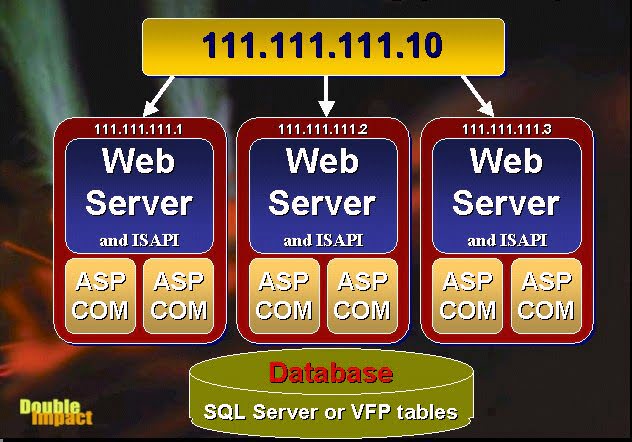
Remember, large scale application require a fair amount of hardware and network know how - make sure you have staff or support available that understands scalability, infrastructure, security and deployment issues in large scale environments. For more information on scalability scenarios see:
Building Large Scale Web applications with Visual FoxPro.
Building a Web Farm with Windows 2000's Network Load Balancing service
My recommendation for scalability for large application is with the latter approach - it's more reliable and provides full redundancy as well as more efficiently balancing resources across machines than Web Connection built-in mechanisms. It's also an accepted standard for scaling Web applications in a tiered environment.
DCOM is a good choice for a quick fix, but as you'll see below configuration can be daunting especially if you don't have a firm grasp on how COM and the distributed architecture works. More info is available in the Large Scale Web apps article described above.
The following sections delve into the details of configuring Web Connection's internal mechanisms for moving out over the network.
Dealing with Network Pathing
The following applies only if you use DBF files rather than a SQL backend.
When building a server that will run on multiple machines simultaneously it's important to set up your pathing correctly so that a single EXE file can be run on every one of these machines and still point at common data accessed on a network path. The following tips are suggestions only - you may configure your servers differently to be able to share data, but the following steps have worked well for me here:
Always use Network UNC paths and relative paths
In order to make access to data or any file based resources transparent to the Web Connection application always reference everything with a network relative path using UNCs or relative paths. Use SET DEFAULT TOand from then on in use a relative path such .\data or .\classes to reference other files and Paths. UNCs are much slower than drive maps but once you use relative paths things work quickly again. SET DEFAULT TO <\MachineName\Share\Path> or wwServer::cAppBasePath
The first step should be to SET DEFAULT to your network startup directory. This simple step puts every application into the same directory regardless from which machine it is running. You can actually set this with the server's startup form by setting the Startup Path setting or by setting the value explicitly in wwServer::SetServerProperties to THIS.cAppBasePath (cAppBasePath causes SET DEFAULT TO be called with the path specified).Use relative paths whenever possible
If you used SET DEFAULT TO to establish a net startup path you can follow this up with relative paths that don't point at a particular drive to allow. Use relative paths for explicit file paths or for SET PATH TO statements that add specific data or other paths to the server.** Make sure your TEMP path points at the Web Server's TEMP path**
The temporary files that Web Connection creates are always sent to the Web Server's temp path, so your remote server must pick up the files from there. You can change this setting in wcmain.ini or on the Status form of the server. You can set this on each server's setup form. Ideally you'd point all servers at the same wcmain.ini and use a UNC path to reference the Temp path: Path=\Server\tempshare\Watch out for Web Connection's system files
Several Web Connection files want to run in a common location. These files are DBF based and in order for remote machines to access these files they will have to do so over the network. The files in question are:wwRequestLog.dbf (or whatever you optionally name your log file) (application path)
wwSession.dbf (Temp path)
These files are optional and can be turned off. For SQL applications these files can be ported into a SQL database with some modifications to the wwSession and wwServer classes.
The above suggestions apply to any network servers built regardless of whether you use Automation or File Based messaging.
File based Messaging on Multiple Machines
Setting up Web Connection to work over a network link involves setting it up so that it looks for the temporary message files generated by requests across the network and mapping the filenames properly to locally addressable paths, which is handled internally by Web Connection. Your setup is mainly concerned with identifying the remote path that Web Connection will scan for incoming request message files.
No special setup is required on the Web server or with wc.dll/exe/ini. The server operates as before placing the files onto its local drive. The VFP Web Connection server on the other hand is now looking across the network, polling for incoming requests on the Web server's drive. So for the remote server it's TEMPFILEPATH is going to be z:\temp\ for example.
All filenames returned by the wwRequest class methods are automatically mapped to this from the Web server's path (ie. c:\temp) to the network path (ie. z:\temp). The actual filenames will be Web server pathed - the translation is necessary to properly translate the path into the network path, so that no code changes are required internally when moving a Request process off the local machine onto the network.
Using DCOM to remote Servers across the network
Running Automation servers across the network is a bit trickier. Please note that these complications are not an issue with Web Connection as much as they are NT's DCOM and security issues that apply to porting any Automation objects for simultaneous use on multiple machines. The main issue here is that the remote server must allow the Web server's anonymous user account to access the remote COM object on the processing server.
As with file based messaging make sure all your application paths are pointing across the network at the appropriate remote files if data is shared. Establish a Network startup path. This means any common data files (such as the Web Connection Log or Session tables) as well as any other file based resources such as INI files that you might want to access.
In order to run Automation remotely you run Distributed COM (DCOM) across the network. The steps to remote a server rather complex to set up.
In this setup the Web server is the Client (Web Connection ISAPI DLL manages multiple client instances of your server) and the remote machine is the Server. The Web server makes requests on the remote server and receives results from it.
Build your server and test it as a local server:
o=CREATEOBJECT("test.testserver")
o.ProcessHit("query_string=wwmaint~Fasthit")
Make sure you have your pathing properly corrected to adjust for access across the network using UNC pathing. For example, if your data sits on the local C: drive build your data access so it points at: \YourServer\CROOT\DATA\MyFile rather than accessing the drive letter (unless you can guarantee drive maps - drive maps are significantly faster than UNC names).
Copy the server to the remote machine. Copy the .EXE, .TLB and .VBR files. Register the server with: YourServer.exe /regserver.
Test the server locally on the remote before attempting to run it over DCOM (if you have VFP installed that is). Use the same CREATEOBJECT() syntax shown above. Note you need VFP or at least the VFP runtime on the server for the server to instantiate. If the VFP development environment is not available you'll have to test the server with VB, VBScript or in the worst case using VBScript run through the browser.
Now we have to configure the DCOM security. Let's start on the Web Server. Although the COM object doesn't run on the Web server the DCOM system there fires and must allow access to the server. The best way to make sure you have this right is to actually run the COM object local on the Web Server first. If that works the machine will be correctly configured for remote access as well. Make sure that the Web Server allows IUSR_ and IWAM_ and any users or groups that authenticate and need to call the remote server running the Web Connection application. Run DCOMCNFG and configure the Defauler Security permissions for Access and Launch Permissions to include the IUSR_ and IWAM_ accounts and any others that might be logged in when running requests (or Everyone).
*On to the remote server that hosts your remote DCOM Web Connection application. First let's do it the easy way using the EveryOne account. In this scenario use open DCOM security on the Web Connection Server machine. Run DCOMCNFG and go to the Default Security tab. Go into the Default Access and Default Launch permission dialogs and add EveryOne. This allows open access to the COM components from the local network. That's all you should need to do - the default permissions will run down to your Web Connection COM object and this should allow you to launch the server from the Web Server's security environment without further configuration.
Although using EveryOne is fairly safe some net admins will not let you do this. You can work around this but it gets tricky to set this up as you will need to sync your user accounts between the Web Server and the Web Connection remote server. In particular you need to sync the Web Server's IUSR_ account to the remote WC server's machine. To do so, start by going into the Web Server's MMC and assigning the account real password (overriding the random one assigned by IIS) in the Directory Security|Anonymous Access dialog of the Web site and tell IIS to sync the password with User Manager (if it doesn't prompt you'll have to do this manually in the User Manager). Now go over to the remote machine and create the Web Server's IUSR_ account with the same name and password. Save this then add this permission to the DCOMCNFG Default Launch and Access Permissions. If there are any other accounts that might authenticate they will have to exist on both machines as well. So if rstahl authenticates for some maintainence requests rstrahl must exist with the same username and password on both machines. This is easier if you have a domain which is accessible by both machines which is easiest.
At this point you should test the server from the Web server machine interactively. You can do this with VFP's CREATEOBJECTEX() command which allows you to access a COM component on a remote machine. Assuming your remote server is called REMOTESERVER:
o=CREATEOBJECTEX("test.testserver","REMOTESERVER")
? oProcess.GetProcessID(0)
? o.ProcessHit("query_string=wwmaint~Fasthit")
This should work assuming your current user account has the DCOM rights described above to access the COM object on the remote server. If there is a problem note the problem: Access denied errors most likely are caused by invalid DCOMCNFG settings. CoCreateInstance errors or other instantiation problems are caused by the server not being registered correctly or a mismatch between the client and server class ids. Make sure the server versions are identical and re-register the server in that case.
- Phew! You should now be ready to load the server through Web Connection. Add the remote servers to wc.ini:
[Automation Servers]
Server1=wwDemoOle.wcDemoServer
Server2=wwDemoOle.wcDemoServer,RemoteServer
Server3=wcRemote.wcRemoteServer,OtherRemoteServer
This setting will load one local server, one on the RemoteServer machine and one on OtherRemoteServer. Actually, for testing it's a good idea to use a single remote server. but in a live environment you'll probably want to have multiple remote servers potentially on multiple remote machines.
If all is well, the server will come up on the remote box as expected. Note that load time for remote server is significantly slower than local servers as is the time it takes to release the server. Operation of method calls however, is swift although slower than on the local machine. If the server fails to load, you'll see Servers are busy message in which case you need to review the steps here.
If you run into difficulties with 'Access Denied' errors I suggest you physically log on to your Web Server box as your IUSR_ or IWAM_ account then fire up VFP to try and create the remote object. This allows you to interactively change the DCOM settings plus get the COM error messages properly returned to you by VFP. It's much easier to handle and respond to the errors in VPFs interactive environment than trying to handle the Web server and its error messages.
If you get 'Class not registered' error for CoCreateInstanceEx this means that the server is either not registered on the remote or that the classids have changed and no longer match. In this case recopy the .VBR file and rerun the server registration routine.

Comment or report problem with topic