
 Step 4 - Checking out the code
When Setup completes it automatically starts your Web Connection server and opened the demo page so you can play around with the application.
The Web Connection Server started with the DO LAUNCH command that runs your FoxPro server and launches the Web Browser. This launches the main program file wcDemoMain.prg that is the entry point to the FoxPro server. You can also DO wcDemoMain to start your server without opening a browser.
Starting your Application from the FoxPro IDE
Make sure your FoxPro current path is project's
Deployfolder. Then run either:DO LAUNCH` && starts Web Browser and your Serveror
DO wcDemoMain` && starts just the FoxPro server
The demo application is also a PRG file that you can edit.
Shut down the Web Connection Server by clicking on the Exit button on the Window.
Open up
wwDemo.prgwithMODIFY COMMAND samples\wwDemo\wwdemo.wwDemo.prgcontains a samplewwProcessclass calledwwDemowith methods for each of the request links from the Web page.Find the ShowAlbums() method in the class (right click in the editor- Procedure|Function List and find wwDemo.ShowAlbums).
At the very top add
SET STEP ONinto the code.Save the file.
Restart the server with
DO LAUNCH WITH "NONE"orDO wcDemoMain.Flip over the HTML Demo page
Find the Show Albums Example and enter M to search for artists that start with an M.
Click on the Show Albums button
If you go back to Visual FoxPro now you should find the debugger popping up on the SET STEP code that we just inserted:
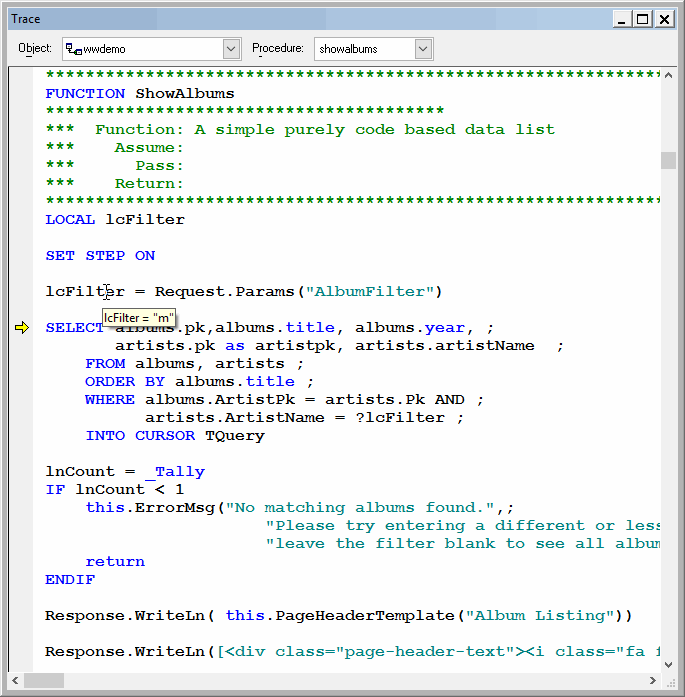
You can now happily step through the code line by and see the operation of each request as it happens. For example, you can now see the content of the request variables as returned by the request:
lcFilter = Request.Params("AlbumFilter")
The filter is then applied to the SQL statement.
As you just saw making a code change is very easy - you simply change the PRG file, save it and start up the server again. You don't need to recompile (although you could recompile the WCDEMO project everytime) and the changes take immediately.
Debugging and Error Handling in Web Connection
Now go back into that code and take out the SET STEP ON. Instead put in some bogus code like:
loErrObject = CREATEOBJECT("NonExistingObject")
Guess what will happen here? The code fails because this object doesn't exist and a VFP error occurs. VFP pops up an error dialog ontop of the editor with the code highlighted:
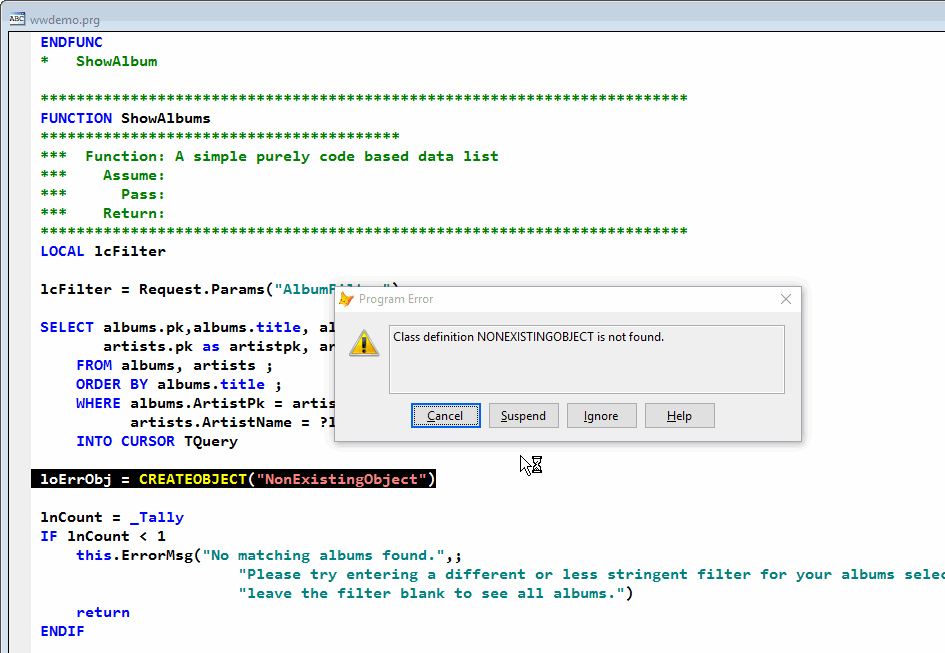
This is great for debugging - certainly beats typical COM debugging that doesn't allow you to debug a compiled object at runtime, right.
While this is nice for debugging if this occurs on your live Web site, this would be a problem though. I know you don't make coding mistakes, but there are system circumstances or typos etc that do slip into production code. A stop error as we're seeing above would lock the Web Connection server dead in its tracks - it wouldn't be able to take any more requests until the dialog is closed.
The Server.lDebugMode Flag
Web Connection has a debug flag on the Server.lDebugMode that can also be set and saved from the configuration interface shown earlier. When the flag is on, you get the behavior we saw above where the code stops and lets you fix or examine the error as it's happening.
For a deployed application this is not what you want though - an application that stops as above is an application that's hung. So for deployed applications you want to set the Server.lDebugMode flag to false. When you do every request is trapped inside of a TRY/CATCH block and the errors are routed through an error handler. The default error handler logs the error and displays an error page.
To change the setting in your app:
- Run the Web Connection Server (
do wcdemomain) - Click on the Status button
- Uncheck the Debug Mode checkbox
- Click Save Save Settings.
Now re-run the request. You'll find that Web Connection now handles the error and passes back an error page that describes the error on the Web page:
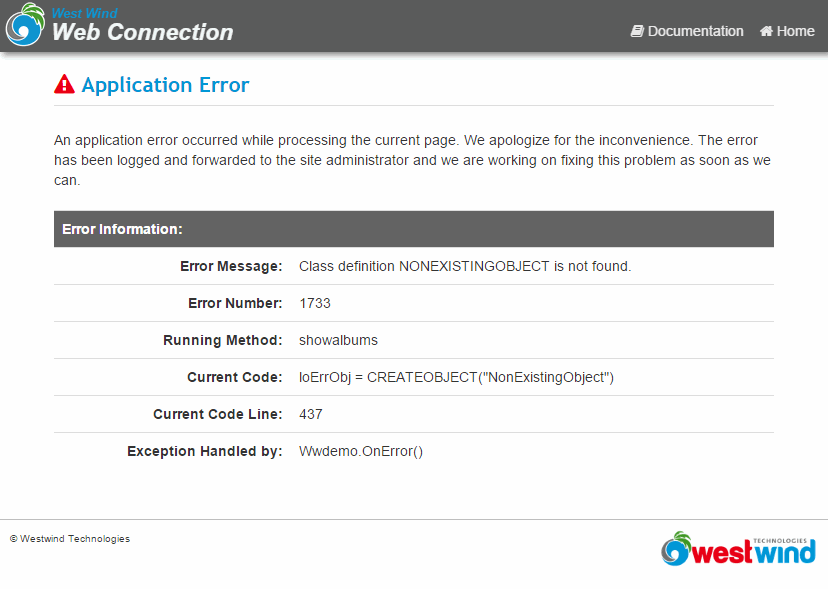
This is obviously much nicer than the server crashing and hanging situation we encountered before. What happens behind the scenes is that the Web Connection error methods kick in and generate this HTML output page.
The page can be customized by overriding the wwProcess::ErrorMsg() and the OnError method in your Process class. OnError handles the error and generates the Error information HTML. You might want to override this to not display application specifics but still log the information. The best way to see how this works is to look at the base class implementations in wwProcess:OnError and wwProcess::ErrorMsg() in wwprocess.prg.
Live Reload Server
Web Connection also includes a Live Reload server feature which when enabled can monitor changes to files and automatically shut down and restart the FoxPro server without automatically.
To do this it's best to run with
DebugMode=Off(in wcDemo.ini) so errors don't stop the server, and to use an external editor outside of the running FoxPro instance to edit your code. For more info see: Live Reload Server.

Comment or report problem with topic