
 IIS and the Web Connection Managed Handler
Setting up IIS 7 for using with the managed module is easy by using the Integrated pipeline. With IIS 7 this model permits true XCOPY deployment with no additional configuration needs - you can simply copy the WebConnectionModule.dll in your BIN directory as part of your Web directory and make a couple of changes in web.config to enable to the module.
Here's how to set up a new project and switch to the Managed Module:
- Start out by Creating a new Project in the Management Console (DO CONSOLE)
- Create a project as usual with a custom script map
- When the project has been created go into the IIS Service Manager
- Select the West Web Connection Application Pool
- Click Basic Settings and ensure that the Managed Pipeline Mode is set to Integrated
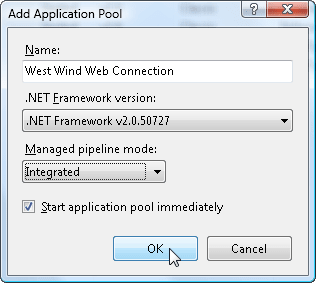
By default the web.config file that installs with the new project has the module hook ups commented out which in turn results in the ISAPI DLL being used. To switch to using the module open web.config and edit the following section:
<?xml version="1.0"?>
<configuration>
  <system.webServer>
    <handlers accessPolicy="Script, Execute, Read">
      <!-- IIS 7 in Integrated Mode -->
      <add name="*.wp_wconnect" path="*.wp" verb="*" type="Westwind.WebConnection.WebConnectionHandler,WebConnectionModule" preCondition="integratedMode,runtimeVersionv2.0" />
      <add name="*.wc_wconnect" path="*.wc" verb="*" type="Westwind.WebConnection.WebConnectionHandler,WebConnectionModule" preCondition="integratedMode,runtimeVersionv2.0" />
      <add name="*.wcs_wconnect" path="*.wcs" verb="*" type="Westwind.WebConnection.WebConnectionHandler,WebConnectionModule" preCondition="integratedMode,runtimeVersionv2.0" />
      <add name="*.wcsx_wconnect" path="*.wcsx" verb="*" type="Westwind.WebConnection.WebConnectionHandler,WebConnectionModule" preCondition="integratedMode,runtimeVersionv2.0" />
      <add name="*.wwsoap_wconnect" path="*.wwsoap" verb="*" type="Westwind.WebConnection.WebConnectionHandler,WebConnectionModule" preCondition="integratedMode,runtimeVersionv2.0" />
      <add name="*.blog_wconnect" path="*.blog" verb="*" type="Westwind.WebConnection.WebConnectionHandler,WebConnectionModule" preCondition="integratedMode,runtimeVersionv2.0" />
      <add name="*.wwd_wconnect" path="*.wwd" verb="*" type="Westwind.WebConnection.WebConnectionHandler,WebConnectionModule" preCondition="integratedMode,runtimeVersionv2.0" />
      <!-- end IIS 7 in Integrated Mode -->
    </handlers>
  </system.webServer>
</configuration>
Note there are additional entries in web.config that also need to be there, but these items will be already set. The above section needs to be uncommented in the XML (just remove the <!-- and --> before the <add and after the last />).
This section basically maps each script map to the managed module. This setting overrides any ISAPI handler mappings, so you don't need to do anything else. If you want to switch back to the ISAPI handler, simply uncomment these mappings.
Look Ma - No Server Configuration for ScriptMaps
What's really nice about hte managed module is that the script mappings are fully self contained in the web.config file. Since there are no paths in the maps you can copy these settings to the server and don't need any explicit configuration on the server.

Comment or report problem with topic