
 Class wwWebDataGrid
The wwWebDataGrid provides a cursor based, read-only 'grid' control for displaying data in columnar format.
The DataGrid can display data either based on the current database structure by auto-generating columns from the data source, or you can create custom column layouts to describe the layout. Databinding can be done via powerful FoxPro expressions that are rendered for each column and can be executed dynamically to produce sophisticated layouts and rendering.
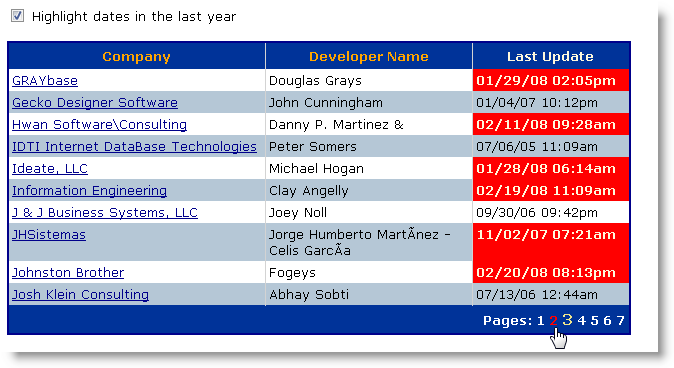
For more details on how the DataGrid works check the wwWebDataGrid How To's section.
wwWebDataGrid
Class Members
| Member | Description | |
|---|---|---|
 |
PageIndexChanged |
Default handler always fires and sets the page index. |
|
RowRender |
Fires just before an item row is rendered in the DataGrid. You can optionally return the full content of the row as a string. |
|
SortOrderChanged |
Fires when the SortOrder header is clicked and the page order is changed. |
 |
AddControl |
Overridden AddControl method that allows adding Column objects to the DataGrid. o.AddControl(loCtl) |
|
DataBind |
Databinds the DataGrid. Unlike some other list controls you should always call DataBind() to ensure that internal settings get updated properly for binding. This includes page counts, sort orders etc. o.DataBind() |
|
RemoveColumn |
Removes a column properly from the DataGrid. o.RemoveColumn(lcColumnId) |
 |
ActiveColumn |
The active grid column object instance during databinding. This property can be used to get access to the individual column that is current active for databinding. |
|
ActiveColumnAttributeString |
The content of the column's ItemAttributeString that is used to render the current column. This value can be safely overridden in any databinding (ControlSource) or formatting expression to affect only the active column. |
|
AlternatingItemCssClass |
The CSS Class used on Alternating Rows. |
|
AutoGenerateColumns |
Automatically generates all columns if set to .t. |
|
CellPadding |
The CellPadding for the HTML table. |
|
Columns |
Collection of wwWebGridColumn items that contain the behaviors for each to the Columns that are displayed. |
|
CurrentPageIndex |
Holds the value for the current Page that is displayed if paging is on. You can also preset this value to set the grid to a specific page. If the page index exceeds the number of pages the last page is selected. |
|
DataKeyField |
When specified causes each row to be rendered with an id expression that includes the evaluated expression. This can be useful for client side script code to pass state information to the server for data that needs updating. |
|
DataSource |
The name of a cursor or table that we are binding to. |
|
HeaderCssClass |
The CSS Class used for the List Header. |
|
ItemCssClass |
The CSS Class used for displaying normal rows. By default no Class is applied so the default table class/styles are used. |
|
PageCount |
Number of total pages for datasource based on the PageCount. This property gets set after DataBind() has been called and is set only if PageSize is greater than 0. |
|
PagerColumnAttributes |
Any custom attributes you might need to set on the page column. |
|
PagerCssClass |
The CSS Class used in the Pager row of the table. |
|
PagerText |
The text displayed before the actual page display. Defaults to Pages:. |
|
PageSize |
Size of the Page to display. If non-zero causes the DataGrid to add a Pager band to the bottom of the list that allows the user to select a different page. |
|
RowAttributeString |
A complete attribute string that can be applied to the <TR> tag of the data items. |
|
RowContent |
Can be assigned to inside of the RowRender event to completely override rendering of an individual row. If set the full row including the <tr></tr> tags must be rendered in the text assigned to this property. This value is cleared before every call to the RowRender event. |
|
SortColumn |
Internal property used to keep track which column name is currently sorted. The value is the name of the column. |
|
SortOrder |
Returns the current direction of the Sorting that might be active. Either empty or "DESC". |
Example
Script Code:
<ww:wwWebDataGrid ID="gdCustomers" runat="server" PageSize="10">

<Columns>

    <ww:wwWebDataGridColumn runat="server" id="colCompany"  Expression="Company" HeaderText="Company"  />

    <ww:wwWebDataGridColumn runat="server" id="colCareOf" Expression="CareOf" HeaderText="Name"  />

</Columns>

</ww:wwWebDataGrid>
Fox Code:
THIS.gdCustomers = CREATEOBJECT("wwwebdatagrid",THIS)
THIS.gdCustomers.Id = "gdCustomers"
THIS.gdCustomers.PageSize = 10
THIS.AddControl(THIS.gdCustomers)THIS.colCompany = CREATEOBJECT("wwwebdatagridcolumn",THIS)
THIS.colCompany.Id = "colCompany"
THIS.colCompany.Expression = [Company]
THIS.colCompany.HeaderText = [Company]
THIS.colCompany.UniqueId = [gdCustomers_colCompany]
THIS.gdCustomers.AddControl(THIS.colCompany)
THIS.colCareOf = CREATEOBJECT("wwwebdatagridcolumn",THIS)
THIS.colCareOf.Id = "colCareOf"
THIS.colCareOf.Expression = [CareOf]
THIS.colCareOf.HeaderText = [Name]
THIS.colCareOf.UniqueId = [gdCustomers_colCareOf]
THIS.gdCustomers.AddControl(THIS.colCareOf)

Comment or report problem with topic