
 Securing your Web Connection Installation
In addition to dealing with application based security you also need to thinK about securing your Web Connection installation. In particular, Web Connection ships with maintenance modules that are accessible through HTML interfaces which are Web accessible. If these interfaces are publicly exposed they can cause serious security risks to your online application.
The first step is to understand that Web Connection consists of two components, which both expose administrative functions:
The Administration Interface
The Administration interface lives in the `Admin folder and this folder should be locked down with either Windows or ASP.NET (web.config) security to prevent unauthenticated access. If you use the Web Connection configuration toolsThe .NET Module and ISAPI extension
The Web Connection Handler includes a number of admin functions that deal with managing the server to Web Connection connectivity. It administers server management and code update features especially for operation in COM mode. You can also switch the server between COM and File operation through this interface.The Web Connection Server
The Web Connection contains a wwMaint module which is used to configure internal setting of the Web Connection server. Most importantly it includes an edit link that allows edit the configuration files directly over the Web.
Automated Configuration
Web Connection provides tools to help you with site configuration, and these tools do the right thing for security configuration by default. We highly recommend you configure your site using the automated tools provided for this purpose which are:
- Use the
<yourApp>configureserver.prgScript generated for your application - The old Console Server Configuration Wizard (for pre 6.x applications)
Using the server configuration script is the recommended way to do this and you can customize this script with any additional configuration your application may need. By default the configuration script is compiled into your Web Connection server EXE and can be accessed with the following from a Windows Admin Prompt:
YourApp.exe CONFIG
If either of these tools don't work for you for whatever reason, here are manual configuration steps for various security settings/issues.
Enable Basic and Windows Authentication
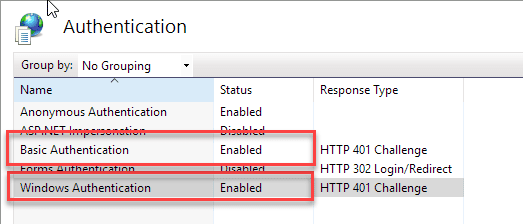
In order to use Web Connection's internal security blocks against access you should enable Basic Authentication and Windows Authentication on the Web Server for the virtual/root directory that your application lives in. Setting the Admin passwords will use Basic Authentication and Windows Security for checking access to these functions.
Windows Home Editions
Note that the various Windows Home Additions don't have support for Windows Authentication that maps logins to Windows accounts. If you are running Windows Home set the
AdminAccountvalue to empty (ie. no value is set).
Lock down the Admin.aspx page
The admin page serves as a central administrative page to all the administrative features available.
Important: Lock down the Admin Page
The administration page contains links that can take down your application if left unauthorized. Please make sure to lock down the Admin page to require authentication to access as shown here.
If you're running an old version of the administration page, please update your version to the latest version shipped with Web Connection. Older versions could potentially allow access to the Admin interface. The newer version (6.19+) doesn't not display the admin page links when accessing the page remotely without any authentication.
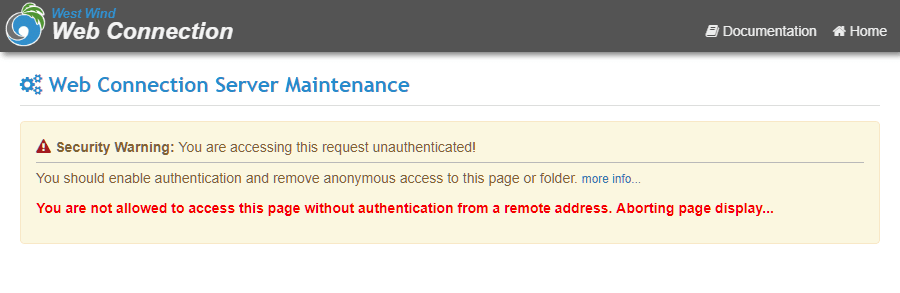
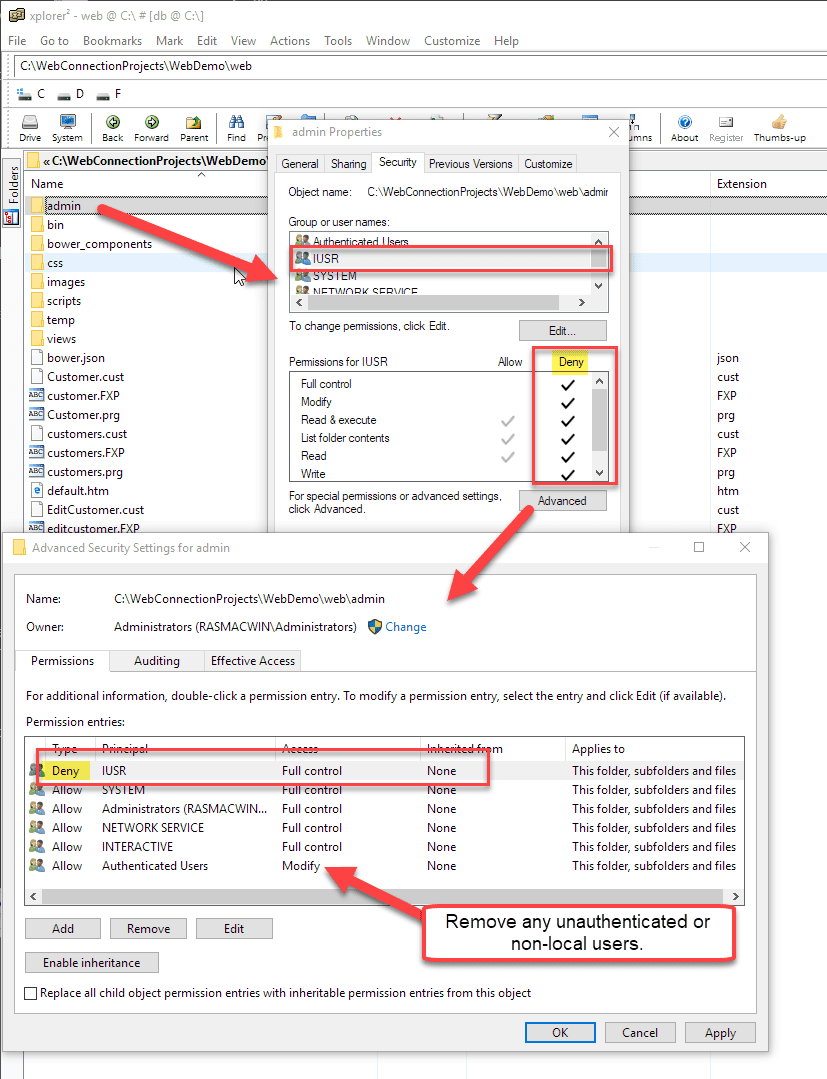
To secure admin functions your first step should be to restrict access to this page via Windows or ASP.NET Security.
The simplest is to use Windows Authentication and remove the IUSR_ account and Users or even better only allow Administrators or specific users to access the Administration page.
Windows Authentication Errors for Local Links on Windows Server
When logged into your Windows server, IIS Windows authentication through a browser does not work for either Windows Auth or Basic Auth using Windows user accounts. Login attempts just fail with a 401 error.
This is a problem if you want access the Admin page or any Admin links for Web Connection administration.
This is a Windows Policy called Loopback Protection and it has to be disabled in order to access local sites with authentication.
You can find out more:
Windows Authentication Errors on local Servers (Loopback Protection).
The web.config/wc.ini files and the AdminAccount key
web.config and wc.ini contain a number of important settings that control how your Web Connection server interacts with the Web server. The most important setting in terms of security in this file is the AdminAccount key which determines who has access to the Web Connection handler admin functions.
The following values can be set for this key:
- ANY
Any authenticated account. This is the default value. - accountName
A specific user account name - accountName, accountName2
Comma delimited list of account names - empty
No value means every one can access (not recommended).
For web.config:
<add key="AdminAccount" value="ricks,megger" />
For wc.ini:
AdminAccount=ricks,megger
Admin functions are typically accessed through Command.wc in the module and wc.wc?_maintain~Command in ISAPI through the URL interface. These requests never hit your FoxPro Web Connection application - they're processed directly by the IIS hosted handlers and are not passed any further.
It's important that you secure the AdminAccount to an authenticated account or a list of accounts that will be granted access.
Use SSL Links to the Admin Page
I recommend you only access the ADMIN.ASPX securely through HTTPS. This will prevent possible hacking of passwords via basic authentication that sends passwords in clear (or easily cracked hashed format) over the wire. The additional HTTPS security protects your passwords from hackers.
The AdminAccount setting is also the default security account used for the Web Connection server admin features. The following code in wwMaint.prg validates users using Basic Authentication:
*** Only allow Admin account from the configuration files
*** and authenticate. If no success don't let on
IF !THIS.Login("WCINI")
  RETURN
ENDIF
Scripts and input forms
If you rely heavily on template and scripts using scriptmapped extensions, be aware that it may be possible for a remote user to post a message that containing script tags that may get evaluated on the server. Those script tags can potentially execute damaging code as the server side parses this code (this BTW is a problem for any script based engine like WWWC, ASP, Cold Fusion etc.).
For example, if you take user input in any way and echo it back to the user and the user enters a script tag like Visual FoxPro 09.00.0000.7423 EXE Support Library for Windows you can potentially see the actual version embedded instead of the HTML markup! Obviously more dangerous commands and blocks of code could be used instead. The solution to this problem is to always translate posted code into display only HTML by using functions like EncodeHtml() which takes any HTML tags and converts them into display only text. Failure to do so can cause serious security issues as potentially all of the power of VFP is available to an outside user.
Form and QueryString security
If you are running dynamic queries and/or execute commands directly from user input you have to be very careful about the input you receive. It's possible that input can be formatted in such a way that the command that you are running - such as a SQL statement with a WHERE clause constructed with the Form() or QueryString() input - is actually formatted to execute a command. For example, it might be possible to smuggle in a call to EVAL, EXECSCRIPT, STRTOFILE or other VFP command. To prevent this Web Connection includes a security feature that filters Form() and QueryString() requests by checking for common dangerous expressions.
To use this set the WCONNECT.H flag WWWC_FILTER_UNSAFECOMMANDS, or use the wwRequest::lFilterUnsafeCommands property to provide basic filtering of the input string. This filter function is limited at best but it provides a good baseline to protect for basic hack attempts - unless somebody is extremely familiar with the way Web Connection and VFP works and has some knowledge of the code beneath the request it'll be unlikely to be exposed to attack. For ultimate security, we recommend that you carefully filter any parameters that you pass to SQL statements or other macro or EVAL() type processes that execute user input directly.

Comment or report problem with topic