As a publisher of a Help Creation tool called Html Help Help Builder, I’ve seen a lot of problems with help files that won't properly display actual topic content and displays an error message for topics instead. Here’s the scenario: You go ahead and happily build your fancy, schmanzy Help File for your application and deploy it to your customer. Or alternately you've created a help file and you let your customers download them off the Internet directly or in a zip file.
The customer downloads the file, opens the zip file and copies the help file contained in the zip file to disk. She then opens the help file and finds the following unfortunate result:
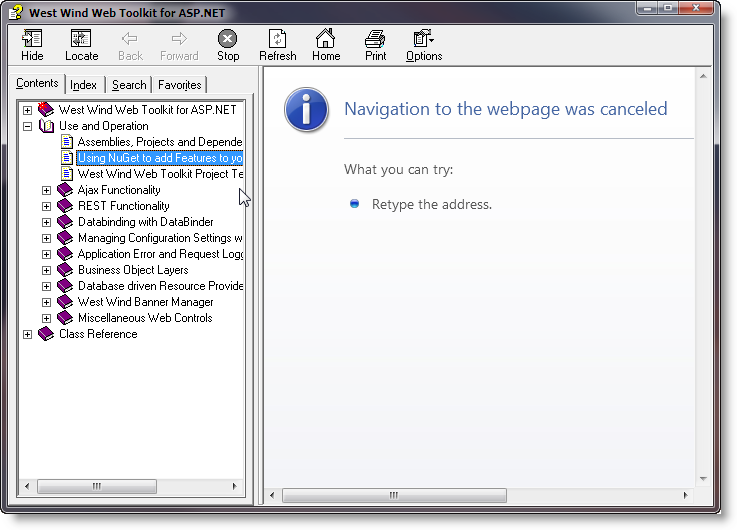
The help file comes up with all topics in the tree on the left, but a Navigation to the WebPage was cancelled or Operation Aborted error in the Help Viewer's content window whenever you try to open a topic. The CHM file obviously opened since the topic list is there, but the Help Viewer refuses to display the content. Looks like a broken help file, right? But it's not - it's merely a Windows security 'feature' that tries to be overly helpful in protecting you.
The reason this happens is because files downloaded off the Internet - including ZIP files and CHM files contained in those zip files - are marked as as coming from the Internet and so can potentially be malicious, so do not get browsing rights on the local machine – they can’t access local Web content, which is exactly what help topics are. If you look at the URL of a help topic you see something like this:
mk:@MSITStore:C:\wwapps\wwIPStuff\wwipstuff.chm::/indexpage.htm
which points at a special Microsoft Url Moniker that in turn points the CHM file and a relative path within that HTML help file. Try pasting a URL like this into Internet Explorer and you'll see the help topic pop up in your browser (along with a warning most likely). Although the URL looks weird this still equates to a call to the local computer zone, the same as if you had navigated to a local file in IE which by default is not allowed.
Unfortunately, unlike Internet Explorer where you have the option of clicking a security toolbar, the CHM viewer simply refuses to load the page and you get an error page as shown above.
How to Fix This - Unblock the Help File
There's a workaround that lets you explicitly 'unblock' a CHM help file. To do this:
- Open Windows Explorer
- Find your CHM file
- Right click and select Properties
- Click the Unblock button on the General tab
Here's what the dialog looks like:
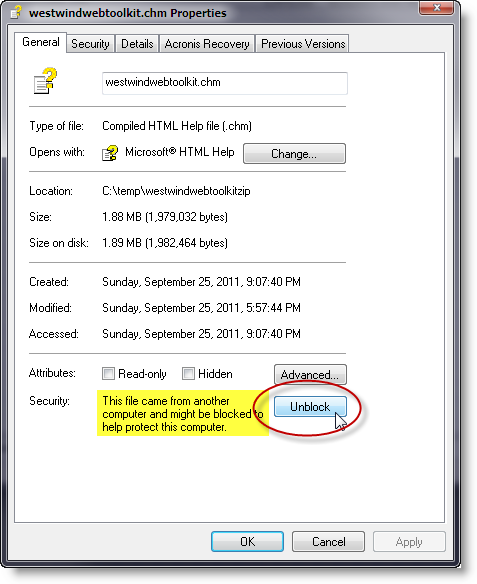
Clicking the Unblock button basically, tells Windows that you approve this Help File and allows topics to be viewed.
You can also use a Powershell command to do this (on Windows 10):
PS> unblock-file -Path '.\westwindwebtoolkit.chm'
Is Unblocking Safe?
Is unblocking insecure? Not unless you're running a really old Version of Windows (XP pre-SP1). In recent versions of Windows Internet Explorer pops up various security dialogs or fires script errors when potentially malicious operations are accessed (like loading Active Controls), so it's relatively safe to run local content in the CHM viewer. Since most help files don't contain script or only load script that runs pure JavaScript access web resources this works fine without issues.
How to avoid this Problem
As an application developer there's a simple solution around this problem: Always install your Help Files with an Installer. The above security warning pop up because Windows can't validate the source of the CHM file. However, if the help file is installed as part of an installation the installation and all files associated with that installation including the help file are trusted. A fully installed Help File of an application works just fine because it is trusted by Windows.
Summary
It's annoying as all hell that this sort of obtrusive marking is necessary, but it's admittedly a necessary evil because of Microsoft's use of the insecure Internet Explorer engine that drives the CHM Html Engine's topic viewer. Because help files are viewing local content and script is allowed to execute in CHM files there's potential for malicious code hiding in CHM files and the above precautions are supposed to avoid any issues.
Other Posts you might also like